

Last December, a supplement seller watched their bestselling vitamin go out of stock for 8 days during peak season. The reason? Their prep center took 12 days to process what should have been a 2-day restock order.
That single stockout cost them $50,000 in lost sales during their highest-converting week of the year.
If you’re moving 10,000+ units monthly, you’ve probably experienced this nightmare scenario. Traditional prep centers treat your high-volume business like everyone else’s small-batch orders, creating bottlenecks that cost you real money every single day.
That’s exactly why we built Navigate.
AMZ Prep’s Navigate platform isn’t just another 3PL software, it’s the first fulfillment system designed specifically for high-volume Amazon FBA sellers who can’t afford delays, errors, or inventory blind spots.
While other prep centers are still using spreadsheets and manual processes, Navigate delivers same-day processing, real-time inventory visibility, and automated workflows that scale with your success, not against it.
What Is a Navigate Platform?
Navigate is AMZ Prep’s complete fulfillment management system, handling everything from inventory receipt to Amazon shipment. Unlike generic 3PL software, it’s built exclusively for Amazon FBA requirements across USA, Canada, and UK marketplaces.
The platform manages FNSKU labeling, complex prep instructions, and compliance requirements while maintaining the speed and accuracy that sellers demand.
Complete Navigate Workflow: Step-by-Step Process
Understanding Navigate’s complete workflow gives you confidence that your FBA operations are in capable hands. Here’s exactly how the platform handles your inventory from arrival to Amazon shipment.
Step 1: Initial Account Setup and Store Integration
The setup process is designed to get high-volume sellers operational quickly with no challenges. Navigate’s integration system ensures seamless connection with your existing Amazon operations while maintaining security and compliance.
Account Creation Process
- Once you sign with us, the team will handle the setup. The AMZ Prep team will create your Navigate account for you.
- After that, simply visit https://ship.trynavigate.co/ to log in and complete your business information.
- Input your credentials and proceed through the simplified account creation process.
- Once the account is created, you will be directed to the dashboard.
Amazon Store Connection
AMZ Prep’s Navigate platform integrates directly with your Amazon Seller Central account across multiple marketplaces like Amazon USA, UK, or Canada.
During integration, you’ll authorize Navigate’s access to the necessary Seller Central information. This connection has an expiry date, and you’ll need to reconnect when the token expires to maintain full platform functionality.
Product Catalog Synchronization
Once connected, Navigate automatically syncs your existing Amazon product catalog. This process can take up to 18 hours for complex catalogs with hundreds of SKUs, but runs completely in the background while you continue your normal business operations.
Product Management and SKU Configuration
Navigate displays product information that gives you complete visibility into your inventory across both Amazon’s fulfillment network and AMZ Prep’s warehouse facilities.
Product Information Dashboard
The platform provides complete insights into each product’s status and availability across multiple locations.
- Product Details – Complete descriptions, SKUs, and ASINs for easy identification and management.
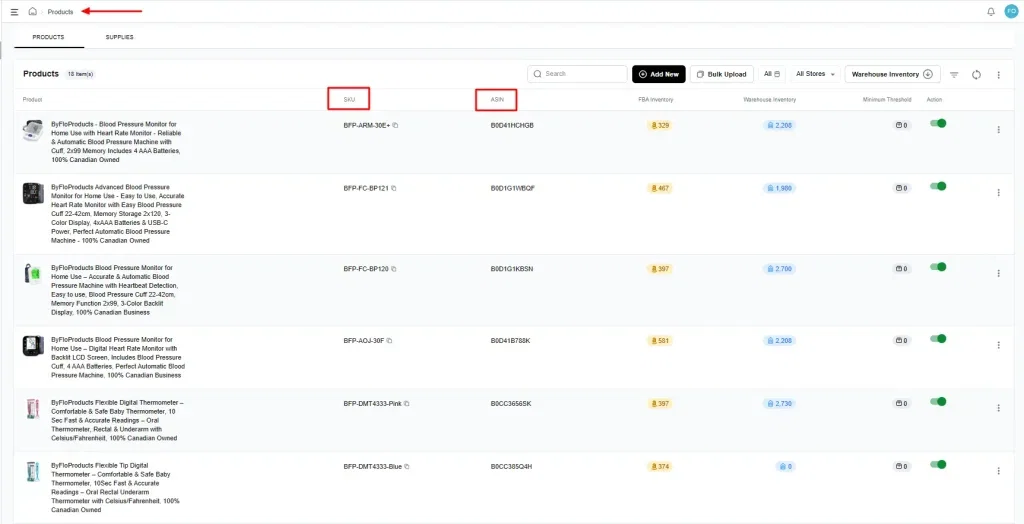
- FBA Inventory – Real-time count of units available on Amazon’s fulfillment network.
- Warehouse Inventory – Current units available in AMZ Prep’s warehouse facilities.
- Minimum Threshold Settings – Customizable reorder notification levels to prevent stockouts.
Adding Products to Navigate
For products not automatically synced (typically inactive SKUs), Navigate provides flexible options to ensure your complete catalog is available for management.
Fetch SKU Method
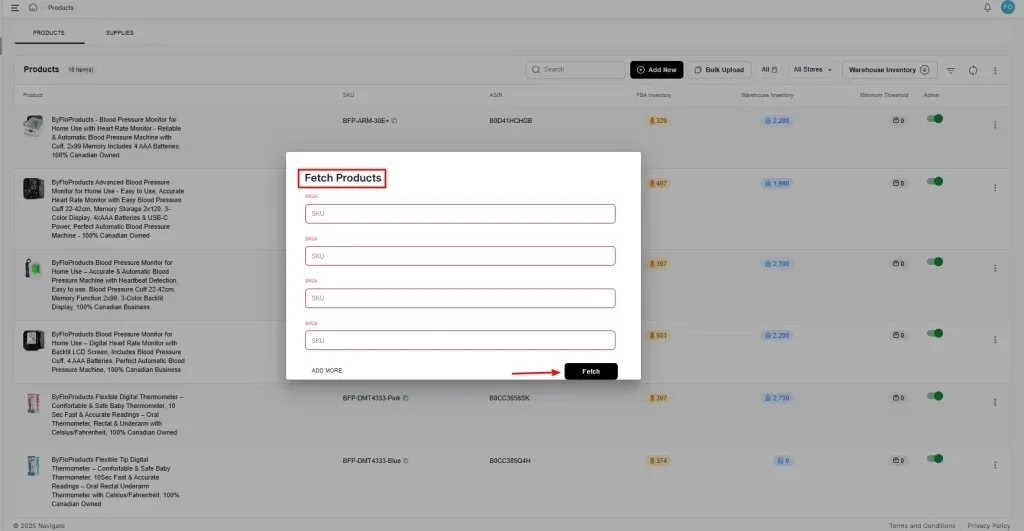
Use the integrated fetch function to pull specific SKUs directly from your Amazon catalog into Navigate without manual data entry.
- Click the three dots menu and select “Fetch Products”
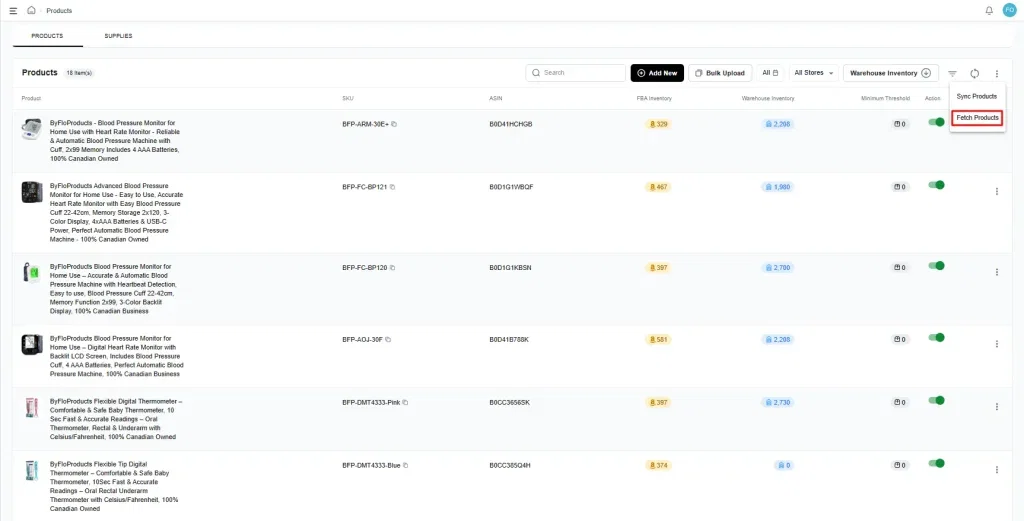
- Add the SKU name exactly as it appears in Amazon.
- Click “Fetch” to automatically import product details and specifications.
Manual SKU Addition
Add products individually when automatic syncing isn’t available or for new products not yet active on Amazon.
- SKU – Enter exactly as shown in your Amazon Seller Central.
- Merchant Code – Input the corresponding ASIN for accurate product matching.
- Barcode – Provide the FNSKU for proper labeling and identification.
Bulk Product Upload
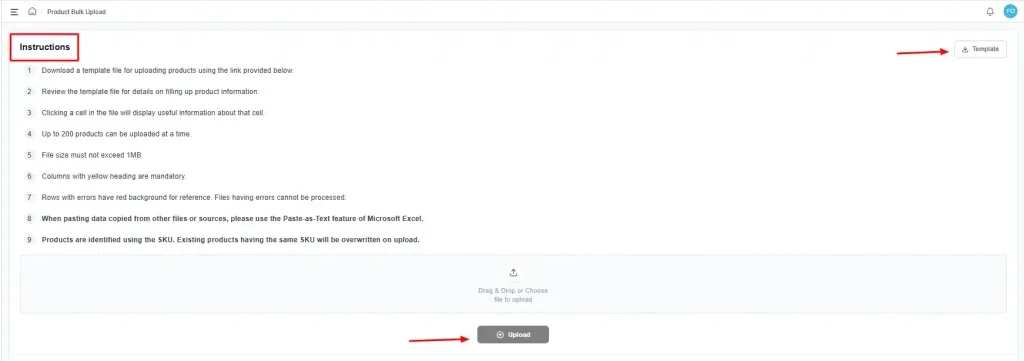
For sellers managing extensive catalogs, Navigate supports bulk product uploads using optimized templates that simplify catalog management.
All you have to do is click on ‘Bulk Upload,’ The bulk option allows you to upload 200 products at a time.
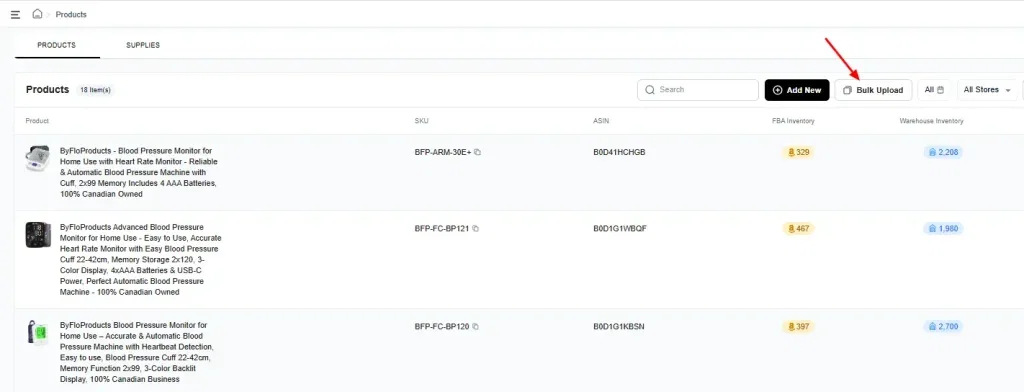
You can download our templates, and then click on ‘Upload’ to upload your products and make the process easy. Make sure you follow the instructions given.
Essential Product Configuration
Each product requires specific configuration for successful processing, ensuring Navigate handles your inventory according to your exact specifications and Amazon’s requirements.
- Prep Instructions – Specify polybagging, bubble wrap, bundling requirements, or other preparation needs.
- Label Requirements – Configure FNSKU application, expiration date labeling, and compliance marking needs.
- Prep Owner and Label Owner – Designate responsibility for preparation and labeling (must match Seller Central settings).
- Lot Number and Expiry Date Tracking – Enable mandatory tracking for compliance-critical products before creating inbounds.
Step 2: Inbound Shipment Management
Navigate simplifies the entire inbound process, providing efficient handling of inventory shipments from your suppliers or manufacturers to AMZ Prep’s warehouse facilities. The system accommodates both individual shipments and bulk operations for sellers.
Creating Inbound Shipments
When sending inventory from your suppliers or manufacturers to AMZ Prep’s warehouse, Navigate provides flexible options to handle shipments of any size efficiently.
Individual Inbound Creation: For focused shipments with specific requirements, Navigate’s individual inbound system provides detailed control over every aspect of the shipment process.
Bulk Inbound Processing: High-volume operations benefit from bulk inbound templates that handle multiple SKUs simultaneously, reducing setup time and ensuring consistency across large shipments.
Required Inbound Information: Navigate requires shipment details to ensure smooth processing and accurate inventory management.
- Ship-From Location – Specify your supplier or manufacturer’s address for accurate logistics coordination
- Ship-To Location – AMZ Prep warehouse destination for proper routing and receiving preparation
- Detailed Product Quantities – Exact unit counts per SKU with specifications for accurate processing
- Lot Numbers and Expiry Dates – Essential information for applicable products requiring compliance tracking
- Special Handling Instructions – Any unique requirements for product handling or processing
- Supporting Documentation – Upload attachments such as packing lists or special instructions
Inspection Requirements Selection: Navigate offers three comprehensive inspection levels tailored to different business needs and quality assurance requirements. Choosing the appropriate inspection level helps high-volume sellers balance cost control with quality assurance.
10% Inspection – AMZ Prep opens one carton per SKU, counts units, and assumes remaining cartons contain the same quantity in good condition. This cost-effective option works well for trusted suppliers with consistent quality.
Carton-Only Inspection – Complete carton count and condition inspection without opening individual units. This option verifies shipment integrity while maintaining packaging efficiency for products with reliable quality standards.
100% Inspection – Every carton opened, every unit counted and inspected individually. This comprehensive option includes additional costs but provides maximum quality assurance for high-value products or when building new supplier relationships.
Inbound Processing and Inventory Updates
Navigation provides real-time updates throughout the inbound process, ensuring you maintain complete visibility into your inventory status from shipment arrival through availability for prep requests.
Shipment Status Tracking: Navigate’s tracking system keeps you informed at every stage of the inbound process.
- Shipment Creation Confirmation – Immediate notification when your inbound shipment is successfully created
- Audit Status Updates – Real-time notifications when shipment status changes to “Partially Audited”
- Inventory Completion Notifications – Automatic alerts when inventory is complete and ready for FBA shipment creation
Receiving and Documentation: The warehouse team processes your inbound shipments with detailed attention to accuracy and quality control.
- Received Quantities – Precise recording of received quantities per SKU with verification against expected amounts
- Damage Assessment – Documentation of any damaged units with detailed condition reports and photographic evidence
- Missing Item Documentation – Identification and recording of any missing units with detailed discrepancy reports
- Lot Numbers and Expiry Dates – Accurate recording of compliance information where applicable for regulatory requirements
- Detailed Auditor Comments – Comprehensive notes regarding shipment condition, quality observations, and any special circumstances
Inventory Activation Process: Inventory only becomes available for prep requests after the inbound process is completely finished. This systematic approach ensures accurate inventory counts and prevents processing errors that could impact your Amazon operations.
The warehouse team must complete all receiving details, including package count verification and shipping information updates, before the inbound can be finalized. Only after clicking “Complete” does the inventory become available in the system for prep request creation.
Step 3: Prep Request Creation and Management
Once your inventory is received and processed, Navigate enables efficient prep request creation for shipping to Amazon fulfillment centers. The Navigate platform handles complex prep requirements while maintaining the speed and accuracy essential for high-volume operations.
Setting Up Prep Requests
Navigate’s prep request system provides comprehensive control over every aspect of your Amazon shipment preparation, ensuring compliance with Amazon’s requirements while optimizing for speed and cost efficiency.
Prep Request Configuration: The platform guides you through detailed prep request setup with validation at every step to prevent errors and delays.
- SKU and Quantity Selection – Choose specific SKUs and quantities for Amazon shipment with real-time inventory verification.
- Prep Owner and Label Owner – You have to select one from both ‘Prep Owner’ and ‘Label Owner’ (must match your Seller Central settings exactly).
- Detailed Prep Instructions – Specify exact preparation requirements including polybagging, bubble wrap, bundling, or custom packaging needs.
- Package Optimization – Configure carton specifications for optimal handling and Amazon compliance.
Validation Process: Navigate uses an intelligent visual status system to track prep request validation, ensuring all parameters are correct before processing begins.
- Blue Icon (Validation in Progress) – If it shows blue, then your prep request is being validated against Amazon’s requirements and your product specifications.
- Red Icon (Validation Failed) – If it shows red, then the system has detected errors that need correction before processing can continue, with detailed error descriptions for quick resolution.
- Green Icon (Ready for Processing) – All parameters are correct and your order moves into the processing queue for immediate handling.
Processing and Shipment Creation
Once validated, AMZ Prep’s team processes your prep request according to exact specifications, following Amazon packaging guidelines for optimal delivery success and compliance.
Prep Processing Workflow: The processing team follows systematic procedures to ensure consistent quality and compliance across all prep work.
- FNSKU Label Application – Download and print FNSKU labels directly from Navigate, then apply according to Amazon’s labeling requirements.
- Prep Work Completion – The team starts with the preparation including polybagging, bubble wrap application, bundling, or custom packaging according to specifications.
- Amazon Guidelines Compliance – We also follow Amazon’s packaging guidelines precisely to ensure optimal delivery success and prevent rejection.
- Quality Verification – There will be a complete quality control check before packaging to ensure all prep work meets standards.
Shipment Method Selection: Navigate automatically determines the optimal shipping method based on your order characteristics, weight, dimensions, and destination requirements.
SPD (Small Parcel Delivery) – Amazon Partnered: This method provides integrated shipping solutions ideal for specific order profiles with built-in tracking and cost optimization.
- Optimal Order Profile – Perfect for orders under specific weight and dimension thresholds with standard shipping requirements.
- Amazon Integration – Seamless integration with Amazon’s carrier network for streamlined delivery tracking and management.
- Automated Processing – Automatic label generation and tracking integration reduces manual handling and potential errors.
LTL/Freight – Amazon Non-Partnered: This shipping method accommodates larger shipments with specialized handling requirements and cost optimization for high-volume orders.
- High-Volume Optimization – This is especially for high-volume, high-weight shipments requiring specialized freight handling.
- Pallet Configuration – Intelligent pallet optimization for maximum cost efficiency and proper freight handling.
- Specialized Handling – Professional management of oversized products or unique freight packaging requirements.
Advanced Shipment Management
Navigate coordinates with major carriers including FedEx, UPS, and DHL to ensure reliable delivery to Amazon fulfillment centers. The platform’s carrier relationships provide consistent service levels even during peak periods when shipping capacity becomes constrained.
Package Configuration Requirements: Navigate requires detailed package information to ensure accurate shipping calculations and proper handling throughout the delivery process.
- Measurement System Selection – Choose between Metric or Imperial systems based on your preferences.
- Individual Carton Specifications – Precise dimensions and weights for each carton to ensure accurate freight calculations.
- Units Per Carton Documentation – Exact unit counts per carton for inventory accuracy and Amazon compliance.
- Multi-SKU Carton Handling – Proper documentation when multiple SKUs are combined in single cartons.
Shipment Splits Optimization: Amazon often provides multiple shipment split options for cost optimization. AMZ Prep’s Navigate platform analyzes all available options and helps you select the most cost-effective routing configuration.
The shipment split process involves Amazon generating various routing options, which Navigate evaluates for cost efficiency and delivery timing.
You can review all available splits and select the lowest-cost option that meets your delivery requirements. This optimization process typically takes several hours as Amazon generates split options.
Dispatch Scheduling: All dispatch dates are strategically set for next business day processing to ensure smooth logistics flow and prevent delivery complications. This scheduling approach provides buffer time for any last-minute adjustments while maintaining consistent delivery timelines.
Step 4: Operational Workflow for Warehouse Teams
Navigate coordinates warehouse operations through systematic assignment and processing protocols that ensure consistent service levels and accurate processing.
Inbound Assignment and Processing
The warehouse management system distributes workload efficiently across AMZ Prep’s facilities while maintaining quality standards and processing speed.
Daily Assignment Protocol: AMZ Prep assigns inbound shipments to specific warehouse locations each morning using workload balancing and geographic optimization to ensure efficient processing distribution.
Processing Requirements and Standards: Warehouse teams follow comprehensive processing protocols to ensure accuracy and quality across all inbound shipments.
- Received Quantity Verification – Systematic counting and verification of received quantities against expected amounts with discrepancy documentation
- Damage Assessment and Documentation – Thorough assessment of product condition with detailed documentation and photographic evidence when necessary
- Missing Item Identification – Systematic identification and recording of missing items with detailed discrepancy reports for client notification
- Lot Number and Expiry Date Recording – Accurate recording of compliance information where applicable for regulatory requirements and tracking
- Comprehensive Auditor Comments – Detailed notes regarding shipment condition, quality observations, processing notes, and any special circumstances requiring attention
Prep Request Processing
Prep requests flow through systematic assignment and processing protocols that maintain quality while optimizing processing speed.
Assignment and Prioritization: Prep requests are assigned to warehouse teams based on geographic location, team specialization, and current capacity optimization to ensure efficient processing flow.
Systematic Processing Steps: Warehouse teams follow standardized processing procedures that ensure consistency and quality across all prep work.
- FNSKU Label Download and Printing – Access Navigate’s label generation system to download and print properly formatted FNSKU labels
- Prep Work Completion – Execute preparation according to exact specifications including polybagging, bubble wrap, bundling, or custom packaging requirements
- Amazon Guidelines Compliance – Follow Amazon’s current packaging guidelines precisely to ensure successful delivery and prevent rejection
- Shipment Status and Dimension Updates – Update Navigate with accurate shipment dimensions, weights, and processing status for logistics coordination
- Transportation Method Coordination – Work with Navigate’s transportation selection system to coordinate optimal shipping methods
Quality Control and Completion
Every shipment undergoes systematic quality control procedures before completion to ensure Amazon compliance and successful delivery.
Shipment Verification Protocol: Before completion, warehouse teams perform comprehensive verification procedures to ensure quality and compliance.
- Accurate Prep Work Completion – Verification that all preparation work meets specified requirements and Amazon’s current standards
- Correct Labeling Application – Confirmation that FNSKU labels are properly applied according to Amazon’s placement and formatting requirements
- Proper Packaging for Amazon Receipt – Verification that packaging meets Amazon’s guidelines for successful receipt and processing
- Complete Documentation and Status Updates – Systematic review of all documentation and status updates for accuracy and completeness
Support and Technical Assistance
Navigate provides support resources designed to help high-volume sellers maximize platform efficiency and resolve issues quickly.
Help Desk Resources
Navigate’s support system includes multiple resources to ensure you can access help when needed and maintain smooth operations.
Comprehensive Support Channels: The platform provides multiple support options tailored to different types of assistance needs.
- Complete Help Desk Documentation – Comprehensive online documentation covering all platform features and processes.
- Step-by-Step Video Tutorials – Visual guides walking through complex processes and platform features.
- Technical Support Email – Direct access to technical support at techsupport@amzprep.com with guaranteed response times.
- Response Time – 3-4 hour response time during business hours (Monday-Friday, 9am-5pm) for all support requests.
Issue Reporting Process
Navigate maintains a systematic issue reporting process that ensures quick resolution and continuous platform improvement.
Structured Issue Reporting: When reporting issues or requesting new functionality, Navigate requires specific information to ensure efficient resolution.
- Detailed Information Collection – Gather complete details including client name, work order ID, and comprehensive issue description
- Supporting Materials – Include screenshots, videos, or other supporting materials that help illustrate the issue or request
- Email Submission – Submit completed issue reports to techsupport@amzprep.com using provided templates for consistency
- Response Monitoring – You can expect the acknowledgment within 3-4 hours during operational hours with status updates throughout resolution.
Navigate Platform Advantages for FBA Sellers
Navigate provides specific advantages that address the unique challenges faced by high-volume Amazon FBA sellers.
Fill and Forget: We Handle the Rest
With Navigate, all you have to do is fill in your product and shipment details and then forget the rest.
Our team takes it from there, handling everything from inventory receipt to Amazon-ready shipments with zero micromanagement on your end.
The platform’s simplified workflow ensures every step is executed with precision, keeping your operations fast, error-free, and scalable.
Built for Amazon Sellers and eCommerce Brands
Unlike other 3PL software, Navigate is built for Amazon FBA requirements and eCommerce brands, ensuring compliance with Amazon’s packaging guidelines, labeling requirements, and shipment procedures. This specialization reduces rejection rates and ensures smooth delivery to Amazon fulfillment centers and as well as the end customers.
Navigate’s Amazon integration automatically handles compliance requirements, shipment splits, and FBA documentation, reducing the manual work required to maintain Amazon compliance as your volume scales.
Scalable Operations
As your FBA business grows, Navigate’s systems handle increased volume without requiring new processes or additional operational complexity. The platform scales automatically, allowing you to focus on business growth rather than operational management.
- Volume Scaling – Handle increasing unit volumes without proportional increases in management time or complexity.
- SKU Expansion – Add new products and product lines without disrupting existing operations.
- Marketplace Growth – Expand to new Amazon marketplaces using the same operational framework.
- Seasonal Flexibility – Handle seasonal volume spikes without operational bottlenecks or service degradation.
Complete Operational Visibility
Real-time tracking and reporting will eliminate the inventory guesswork that causes high-volume sellers to lose money through stockouts and overstock situations.
Navigate provides visibility into every aspect of your fulfillment operations, from supplier shipments through Amazon delivery, allowing you to make decisions and maintain optimal inventory levels across your entire operation.
Conclusion
While other sellers struggle with manual processes, communication delays, and fulfillment blind spots, Navigate users focus on what matters most: growing their Amazon business.
Every day you delay implementing proper fulfillment systems is another day of potential stockouts, processing delays, and missed growth opportunities.
The supplement seller from our opening story? After switching to Navigate, they haven’t experienced a single stockout in over 12 months. Their processing time dropped from 12 days to same-day, and they’re now confidently scaling to new product lines without worrying about fulfillment capacity.

Arishekar N is a Vice President (VP) of Marketing at AMZ Prep, specializing in ecommerce fulfillment and Amazon logistics strategies with a proven track record of driving growth for e-commerce businesses. He is a strategic leader with extensive expertise in marketing, e-commerce operations, SEO & advertising, and branding.
Stay updated on his latest insights by following him


Comments