

Taking a break is something we all need, but if you’re an Amazon seller, the thought of stepping away from your business isn’t exactly exciting. After all, it’s not like your customers will take a vacation when you do, right? Vacation for an Amazon Seller is like a pipe dream or it is?

The good news is you can enjoy your time off without worrying about your business by using Amazon’s Vacation Mode. This feature has been around for a while, so you can easily set it up to manage your store while you’re away. Let’s take a look at How you can take a vacation as an Amazon seller
What is Amazon Vacation Mode?
Amazon Vacation Mode is a feature that allows Amazon sellers to temporarily deactivate their self-fulfilled (FBM) listings, making them inactive and invisible in search results while you’re on vacation. Sellers using models such as Seller Flex Amazon may also need to consider how temporary operational changes affect their fulfillment workflow. This feature helps manage your listing status when you need to step away from your seller account.
Will my FBA orders be processed while I’m on vacation?
Yes, if you use FBA, Amazon will continue to process and ship your orders. Although FBA might seem costly from a fee perspective, it can be a great option if you’re a frequent traveler. With FBA, Amazon handles order processing and shipping, so as a seller you don’t need to worry about pending orders or return requests while you’re away. This can be especially convenient for maintaining smooth operations even when you’re not actively managing your store.
Why Planning is Important Before Activating Vacation Mode
Don’t think of Vacation as a Break in your Business- It’s a strategic pause that requires careful planning to ensure your business continues in your absence. Amazon Vacation Mode is a feature designed to help sellers temporarily suspend their listings, allowing you to enjoy time off without negatively impacting sales or customer satisfaction.
Skipping the planning phase can lead to a cascade of issues missed orders, delayed shipments, and dissatisfied customers. These problems not only tarnish your reputation but also affect your future sales. Proper preparation ensures that your business remains stable, your customers stay happy, and your seller metrics remain intact.
Before You Go
Fulfill Existing Orders
Before activating Vacation Mode, ensure all pending orders are fulfilled. This step prevents customer frustration and negative feedback. Double-check for any outstanding orders and ship them out before deactivating your listings.
Pre-Vacation Checklist
Do not forget to do these before you Leave
- Fulfill All Pending Orders
Ensure that all orders placed before you entered Vacation Mode are shipped out. This helps avoid customer complaints and negative feedback. Address any outstanding orders promptly to maintain customer satisfaction.
- Set Your Account to Vacation Mode
Activate Vacation Mode at least 48 hours before you leave. This allows Amazon enough time to process your request and deactivate your listings, preventing customers from placing new orders while you’re away.
- Set Up Automatic Replies
Create an automatic reply for customer messages to inform them of your absence and provide an expected response date. Remember, even with your listings inactive, you’re required to respond to customer messages within 24 hours.
- Ensure FBA Inventory is Stocked
Verify that your FBA inventory levels are sufficient to cover anticipated sales during your absence. Adequate stock helps prevent stockouts and ensures your business continues to run smoothly.
- Use Customer Service by Amazon
If you can’t handle customer inquiries yourself, consider using a service like Customer Service by Amazon. They can manage customer service tasks on your behalf, allowing you to fully enjoy your time off.
- Check Your Account Periodically
Even with your listings deactivated, periodically check your account to ensure everything is functioning correctly. This helps catch any potential issues before they escalate.
Additional Considerations for Amazon Vacation Mode
- Process Return Requests
Even with inactive listings, you must still handle return requests. You can update your settings to receive return request emails with quick links to authorize, close, or reply. Amazon also offers the option to automatically authorize returns. - Subscription Fees Continue
If you have a Professional Seller account, you’ll still be charged the monthly subscription fee. If you’ll be away for an extended period and want to avoid paying it, consider downgrading to an individual account temporarily.
User Permissions for Listing Changes
Only users with the proper permissions can change your listing status. If you have multiple users on your seller account, ensure those responsible for managing listings have the necessary access rights.
How do I activate Vacation Mode in Seller Central?
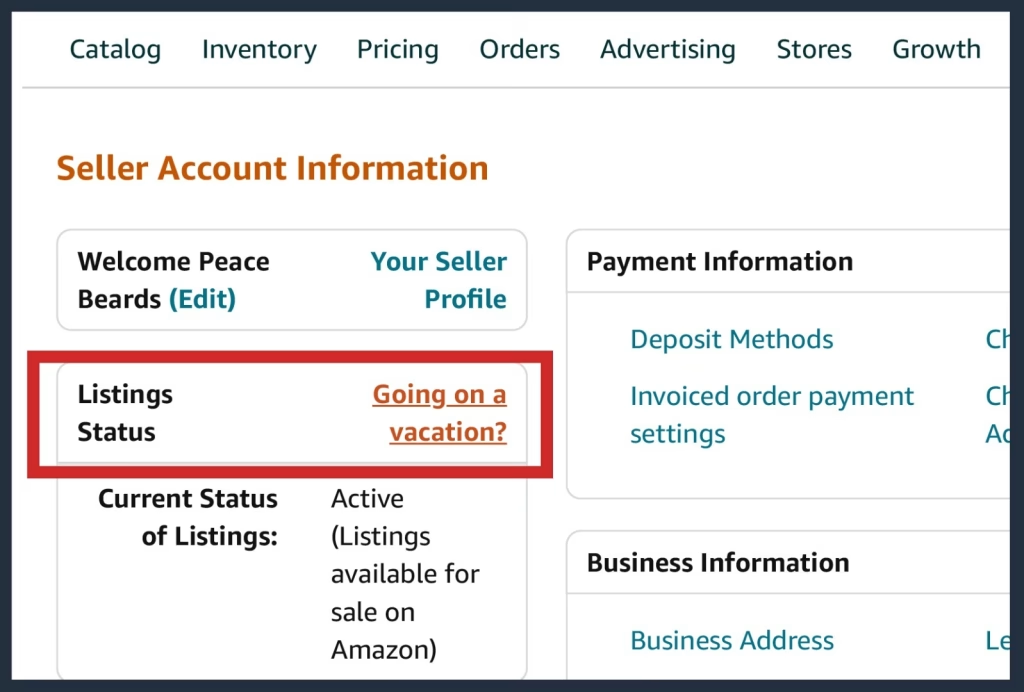
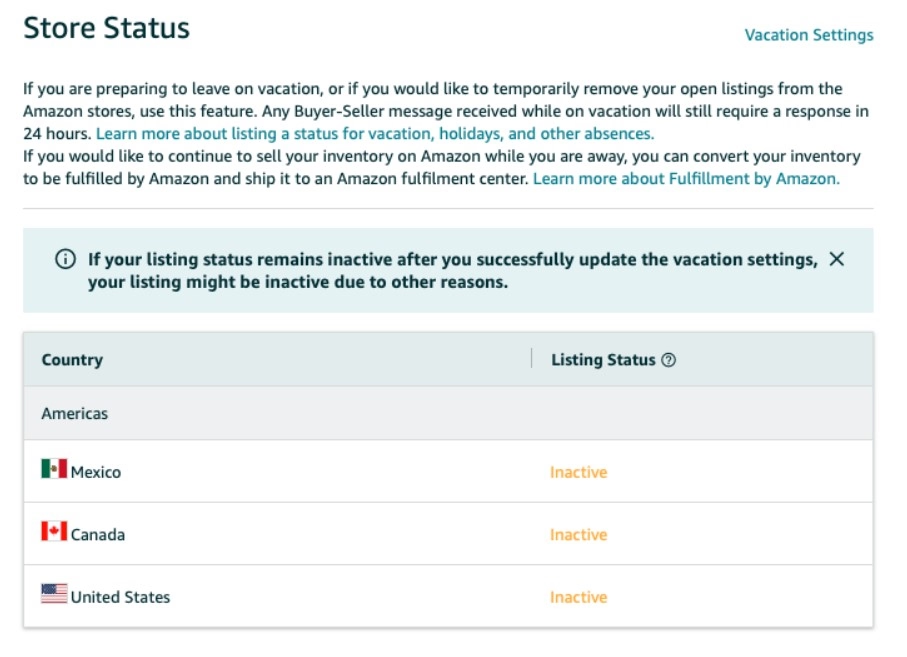
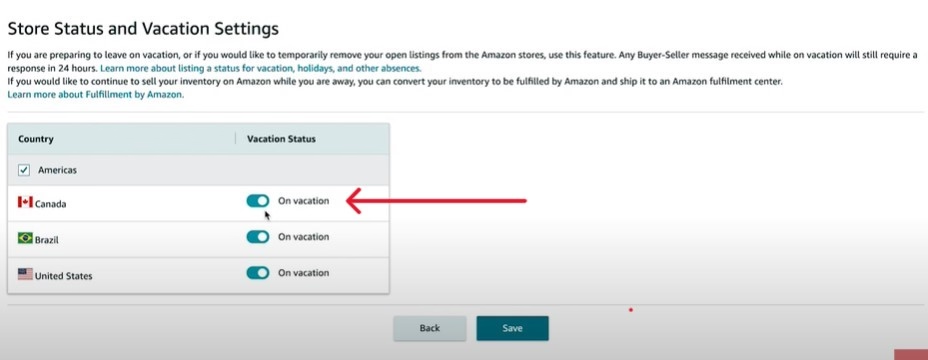
To activate Vacation Mode, go to the Vacation Settings page in Seller Central. Update your vacation settings to set your account to Vacation Mode. This will make your FBM listings inactive and prevent any new orders from being placed.
Vacation mode is one of many seller management tools explained in our complete guide on how to sell on Amazon, helping you run your business efficiently.
Step-by-Step Guide
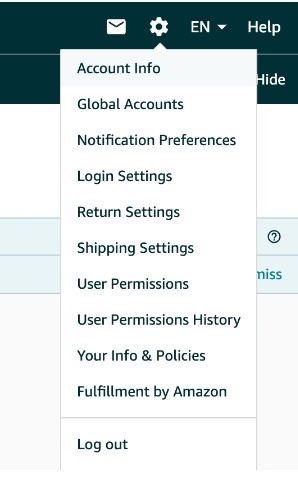
- Log into Seller Central Navigate to your Seller Central account and select “Account Info” from the Settings tab.
- Select Listing Status Click on the option labeled “Going on vacation?” or a similar phrase related to vacation settings.
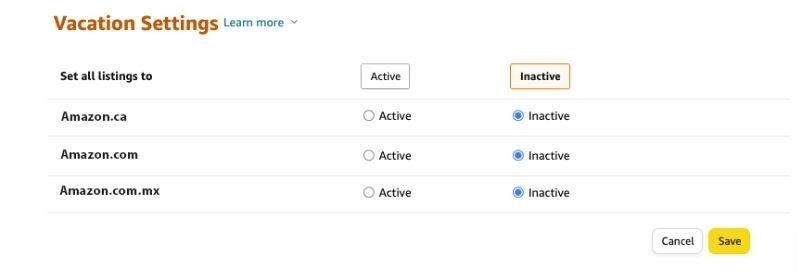
- Set Marketplaces to ‘Inactive’ Choose the marketplaces where you want to suspend sales and change the status to “Inactive.”
Timing
Deactivate your listings at least 48 hours before your vacation begins. This window helps prevent last-minute orders that you won’t be able to fulfill. However, avoid deactivating too early to maximize your sales potential before you leave.
How long does it take for Vacation Mode to take effect?
Vacation Mode updates should take effect within 24 hours. Ensure you update your vacation settings well in advance to avoid any disruptions in your Amazon business.
Managing Your Account While Away
It is a hassle but buyers will want answers while you are away
Responding to Buyer Messages
Even with inactive listings, you’re still required to respond to buyer messages within 24 hours. Maintaining this communication is vital for keeping your account in good standing and avoiding penalties. Since you’ll likely be checking Seller Central from hotel or airport Wi-Fi while you travel, it’s worth knowing how to use a VPN so your login stays encrypted on those public networks and your account access isn’t left exposed
Delegating Account Monitoring
If managing messages personally isn’t feasible, designate a trusted individual to monitor your account and respond to inquiries. Provide clear instructions and ensure they have the necessary access and information to handle customer interactions effectively.
Automate Your Way to Smooth Vacation and Happy Customers
Why don’t we set to auto-reply
Automating Responses and Feedback
Leverage tools like eDesk or automated feedback apps to handle common inquiries and feedback. Automating responses to routine questions, such as order status updates or return requests, can significantly reduce your workload while you’re away.
Using Inventory Management Tools
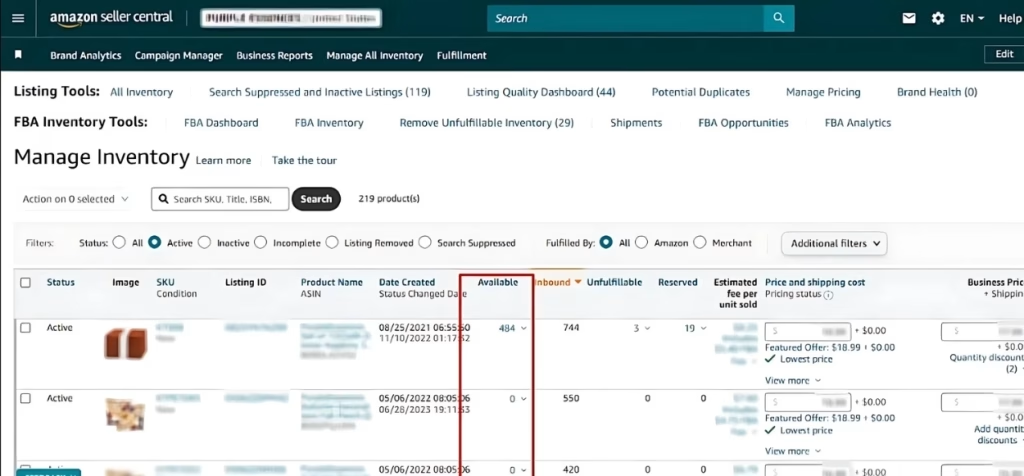
For FBA sellers, inventory management tools are indispensable. They help track stock levels, forecast demand, and automate purchase orders, ensuring you avoid stockouts during your vacation.
How do I Reactivate my Listings after my Vacation?
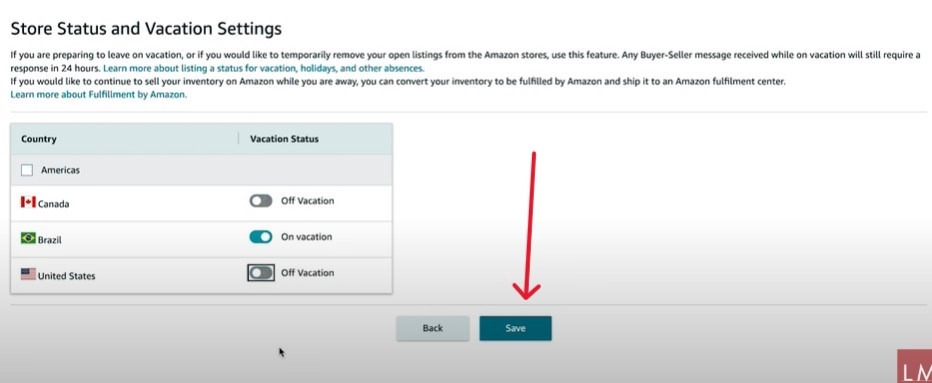
To reactivate your listings, return to the Vacation Settings page in Seller Central and update your vacation settings. Your listings will become active again, and you can continue selling on Amazon as usual.
Turning Off Vacation Mode
Once your vacation is over, simply log back into your Seller Central account, navigate to the Vacation Settings page, and set the marketplaces back to “Active.”
Resuming Normal Operations
Once you turn your listings back on, it will take up to 24 hours for your listing to show up on searches. While you wait, check any messages or orders you might have missed. Start filling orders like normal to get things running again.
Consequences of Not Using Vacation Mode for Amazon Sellers
Neglecting to utilize Vacation Mode when you’re unavailable to fulfill orders can lead to several negative consequences that affect your account health, customer satisfaction, and overall business performance
- Lowered Order Defect Rate (ODR)
Unfulfilled orders can increase your ODR, a critical metric for maintaining good account standing. A high ODR can lead to account suspension or permanent removal from the platform.
- Damaged Account Health
Delayed or missed orders negatively impact your overall account health, limiting your selling privileges and reducing your store’s visibility on Amazon.
- Negative Feedback and Reviews
Delays or cancellations make customers more likely to post bad reviews. This can scare off possible future buyers and hurt your reputation.
- Impact on Buy Box Eligibility
Poor account health and negative feedback decrease your chances of winning the Buy Box, reducing your visibility and sales potential.
- Potential Account Suspension
Repeated failures to fulfill orders and maintain acceptable performance metrics can result in Amazon suspending your account.
Can I still access my account info and account health while my listings are inactive?
Yes, you can still access and manage your account info and check your account health while your FBM listings are inactive. You can also monitor your listing status and make necessary adjustments.
Utilizing Vacation Mode is essential for responsible Amazon selling. It allows you to take necessary breaks without compromising your business’s integrity and standing on the platform. By ensuring that your operations are managed effectively during your absence, you protect your reputation, maintain customer trust, and safeguard your ability to continue selling successfully on Amazon.
Best Practices FBM vs FBA
| Aspect | FBM Sellers | FBA Sellers |
|---|---|---|
| Operations During Absence | Activate Vacation Mode to completely pause operations. | Continue selling with sufficient inventory in place. |
| Inventory Management | No sales during vacation; orders are paused. | Ensure inventory levels are maintained at Amazon fulfillment centers. |
| Customer Service | No customer service required during vacation mode. | Customer service is maintained through automated tools or delegated support. |
| Sales Continuity | No sales occur until operations resume. | Sales continue seamlessly as long as inventory is available. |
| Pre-Vacation Preparation | Activate vacation mode and update customers accordingly. | Ensure inventory replenishment and set up automated systems for customer inquiries. |
| Customer Communication | Use storefront banners and automated messages to inform customers of temporary unavailability. | Ensure automated customer service tools or dedicated support are in place to manage queries. |
| Delegation | May not require delegation due to paused operations. | Delegate tasks such as customer service, inventory management, and order processing. |
What should I do if there are issues like inclement weather affecting my shipping while I’m on vacation?
For FBM, make sure to manage any shipping issues or return requests before activating Vacation Mode. If you’re using FBA, Amazon will handle these issues for you, so you can relax and enjoy your time off.
Conclusion
As an Amazon seller, you deserve a well-earned break. Plan ahead and activate Amazon’s Vacation Mode, set up automated responses, and use inventory tools to keep everything running smoothly. Whether you’re exploring new destinations or simply relaxing at home, your store will thrive. Customers will receive timely updates, stock levels will stay on point, and sales will keep flowing.
When you return, you’ll be refreshed and impressed by how your business continued to operate in your absence. With smart planning and effective automation, taking a vacation doesn’t mean sacrificing success. Keep this blog bookmarked and Success is also about enjoying life.

Rich Pearl is a Head of U.S Enterprise at AMZ Prep, drawing from his proven experience in the fulfillment industry gained at ShipBob. Rich helps provide strategic guidance and consultation to growing e-commerce businesses looking to master their logistics and achieve operational success.






Happy accident, I stumbled on to this blog, just as I was thinking of taking a vacation.
Really liked the instructions part, Very easy to understand
This is good information, I am betting most people don’t even know about the settings.
Really useful stuff, I was looking for a step-by-step. This guide is great, didn’t hit any snags. Thank you
I didn’t even know a setting like this existed. Thanks