

Amazon Buy Shipping is one of those Seller Central features people talk about, but don’t really explain properly. I’ve worked with hundreds of sellers who either underuse it or treat it as the default option without understanding when it actually makes sense for their brand.
This blog covers what Amazon Buy Shipping is, how it works, what the rate structure looks like, and when you should use Amazon Buy Shipping versus other fulfillment options. I’ll also explain where it fits into Seller Fulfilled Prime and how to evaluate whether it’s the right tool for your operation.
Quick Summary: Amazon Buy Shipping at a Glance
- What it is: A Seller Central tool that lets FBM sellers purchase discounted shipping labels from UPS, FedEx, USPS, and Amazon Shipping.
- Best for: Low-volume FBM sellers (10-50 orders/month) who need A-to-Z claims protection and don’t have carrier accounts.
- Key benefit: 31% lower rates than retail carrier pricing plus automatic A-to-Z claims coverage.
- Not for: FBA inbound shipments, international orders, or sellers with better 3PL rates.
- Cost: Variable based on weight, dimensions, and zone. No fixed fee beyond label cost.
What Is Amazon Buy Shipping
Amazon Buy Shipping is a feature inside Seller Central that lets you purchase shipping labels at Amazon-negotiated rates. It works with major shipping carriers including UPS, FedEx, USPS, and Amazon Shipping. You can buy shipping labels individually or in bulk (up to 100 labels per batch).
This is for Fulfilled by Merchant (FBM) orders only. If you’re using FBA, you can’t use this tool. FBA inbound uses Amazon’s partnered carriers or LTL freight, which is a completely separate workflow.
The core value proposition is simple. You get discounted carrier rates without needing your own volume-based contracts. Amazon handles the rate negotiation. You handle the actual shipping.
How Amazon Buy Shipping Works
The workflow is built into Seller Central. Here’s how it operates step by step.
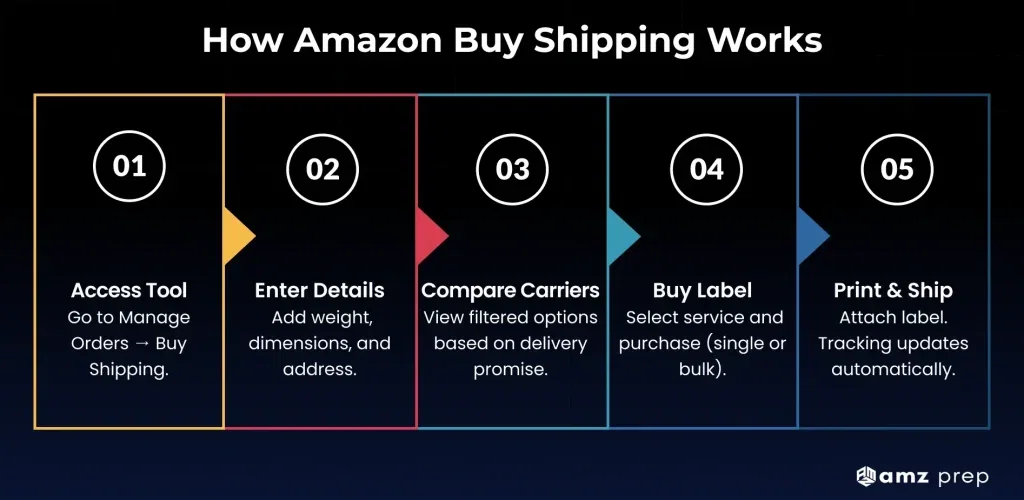
Step 1: Access Buy Shipping from Seller Central
Navigate to Manage Orders and select the orders you want to ship. Click Buy Shipping to start the label purchase process.
Step 2: Enter shipment details
You’ll need to confirm the package weight, dimensions, and destination address. Amazon uses this data to calculate carrier rates and delivery windows. If your weight or dimensions are wrong, the carrier will adjust the charge after the fact.
Step 3: Review carrier options
Amazon filters available Amazon Buy Shipping services based on your delivery promise, ship date, and the carrier’s historical performance. You’ll see rate options from UPS, FedEx, USPS, and Amazon Shipping. The system automatically hides carriers that are unlikely to deliver on-time.
Step 4: Purchase label
Select your preferred carrier and service level. You can purchase one label or batch-process up to 100 labels at once. The buy shipping in bulk feature is useful if you’re processing high order volumes and want to knock out label creation in a single session.
Step 5: Print and ship
Download the label PDF, print it, attach it to the package, and hand it off to the carrier. Amazon automatically uploads the tracking number and confirms the shipment in Seller Central. The order status updates without any manual entry.
That’s the full loop. The entire process takes under two minutes per order if you’re working individually, and significantly less per unit if you’re batching.
How to Set Up Amazon Buy Shipping (5 Minutes)
Step 1: Log into Seller Central
Use your Professional or Individual account credentials.
Step 2: Navigate to shipping settings
Go to Settings, then Shipping Settings, then Buy Shipping Preferences.
Step 3: Select your default carrier preferences
Choose which carriers you want to see first: UPS, FedEx, USPS, or Amazon Shipping.
Step 4: Connect your own carrier accounts (optional)
If you have existing carrier accounts with negotiated rates, connect them now. Go to Shipping Settings, then Carrier Accounts. Click Link Account next to your carrier. Enter your carrier account credentials from your carrier bill. Accept the terms and conditions.
Step 5: Set up bulk shipping preferences (optional)
If you’re processing 50-plus orders per month, enable Buy Shipping in Bulk in your preferences. Configure default package dimensions. Set your handling time windows.
That’s it. You can now purchase labels from Manage Orders, then Buy Shipping.
Amazon Buy Shipping Rates and Cost Structure
There is no fixed Amazon Buy Shipping rate. The cost varies based on package weight, dimensions, destination zone, and the carrier you select.
Amazon advertises that its negotiated rates are over 31 percent lower on average compared to retail ground rates for UPS, FedEx, and USPS. That figure is directionally accurate for most sellers, but your actual savings depend on what you’re shipping and where it’s going.
What Affects Your Amazon Buy Shipping Costs
Weight and Dimensions
Heavier or larger packages cost more. Dimensional weight (DIM weight) applies if the package is large but light.
Example: 2-lb package costs $5-$6 vs 15-lb package costs $18-$25
Destination Zone
Shipping to Zone 2 (nearby) costs less than Zone 8 (cross-country). Zone-based pricing applies to all major carriers.
Example: Zone 3 USPS costs $5-$6 vs Zone 8 UPS costs $18-$25
Carrier and Service Level
USPS Ground Advantage is cheapest for lightweight packages. UPS and FedEx cost more but deliver faster.
Example: Same 2-lb package via USPS Ground Advantage costs $5-$6 vs UPS Ground costs $8-$10
Using your own carrier rates
If you already have a UPS or FedEx carrier account with negotiated rates, you can connect your carrier account to Amazon Buy Shipping and use your own rates while keeping Amazon’s protection benefits (A-to-Z claims coverage, VTR protection, Order Defect Rate shielding). This is useful if your rates beat Amazon’s.
To connect your carrier accounts,
- Go to Seller Central
- Navigate to Shipping Settings,
- Find the carrier you want to link, and
- Enter your account credentials.
Amazon will pull your rates dynamically when you purchase labels.
Real-world cost scenarios
A 2-pound package going 300 miles (Zone 3) via USPS Ground Advantage might cost around $5 to $6 through Amazon Buy Shipping. The same package via UPS Ground could cost $8 to $10. A 15-pound package going cross-country (Zone 8) via UPS Ground might run $18 to $25 depending on dimensions.
The rate calculator inside Seller Central shows the exact cost before you purchase the label. You’re not locked into a decision until you click Buy.
Key Benefits of Amazon Buy Shipping
Beyond discounted rates, Amazon Buy Shipping offers seller protections that matter for account health.
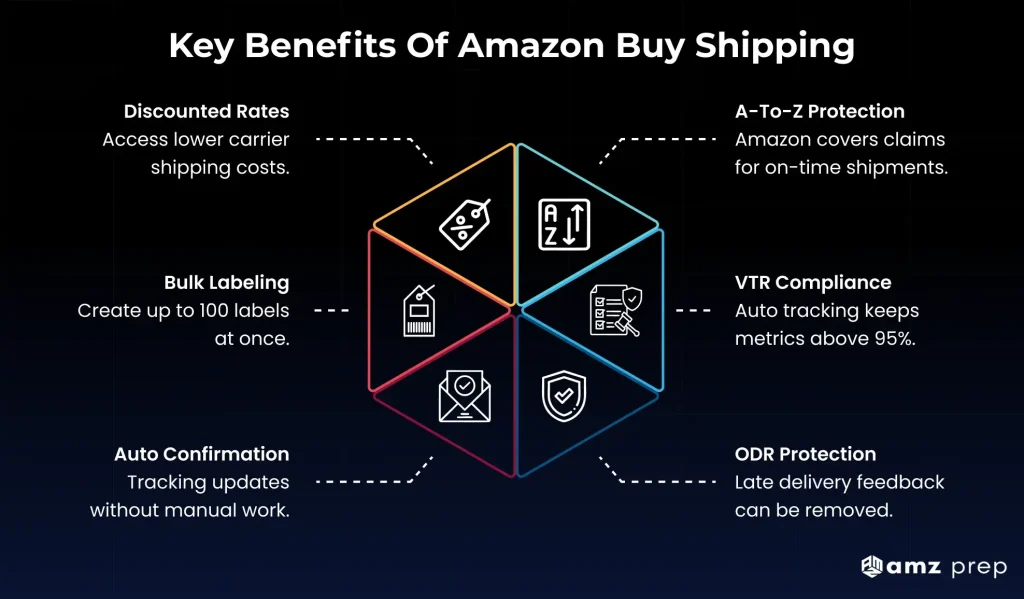
A-to-Z claims protection
If a customer files an A-to-Z claim stating the package didn’t arrive, Amazon covers the cost of the claim as long as you shipped on-time using Amazon Buy Shipping. According to Amazon, sellers get 12 times more Amazon-paid refunds for A-to-Z claims when using this tool compared to shipping outside the system.
To qualify for this protection, you must purchase the label through Amazon Buy Shipping, ship on-time (defined as the moment of the carrier’s first scan), and respond to any customer inquiry in Buyer-Seller Messaging within 48 hours.
Valid Tracking Rate (VTR) compliance
Amazon requires FBM sellers to maintain a Valid Tracking Rate of 95 % or higher at the product category level. If you fall below that threshold, you risk selling restrictions, loss of premium shipping eligibility, and potential suspension.
Amazon Buy Shipping automatically uploads tracking information to Seller Central the moment you purchase the label. The tracking number is valid, the carrier is integrated, and the data flows into Amazon’s systems without manual entry. This keeps your VTR clean.
Order Defect Rate protection
Here’s how feedback protection works. A customer leaves a one-star review because their package arrived late. You shipped on time using Amazon Buy Shipping. The delay was the carrier’s fault, not yours.
You can ask Amazon to remove that feedback from your Order Defect Rate. Amazon reviews it. If the complaint was purely about delivery timing or a missing package, they’ll strike the feedback. It stays on your profile with a line through it and a note that says the problem wasn’t your fault. Your metrics stay clean.
This only works if the feedback is specifically about the delivery. If the customer also complains about the product or your customer service, Amazon won’t remove it.
Bulk label purchasing
The buy shipping in bulk feature lets you process up to 100 labels at once. This is useful for high-volume sellers who don’t want to click through the label purchase workflow 50 times a day. You can queue up a batch of orders, select the carrier preferences, and generate all the labels in one pass.
Bulk purchasing also makes it easier to track shipping charges across multiple orders. You get a single transaction summary showing the total cost for the batch.
Automatic shipping confirmation
When you purchase a label through Amazon Buy Shipping, the order status updates automatically. You don’t need to manually confirm shipment or enter tracking numbers. The carrier integration handles that.
Amazon Buy Shipping: Pros and Cons
Pros
- 31% average savings versus retail carrier rates
- 12 times more Amazon-paid refunds for A-to-Z claims
- Automatic Valid Tracking Rate compliance
- No need for separate carrier accounts
- Bulk label purchasing up to 100 labels at once
- Order Defect Rate protection for delivery-only issues
Cons
- Only works for FBM orders, not FBA inbound
- No international shipping support
- Address locked after label purchase
- Weight or dimension errors result in carrier adjustments
- May not beat rates from high-volume carrier contracts
- Not ideal for big and bulky items over 150 pounds
Amazon Buy Shipping API and Platform Integrations
If you’re running order volume through a warehouse management system (WMS) or multi-channel platform, you can integrate Amazon Buy Shipping via the Merchant Fulfillment API.
The Amazon Buy Shipping API lets developers automate label purchasing without logging into Seller Central every time. If you’re running order volume through a WMS or multi-channel platform, the API pulls order data, generates labels, and uploads tracking numbers automatically.
This makes sense if you want label creation triggered by order status changes, if you’re managing multiple sales channels from one system, or if you’re comparing ShipStation alternatives that support large-scale batch label processing outside Seller Central.
Platform integrations
ShipStation supports the full Amazon Buy Shipping API workflow. You can rate-shop across carriers, purchase labels in bulk, and push tracking data back to Amazon automatically.
Veeqo is a free multi-channel shipping software tool. It integrates with Amazon Buy Shipping and gives you 5 percent cashback on every label you purchase. Useful if you’re running Shopify, eBay, and Amazon from one dashboard.
Sellercloud adds profit tracking and cost calculation to the label purchasing process. You can see your shipping charges per order and calculate margins without switching between platforms. Bulk label generation is built in.
Extensiv focuses on Seller Fulfilled Prime orders. If you’re running SFP and need API-level integration for Prime orders, this is the integrator to look at.
When API integration makes sense
If you’re processing fewer than 50 orders per day, the manual Seller Central workflow is fine. You don’t need API integration.
If you’re running 100-plus orders per day, or if you’re managing multiple sales channels (Amazon, Shopify, eBay, Walmart) from a single WMS, API integration reduces manual work and improves label accuracy.
When to skip the API
If your 3PL or fulfillment partner already handles label purchasing and shipping confirmation, you don’t need to connect Amazon Buy Shipping yourself. Your 3PL should be using their own carrier accounts or integrated shipping tools that deliver better rates or faster inbound speeds.
Amazon Buy Shipping Policy and Requirements
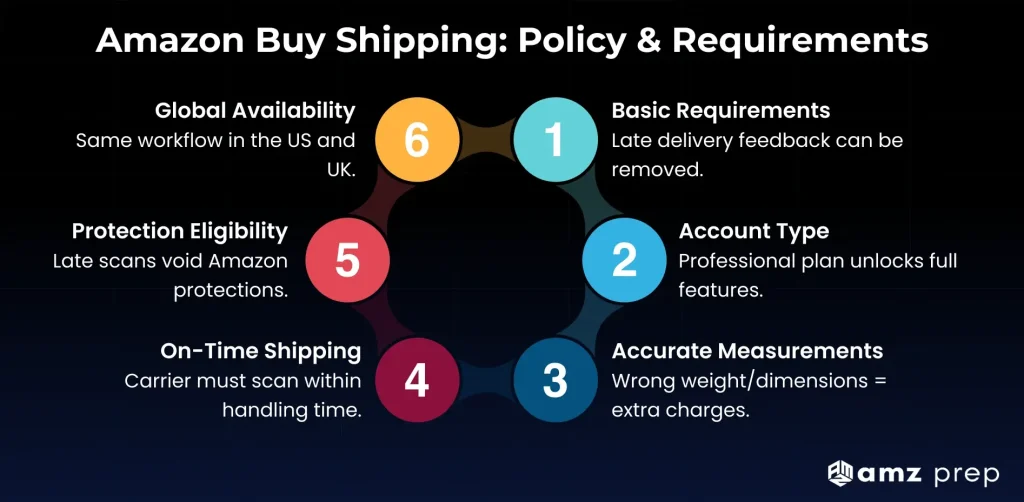
What you need to use Amazon Buy Shipping
- Active Seller Central account (Individual or Professional plan)
- Accurate shipment details (weight, dimensions, destination address)
- Ability to ship on-time (labels must be scanned by the carrier within the promised handling time)
Amazon requires sellers to maintain accurate package information. Amazon recommends using a Professional selling account ($39.99 per month) to access the full range of Amazon Buy Shipping features, including bulk label purchasing and API integration. Individual sellers can still use Amazon Buy Shipping, but some advanced features may be limited.
Accuracy requirements
If you enter incorrect weight or dimensions, the carrier will adjust the charge after scanning the package. This is called a dimensional weight adjustment or a corrected weight charge. You’ll see the updated cost on your next billing cycle.
To avoid adjustments, weigh and measure every package before purchasing the label. Use a calibrated scale and a tape measure. Don’t estimate.
On-time shipping requirement
Amazon’s protections (A-to-Z claims coverage, VTR protection, Order Defect Rate shielding) only apply if you ship on time. On-time means the carrier scans the package within your handling time window.
If your handling time is two business days and you purchase a label on Monday, the carrier must scan the package by end of day Wednesday. If the scan happens Thursday, because of the shipping delay you will lose the protection benefits.
UK availability
Amazon Buy Shipping UK operates the same way as the US version. Sellers in the UK can access discounted rates from Royal Mail, DPD, Hermes, and other carriers through Seller Central. The workflow and benefits are identical.
Who Should Use Amazon Buy Shipping? (Quick Decision Guide)
Use Amazon Buy Shipping if you are:
- Shipping 10 to 500 FBM orders per month
- Don’t have UPS or FedEx carrier accounts
- Need A-to-Z claims protection
- Shipping standard-size items under 150 pounds
- Valid Tracking Rate is close to 95% threshold
Skip Amazon Buy Shipping if you are:
- Only using FBA (it doesn’t apply)
- Shipping 500-plus orders per month with better carrier contracts
- Your 3PL offers cheaper integrated shipping
- Shipping big and bulky items over 150 pounds
- Need international shipping support
When to Use Amazon Buy Shipping (and When Not To)
Amazon Buy Shipping works well in specific scenarios. It’s not the right tool for every seller.
When it Amazon Buy Shipping makes sense
Low-volume FBM sellers without carrier accounts
You’re shipping 10 to 50 orders per month. You don’t have a UPS or FedEx account yet. Amazon Buy Shipping gets you discounted rates without the hassle of negotiating volume-based contracts. It’s a solid entry point.
Sellers prioritizing A-to-Z claims protection and VTR compliance
Your Valid Tracking Rate is sitting at 96 percent. One bad week drops you below the 95 percent threshold and triggers selling restrictions. Or you’ve dealt with A-to-Z claims that dinged your metrics. Amazon Buy Shipping removes that risk. Tracking uploads automatically. Claims get covered. Your account health stays clean.
Merchants shipping standard-size, lightweight items to nearby zones
Most of your packages are 2 to 5 pounds. Destinations fall in Zone 2 through Zone 4. Amazon Buy Shipping rates beat retail carrier pricing for this profile. The workflow moves fast. You’re not overpaying for cross-country shipments or dealing with big and bulky surcharges.
Sellers without 3PL support who need simple label purchasing
You fulfill from a home office or small warehouse. No 3PL. No logistics team. Amazon Buy Shipping keeps it simple. One login. One billing account. You’re not jumping between carrier portals or tracking down invoices from three different providers.
When other options may be better
High-volume sellers with their own deeply discounted carrier contracts
If you’re shipping 500-plus orders per month and you’ve negotiated your own UPS or FedEx rates, your rates probably beat Amazon’s. Connect your carrier account to Amazon Buy Shipping to use your rates while keeping the protection benefits, or skip Buy Shipping entirely and use your carrier’s direct portal.
Brands using 3PLs that provide better rates or integrated Middle Mile solutions
If your 3PL has negotiated carrier rates, or if they offer consolidated freight programs (like AMZ Prep’s Middle Mile for FBA inbound), those options often deliver better economics or faster inbound speeds than parcel shipping. Evaluate your 3PL’s rates before defaulting to Amazon Buy Shipping.
Sellers shipping big and bulky items where specialized freight partners deliver better economics
Amazon Buy Shipping is built for parcel shipping (packages under 150 pounds). If you’re shipping furniture, appliances, or other big and bulky items, LTL freight or specialized white-glove carriers will be cheaper and more reliable.
Brands needing same-day or next-day inbound speed
If you’re trying to get inventory into Amazon FBA as fast as possible, parcel shipping via Amazon Buy Shipping isn’t the answer. Programs like AMZ Prep’s VIP freight consolidation get inventory to Amazon in 2 to 4 days with zero placement fees, which beats the economics of parcel shipping at scale.
Amazon Buy Shipping vs Other Fulfillment Options
Amazon Buy Shipping
- Best for: Low-volume FBM (10-50 orders per month)
- Average cost: 31% below retail rates
- Speed to Amazon: Standard parcel (3-5 days)
- Claims protection: Yes (A-to-Z coverage)
Own Carrier Account
- Best for: High-volume sellers (500-plus orders per month)
- Average cost: Varies, often better than Amazon at scale
- Speed to Amazon: Same as Buy Shipping
- Claims protection: No, unless you connect your account to Buy Shipping
3PL Integrated Shipping
- Best for: Brands with existing 3PL relationships
- Average cost: Often cheaper at scale
- Speed to Amazon: Varies by 3PL
- Claims protection: Depends on 3PL
AMZ Prep Middle Mile
- Best for: FBA inbound only
- Average cost: Competitive with placement fee savings
- Speed to Amazon: 2-4 days
- Claims protection: Not applicable (different use case)
Amazon Partnered Carriers
- Best for: FBA inbound only
- Average cost: Varies
- Speed to Amazon: Standard
- Claims protection: Not applicable
Bottom line: Use Buy Shipping if you’re low-volume FBM without carrier contracts. Use your own carrier account if your rates beat Amazon’s. Let your 3PL handle it if their integrated solution is faster or cheaper.
Amazon Buy Shipping and Seller Fulfilled Prime
Amazon Buy Shipping and Seller Fulfilled Prime (SFP) have a shared history.
When SFP first launched, Amazon required sellers to purchase 99 percent of their SFP shipping labels through Amazon Buy Shipping. This was non-negotiable. The goal was to ensure tracking accuracy and delivery speed.
In 2020, Amazon paused new SFP enrollments due to poor seller performance metrics. Many sellers couldn’t meet the on-time delivery and tracking requirements. Amazon spent the next three years refining the program.
When SFP reopened for new enrollments in October 2023, Amazon made Buy Shipping optional. You can now use any Amazon-integrated carrier for SFP orders as long as the carrier meets Amazon’s tracking and delivery standards.
Why you might still use Buy Shipping for SFP
Even though it’s optional, Amazon Buy Shipping offers two benefits for SFP sellers:
On-Time Delivery Rate (OTDR) protection
If you use Amazon Buy Shipping in combination with Shipping Settings Automation (SSA) and Automated Handling Time, Amazon provides OTDR protection. This means late deliveries caused by carrier delays won’t count against your SFP metrics.
Tracking compliance
SFP requires real-time tracking data. Amazon Buy Shipping automatically uploads tracking numbers the moment you purchase the label, which keeps you compliant without manual entry.
If you’re running SFP and you’re comfortable with your own carrier accounts and tracking systems, you don’t need Buy Shipping. If you want the extra protection layer, it’s still a solid option.
Conclusion
Amazon Buy Shipping works for low-to-mid volume FBM sellers who want simple label purchasing, on-time delivery protection, and access to Amazon’s trusted network of shipping carriers. It eliminates the need for separate carrier accounts and keeps your metrics clean.
That said, it’s not always the best option. If you’re scaling FBM or running a hybrid FBA and FBM operation, your 3PL might beat Amazon’s rates. Or they might offer consolidated freight shipping programs that get inventory into Amazon faster than parcel shipping ever will. Check before you commit.
The goal isn’t to use every Amazon tool that exists. The goal is to use the ones that actually improve your operation without creating new problems. Buy Shipping does that for some sellers. For others, it’s just another system to manage.
Not sure if it makes sense for you? Run the numbers. Pull your last 30 days of shipments. Calculate what you would’ve paid through Amazon Buy Shipping. Compare it to your current shipping charges.
The math tells you whether it’s worth the switch. If the savings are real and the workflow fits, go for it. If your current setup is faster or cheaper, stick with what’s working.
Key Takeaways: Amazon Buy Shipping
Five things to remember
1. It’s FBM-only
Buy Shipping doesn’t work for FBA inbound shipments. Use Amazon’s partnered carriers for that.
2. Rates vary widely
No fixed cost. A 2-pound package might cost $5 to $6. A 15-pound package could cost $18 to $25. Zone matters.
3. Protection is the real value
12 times more Amazon-paid A-to-Z refunds. Automatic VTR compliance. Order Defect Rate shielding.
4. Compare before committing
If you’re high-volume (500-plus orders per month), your carrier contracts might beat Amazon’s rates.
5. Your 3PL might be better
If your 3PL offers integrated shipping or freight consolidation, check their rates first.
Common Amazon Buy Shipping Questions
Can I use Amazon Buy Shipping for international orders?
No, Amazon Buy Shipping does not support international orders. It only works for domestic US shipments. For cross-border orders, use your own carrier accounts or a third-party shipping platform.
Can I use Buy Shipping for FBA inbound shipments?
No, Amazon Buy Shipping is for FBM orders only. FBA inbound uses Amazon’s partnered carriers (UPS, FedEx via Amazon Partnered Carrier program) or LTL freight. The workflows are completely separate.
Do I need a Professional selling plan to use Buy Shipping?
No, Individual sellers can use Amazon Buy Shipping. But you’ll miss some features. Bulk label purchasing caps at lower volumes. Advanced API integrations aren’t available. The Professional plan ($39.99 per month) unlocks everything if you’re processing serious order volume.
Can I edit the recipient address after purchasing a label?
No, the address locks the moment you purchase the label. Need to change it? Go back to Seller Central and update the address before you hit the buy button. Some platforms like ShipStation won’t let you edit addresses for Amazon Buy Shipping API orders at all. The address Amazon has on file is the one that ships.
What happens if my package weight is incorrect?
The carrier bills you for the weight difference. The carrier weighs your package when they pick it up. Your actual weight is 8 pounds. You entered 5 pounds on the label. The carrier bills you for the 3-pound difference. This is a corrected weight charge. It hits your billing account within a few days. Same thing happens if your dimensions trigger a DIM weight adjustment.
Can I use Amazon Buy Shipping with my own carrier rates?
Yes, you can connect your carrier account and use your own negotiated rates. If you have a UPS, FedEx, or USPS account with negotiated rates, connect that account to Amazon Buy Shipping. You use your own rates while keeping Amazon’s protection benefits (A-to-Z claims coverage, VTR protection).







Comments