

A few years ago, one of our clients sent a large shipment to Amazon. It should have checked in within a few days. Instead, the inventory sat in receiving for weeks.
The problem wasn’t the product. It wasn’t the packaging. It wasn’t even the shipping carrier.
It came down to a barcode.
A handful of units had the wrong labels applied. Amazon’s receiving team couldn’t properly identify the inventory. What should have been a routine shipment turned into delayed sales, support tickets, and extra costs. A simple barcode check would have caught it.
At AMZ Prep, we’ve processed millions of units for Amazon sellers. Barcode issues are still one of the most common reasons we see shipments delayed, relabeled, or flagged for compliance problems.
Sellers hear terms like UPC, GTIN, ASIN, and FNSKU all the time. Many aren’t sure which barcode Amazon actually requires. They don’t know when an FNSKU label is necessary, or whether they can use the manufacturer’s barcode already printed on the product.
The rules also change often. Amazon regularly updates how it tracks inventory across its fulfillment network. That makes it important for sellers to stay current on barcode requirements and labeling standards.
In this guide, I’ll break down everything you need to know about Amazon barcode requirements in 2026, including:
- What barcode Amazon requires for FBA shipments
- Amazon barcode size requirements
- Proper FNSKU label placement
- GS1 barcode requirements
- Common mistakes that lead to receiving delays
- Best practices we use when preparing inventory for Amazon fulfillment centers
By the end, you’ll know how to make sure your inventory arrives ready to be received the first time.
What Are Amazon Barcode Requirements?
Amazon barcode requirements are the labeling standards sellers must follow when sending products to Amazon FBA fulfillment centers.
Every product sold through Amazon needs a scannable identifier. This lets Amazon track inventory accurately through receiving, storage, picking, packing, and shipping.
Depending on the product and fulfillment method, Amazon may require:
- UPC barcode
- EAN barcode
- ISBN barcode
- JAN barcode
- Amazon FNSKU barcode
The barcode Amazon requires depends on the seller’s barcode settings and product eligibility.
In simple terms:
- Manufacturer barcodes identify the product itself.
- FNSKU barcodes identify the seller’s inventory.
That distinction matters. It affects how Amazon tracks your inventory and whether your products can be mixed with inventory from other sellers.
Amazon’s barcode and inventory rules keep evolving alongside broader recent Amazon policy changes, so it helps to stay informed.
Amazon FBA Barcode Requirements Guide for 2026
When I review inbound shipments, I check five barcode compliance areas before inventory leaves the warehouse.
| Requirement | Amazon Standard |
|---|---|
| Barcode Type | FNSKU or Manufacturer Barcode |
| Label Color | Black on White |
| Barcode Visibility | Fully Scannable |
| Label Placement | Flat Surface |
| Existing Barcode Coverage | Required when using FNSKU |
The barcode should be:
- Easy to scan
- Clearly printed
- Undamaged
- Positioned on a visible surface
- Free from glare or reflections
Even small issues can create receiving delays. I’ve seen shipments delayed because labels were placed across a package seam. Scanners simply missed them.
Amazon fulfillment centers process millions of units every day. Their systems are built for speed. Clean, scannable labels are the seller’s responsibility, not Amazon’s.
Which Barcode Does Amazon Require: UPC or FNSKU?
Amazon accepts two barcode types for FBA. A manufacturer barcode like a UPC identifies the product itself. An FNSKU identifies your specific inventory inside Amazon’s network.
The barcode you need depends on your FBA barcode setting in Seller Central. Most private-label sellers use FNSKU labels so their stock stays separate from other sellers.
How FNSKU, UPC, and ASIN differ, and how to create and print each one, is covered in the FNSKU labeling system. This page focuses on the requirements every label must meet before inventory ships.
Do I Need a Barcode for Amazon FBA?
Yes.
Every unit entering Amazon fulfillment centers must have a scannable barcode.
Amazon must be able to identify:
- The product
- The listing
- The seller
Without a barcode, Amazon cannot properly receive inventory.
If products arrive without proper labeling, Amazon may:
- Relabel inventory
- Charge additional fees
- Delay receiving
- Reject shipments
I always recommend verifying barcode compliance before inventory leaves your warehouse, rather than relying on Amazon’s labeling service. Preventing errors is usually much cheaper than correcting them later.
Does Amazon Require GS1 Barcodes?

For most branded products, the answer is effectively yes.
GS1 is the global organization responsible for issuing legitimate UPC barcodes.
When you create product listings, Amazon increasingly validates barcode ownership against GS1 databases.
This helps Amazon:
- Reduce counterfeit listings
- Improve catalog accuracy
- Verify brand ownership
Using unauthorized UPCs can result in:
- Listing suppression
- GTIN errors
- Product creation issues
- Brand verification problems
If you’re launching a new product, obtaining GS1-issued UPCs remains the safest approach.
Can I Use UPC Codes Not Registered to My Company?
This is one of the biggest mistakes new sellers make.
Years ago, sellers frequently bought cheap UPC codes from third-party websites. Some may still work temporarily, but they create real risks.
Amazon increasingly compares listing information against GS1 records. If the barcode ownership doesn’t match the product or brand, Amazon may:
- Reject listings
- Request documentation
- Remove product pages
- Restrict listing creation
My recommendation is simple. Use legitimate GS1-issued UPCs whenever possible. The small upfront cost helps you avoid much larger problems later.
Barcode compliance is only one part of a strong supply chain strategy. Choosing the right transportation partners, including leading rail freight companies, can also help reduce costs when moving inventory across the country.
Amazon Barcode Size Requirements
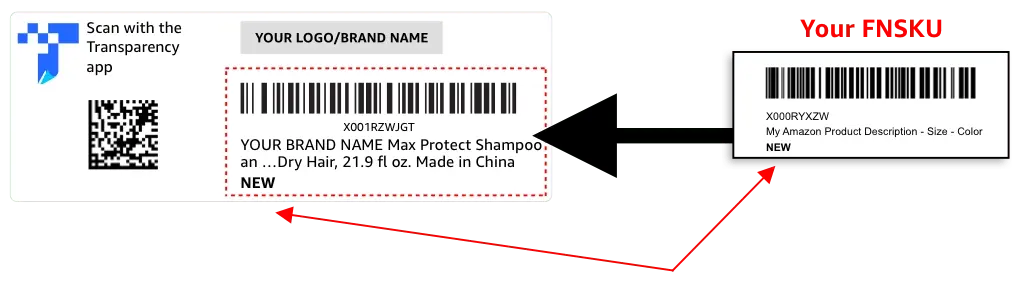
Barcode quality matters as much as barcode ownership. A valid barcode can still fail if it is printed incorrectly.
Amazon barcode labels generally fall within standard sizing requirements. This lets scanners read them quickly and accurately.
Good barcode labels should have:
- Clear black printing
- White background
- Proper spacing
- High contrast
- No smudging
The barcode should never appear:
- Stretched
- Compressed
- Pixelated
- Cropped
- Blurry
Thermal printers are often the preferred option. When paired with a quality barcode generation tool, they produce sharp, consistent labels that scan reliably. Many receiving issues I see come from poor print quality, not incorrect barcode data.
Where Should I Place FNSKU Labels?
Label placement is often overlooked. Even a perfect barcode can become unusable if it’s placed incorrectly.
I recommend placing FNSKU labels on:
- Flat surfaces
- Visible areas
- Stable packaging sections
Avoid placing labels on:
- Package seams
- Curved surfaces
- Corners
- Folded packaging
- Areas covered by shrink wrap wrinkles
If you use an FNSKU label, cover any existing scannable UPC barcode. Failure to cover other barcodes can cause scanners to read the wrong identifier. That may lead to receiving delays or inventory mismatches.
Printing and Testing Barcode Labels
Before labeling a full shipment, test one printed label with a scanner. A quick scan check catches print problems before thousands of units are processed. Thermal printers produce the sharpest, most consistent labels.
Common Amazon Barcode Mistakes I See Sellers Make
After working with countless FBA shipments, I’ve noticed several recurring barcode mistakes.
Using the Wrong FNSKU
This happens more often than sellers realize. Different product variations often have unique FNSKUs. A barcode for a blue product cannot be used on the red version.
Not Covering Existing UPCs
If Amazon requires FNSKU tracking, the UPC should not remain visible. Multiple scannable barcodes can confuse receiving systems.
Printing Low-Quality Labels
Blurry labels create major problems. Always verify print quality before applying labels.
Placing Labels Over Seams
Barcodes should remain flat and readable. Labels that bend across package seams frequently fail scans.
Reusing Old Labels
Barcode requirements may change over time. Always verify that labels match the current ASIN and inventory configuration.
Using Damaged Packaging
Scratched, torn, or wrinkled labels can create receiving issues. Labels should stay clean and intact throughout transit.
Can I Sell on Amazon Without a UPC?
In some cases, yes.
Amazon offers GTIN exemptions for certain products and categories. These exemptions are often used for:
- Handmade products
- Private-label items
- Bundles
- Certain brand categories
Approval is not automatic. Amazon reviews exemption requests and decides eligibility based on category and product details. Even when a UPC is not required, Amazon may still require other forms of inventory identification.
Can Amazon Print Labels for Me?
Yes.
Amazon offers a labeling service. Fulfillment centers apply barcodes on behalf of sellers. The service is convenient, but it involves additional fees.
Many high-volume sellers prefer an experienced prep provider because:
- Costs are often lower.
- Inventory moves faster.
- Quality control improves.
- Receiving issues decrease.
For businesses scaling FBA operations, outsourced prep is frequently more cost-effective than relying on Amazon’s labeling service alone.
How AMZ Prep Helps Sellers Stay Barcode Compliant
At AMZ Prep, barcode compliance is one of the most important quality control checkpoints in our fulfillment process.
Before inventory reaches Amazon, our team verifies:
- Barcode accuracy
- Label placement
- Packaging compliance
- FNSKU requirements
- Amazon routing requirements
By catching issues before inventory ships, we help sellers avoid delays, relabeling fees, and receiving problems. This holds whether you ship a few hundred units or scale nationwide inventory. Clean barcode management is one of the easiest parts of FBA to get right.
Final Thoughts
When I look at why Amazon shipments face receiving delays, barcode issues top the list. The good news is they are also among the easiest to prevent. Fixing them after the fact is much harder.
Meeting Amazon barcode requirements comes down to a few habits. Use legitimate GS1 barcodes. Apply FNSKU labels correctly. Follow proper placement guidelines. Prevention beats correction every time.
It doesn’t matter if you ship your first carton or thousands of units a month. Barcode compliance is one of the simplest ways to improve inventory accuracy. It helps you avoid unnecessary fees and keep your Amazon business running smoothly.
Frequently Asked Questions
What barcode is required for Amazon?
Amazon requires either a manufacturer barcode, such as a UPC, or an Amazon FNSKU. The barcode you use depends on your FBA barcode setting in Seller Central and your product’s eligibility for commingled inventory.
Does Amazon require GS1 barcodes?
For most branded products, GS1-issued UPCs are strongly recommended because Amazon validates barcode ownership against GS1 records.
Can I use UPC codes not registered to my company?
Using unauthorized UPCs may result in listing errors, product suppression, or GTIN verification issues.
Do I need a barcode for Amazon FBA?
Yes. Every unit entering an Amazon fulfillment center needs a scannable barcode. Without one, Amazon cannot receive or track your inventory, which leads to relabeling fees, receiving delays, or rejected shipments.
How do I get a barcode for Amazon products?
You can obtain UPCs from GS1 and generate FNSKU labels directly through Seller Central.
Can I sell on Amazon without a UPC?
Amazon offers GTIN exemptions that allow qualified sellers to list products without a UPC. But be sure to confirm.
What size should Amazon barcode labels be?
Labels should be clearly scannable, properly sized, and printed with sufficient white space around the barcode.
Where do I place FNSKU labels?
Place labels on flat, visible surfaces and avoid seams, corners, and curved areas.

Arishekar N is a Vice President (VP) of Marketing at AMZ Prep, specializing in ecommerce fulfillment and Amazon logistics strategies with a proven track record of driving growth for e-commerce businesses. He is a strategic leader with extensive expertise in marketing, e-commerce operations, SEO & advertising, and branding.
Stay updated on his latest insights by following him


Comments