

Using Walmart Fulfillment Services (WFS) can be a big step forward for your business—but only if the costs make sense. That’s where the Walmart Fulfillment Fees Calculator proves useful.
It lets you estimate storage and shipping costs so you can make informed pricing decisions before listing your products.
In this blog, you’ll learn how to navigate the calculator, what fees to anticipate, and how to interpret real-life examples. Whether you’re just launching or growing fast, having a handle on your fees and partnering with the Walmart fulfillment partner help you keep profits on track.
How to Use the Walmart WFS Fee Calculator

Step 1: Access the Calculator
Visit the official Walmart WFS Cost Estimator: Walmart WFS Cost Estimator
For bulk estimates, use the WFS Bulk Estimate Tool: WFS Bulk Estimate Tool
Step 2: Enter Product Details
Unit Weight: Input your product’s weight in pounds (lbs).
Package Dimensions: Enter the length, width, and height of your product’s packaging in inches.
Additional Product Details: Select applicable features such as:
- Apparel
- Hazardous materials
- Retail price under $10
- Oversize item
Seasonal Storage: Indicate if the item will be stored during peak season (October–December).
Step 3: Calculate the Walmart Fulfillment Service Fees
Click the Calculate button to generate an estimate of your fulfillment and storage fees.
Step 4: Review the Results
The calculator will provide a detailed breakdown including:
Fulfillment Fee: Costs for picking, packing, and shipping your product.
Storage Fee: Charges for storing your product in Walmart’s fulfillment center.
Additional Fees: Any extra fees based on your product’s characteristics.
Important Notes
Unit Weight vs. Dimensional Weight: WFS uses the DIM weight formula(length × width × height ÷ 139) to determine billable weight. If this figure exceeds your unit weight, the dimensional weight applies to your fee calculation.
Packaging Weight: Add 0.25 lbs for packaging materials to the shipping weight.
Rounding: Round shipping weight up to the nearest pound.
Oversize Items: Products exceeding size or weight limits may incur additional fees.
For full details, consult Walmart’s official WFS Fees Guide.
Examples Using the Walmart WFS Fee Calculator
Example 1: Walmart seller dealing with small electronics item
Product: Wireless Earbuds
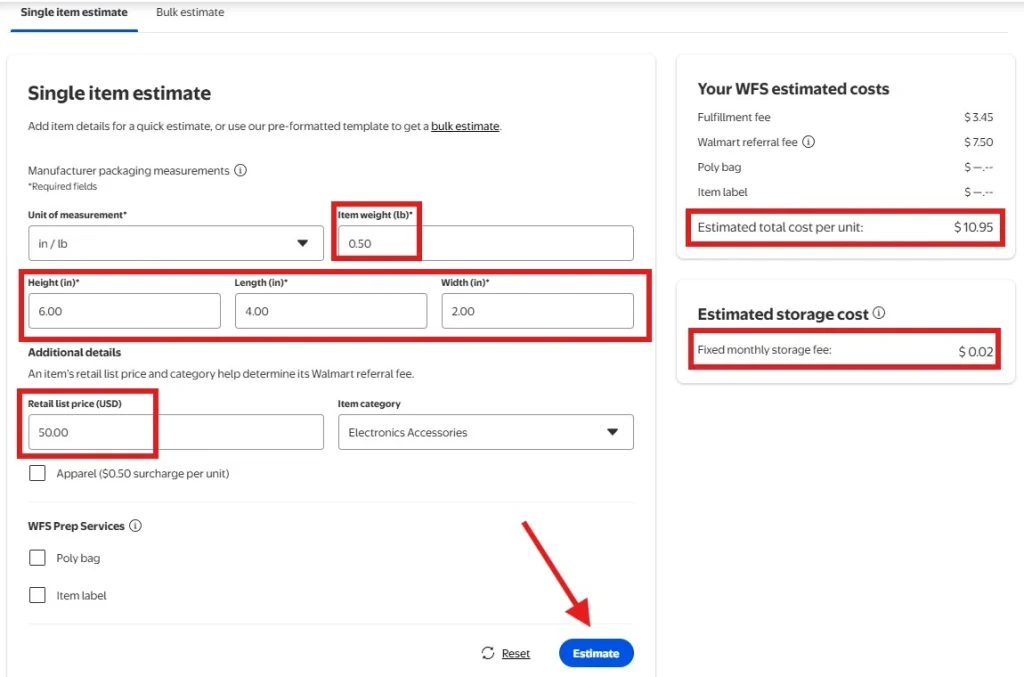
Unit Weight: 0.5 lbs
Package Dimensions: 6 in (L) × 4 in (W) × 2 in (H)
Retail Price: $50
Additional Info: Not apparel, not hazardous, not oversize
Steps:
- Enter 0.5 lbs unit weight.
- Enter dimensions 6 × 4 × 2 inches.
- Leave additional options unchecked.
- Click Calculate.

Result:
Fulfillment fee ≈ $3.45
Storage fee ≈ $0.02 per month (seasonal variation applies)
Total estimated fee: ~$10.95
Profit Calculation
Estimated Fees: $10.95
Net Revenue (after fees): $50 – $10.95 = $39.05
So, the estimated profit before cost of goods (COGS) is $39.05.
To calculate actual profit, subtract your COGS (Cost of Goods Sold) from $39.05.
For example:
If your COGS is $15, then:
Profit = $39.05 – $15 = $24.05
Example 2: Walmart seller enlisted their medium-sized apparel item
Product: Men’s T-shirt
Unit Weight: 0.75 lbs
Package Dimensions: 10 in (L) × 8 in (W) × 1 in (H)
Retail Price: $25
Additional Info: Apparel (check the apparel box)
Steps:
- Enter 0.75 lbs unit weight.
- Enter dimensions 10 × 8 × 1 inches.
- Check the “Apparel” option.
- Click Calculate.
Result:
Fulfillment fee ≈ $3.95
Storage fee ≈ $0.03 per month
Total fees: ~$7.70
Profit Calculation
Estimated Fees: $7.70
Net Revenue (after fees): $25 – $7.70 = $17.30
So, the estimated profit before cost of goods (COGS) is $17.30.
Example with COGS
If your COGS is $8, then:
Profit = $17.30 – $8 = $9.30
Use WFS Fee Calculator to Unlock Smarter Selling on Walmart
Get a detailed breakdown of all Walmart Fulfillment Services fees (storage, pick & pack, shipping).
Avoid unexpected Walmart seller fees that cut into your profits.
Plan your costs confidently with full transparency upfront.
Maximize profits
Analyze fulfillment fees on a per-product (SKU) basis.
Identify high-margin products to prioritize sending to Walmart fulfillment centers.
Pause or rethink products with lower profitability to protect your margins.
Optimize your product mix to boost overall profits.
Tailored strategies
Experiment with product dimensions, weights, and packaging options.
Discover how small changes in packaging or bundling reduce fees.
Use actionable insights to cut storage and shipping costs.
Improve operational efficiency while maintaining excellent customer experience.
Competence
Understand true fulfillment costs to price products aggressively yet profitably.
Avoid underpricing or leaving money on the table.
Plan promotional campaigns or discounts with accurate fee knowledge.
Gain a strategic advantage in Walmart’s competitive marketplace.
Optimize Fees Through Strategic Distribution Planning
Smart sellers reduce fees by considering their nearest walmart distribution center (Walmart fulfillment location) when using the WFS Calculator. Ship products to fulfillment centers closest to your high-demand regions to cut transportation costs during final mile delivery. Combine the calculator’s insights with distribution center locations to decide which products go where. This strategy reduces storage time and shipping distances, boosting your bottom line.
Scalability
Run “what-if” fee scenarios for new products or varying inventory levels.
Anticipate future costs before committing inventory.
Budget better and manage cash flow effectively.
Prepare confidently for product launches or seasonal sales spikes.
Save time
Automate fee calculations and get instant, accurate results.
Eliminate tedious manual math and reduce errors.
Spend more time growing your brand and marketing your products.
Boost overall business efficiency by streamlining fee management.
Final Thoughts
The Walmart Fulfillment Fees Calculator is more than simply a tool for figuring out how much something costs. It also helps you plan.
It gives you precise information on shipping and storage costs, which helps you understand your margins, avoid expensive surprises, and make smart, profitable choices.
This tool gives you the ability to go ahead with confidence and handle Walmart Marketplace growth with more control and accuracy, whether you’re fine-tuning product listings.

Arishekar N is a Vice President (VP) of Marketing at AMZ Prep, specializing in ecommerce fulfillment and Amazon logistics strategies with a proven track record of driving growth for e-commerce businesses. He is a strategic leader with extensive expertise in marketing, e-commerce operations, SEO & advertising, and branding.
Stay updated on his latest insights by following him


Helpful reminder to factor in the apparel surcharge when using the calculator.
Short, actionable, and tags the major fee buckets perfectly.
Loved how you emphasized using the calculator before listing products.
The packaging weight and rounding-up rule is a detail many overlook.
Great step-by-step explanation of the WFS fee calculator.
Understanding storage costs and peak-season surcharges made a big difference for our planning. This blog helped me spot where we were losing margin.
I found the example breakdowns very useful for projecting costs.
Clear and practical exactly what sellers need to avoid hidden fees.
Nice that you included both weight and dimensional weight issues in the guide.