
Cancelling your Amazon seller membership is easy if you have chosen to stop selling on Amazon.
Still, knowing the processes and ensuring all loose ends are tied up can help you avoid unnecessary costs or trouble.
Here is a comprehensive guide to enable you to close your Amazon seller account effortlessly.
What do you think about it?
If you’re reading this article, we understand you have lost hope in making good returns on the Amazon marketplace.
What made you decide to quit selling on the ecommerce platform?
If you feel the Amazon FBA Fees bother you, you can partner with a 3PL provider like us.
Does your current 3PL partner fail to meet your fulfillment expectations? Sorry to hear that.
Why don’t you give it a try with us? Yes. Our excellence in Amazon fulfillment is reflected in our client testimonials and clutch reviews. If you’re interested in learning more about us, fill out the form, and our experts will get back to you.
Otherwise, have you decided to discontinue as an Amazon seller and then continue reading the article to get done with the closure procedure?
Understand the Cancellation Process
Irrespective of the plan you opted in, (1) Individual OR (2) Professional, canceling your account will stop recurring charges.
Make sure that all your transactions, returns, and pending orders are resolved before closing the Amazon seller account.
Resolve Pending Orders and Transactions
Amazon requires sellers to fulfill all pending orders and resolve any open transactions before closing their accounts.
Here’s what to do:
Check for Pending Orders: Log in to your Seller Central account and ensure there are no unfulfilled orders.
Address Customer Returns: Process any return requests and refund customers as needed.
Settle Account Balance: Ensure that any fees owed to Amazon are paid and your account balance is cleared.
Back Up Important Data
Download all relevant reports of your seller account if needed for future tax purposes.
This includes sales reports, tax documents, and order history. Once your account is closed, access to these records will be limited.
So, it’s better to download it to avoid unnecessary tension.
Downgrade Your Subscription Plan (If Applicable)
Changing your professional selling plan to an individual plan can help you save costs. This might sound crazy.
This will stop the monthly subscription fee immediately while allowing you to fulfill any remaining obligations.
We are not sure that this choice is applicable to every seller.
- Go to Settings in Seller Central.
- Select Account Info, then Your Services.
- Click Manage next to your subscription and choose to downgrade.
Step-by-step instructions as follows to close your Amazon Seller Account
Before canceling, review our how to sell on Amazon guide to ensure you’ve used every possible strategy. If you still choose to cancel, close all orders, remove inventory, save your reports, and submit your closure request in Seller Central.
Step 1: Log in to Seller Central.
Step 2: Navigate to Settings > Account Info.
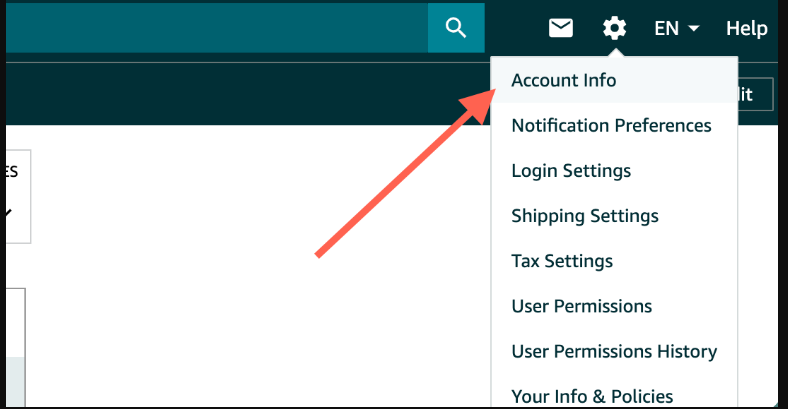
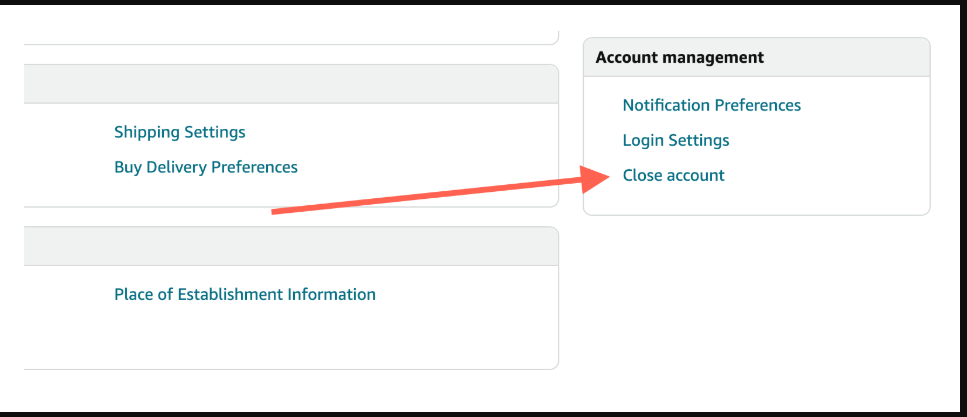
Step 3: Under the Your Services section, click on Close Account.
Step 4: Fill out the closure request form, explaining your reason for cancellation.
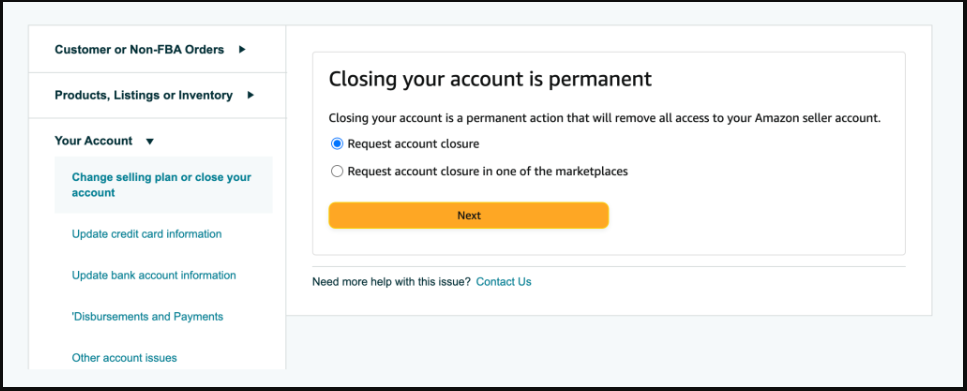
Step 5: Submit the request. Amazon will review it and notify you via email once your account is closed.
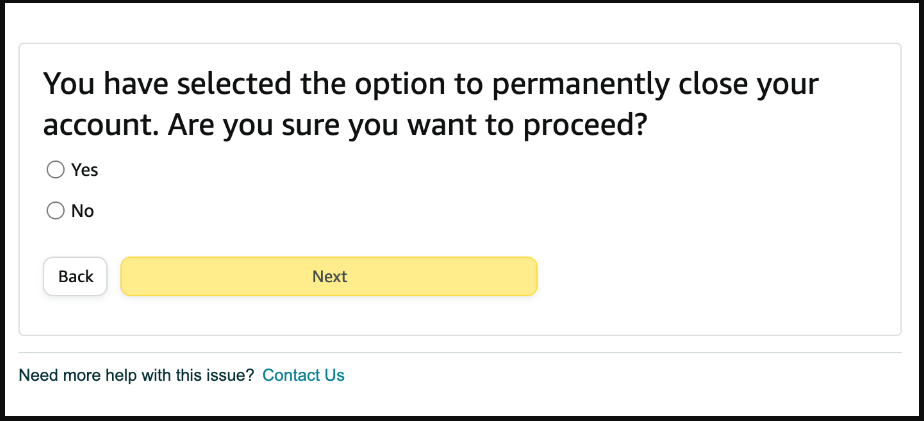
Cancellation Confirmation
After submitting your closure request, Amazon may take a few days to process it.
During this time, monitor your email for updates and ensure no unexpected issues arise. Once you receive confirmation, your account will no longer be active. Implementing email validation helps ensure you receive all critical notifications without interruption.
Important Notes
Reactivating Your Account: If you change your mind, you may be able to reactivate your account by contacting Amazon support, provided your account wasn’t permanently closed. Amazon takes a time period of 90 to close the account permanently.
Refunds: Amazon does not refund subscription fees for the current billing cycle, so canceling mid-month will not result in a partial refund.
FAQs
Is it possible to close my Amazon seller account at my convenience?
Yes, it is possible to terminate your seller’s account at any time. However, it is essential that all your outstanding fees or disputes are resolved and all pending orders are fulfilled prior to the closure.
Does Amazon provide a refund if I close my seller subscription in the middle of the billing cycle?
No. Amazon does not provide refunds for subscription periods that have not been utilized. Your account will continue to be active until the conclusion of the current billing cycle.
What happens to my inventory after I terminate my FBA account?
You are required to generate a removal order for inventory that is stored in Amazon’s facilities. You may be charged with the associated fees to return your inventories to the destination.
Is it possible to reactivate my seller account after cancellation?
It is not possible to reactivate an Amazon seller account once it has been closed. You have to create a new account and complete the registration procedure in order to sell again.
Will the customer reviews be available on my listings post-account cancellation?
As soon as your account is terminated, your customer reviews and listings will not be available. Amazon reviews are associated with the ASINs (Amazon Standard Identification Numbers), not your account.
Can I access my Amazon sales data after seller account closure?
Yes, once you close your account, you will no longer be able to see your sales records or results. Before canceling, you should download and save all of the records.
Does Amazon charge for seller account cancellation?
No, there are no penalties associated with canceling your account, provided that all outstanding issues, including unpaid fees or pending orders, have been resolved.
Is it possible to temporarily suspend my seller account instead of canceling it?
Of course, you have the option to downgrade your Professional merchant account to an Individual plan or deactivate your listings in order to temporarily suspend operations rather than permanently terminating the account.
Is customer service available to assist with the cancellation of an account?
Amazon Seller Support is available to assist you in navigating the account closure process and resolving any outstanding issues.
Is it possible to sell on other Amazon marketplaces after canceling my US seller account?
No, the cancellation of your seller account will have an impact on all Amazon marketplaces that are associated with it. You would be required to establish a new account in order to sell globally again.

Arishekar N is a Vice President (VP) of Marketing at AMZ Prep, specializing in ecommerce fulfillment and Amazon logistics strategies with a proven track record of driving growth for e-commerce businesses. He is a strategic leader with extensive expertise in marketing, e-commerce operations, SEO & advertising, and branding.
Stay updated on his latest insights by following him







Comments