
Amazon reduced FBA storage space by up to 75% in May 2025. Sellers who had 450 cubic feet of storage dropped to just 130 cubic feet.
The change reduced storage from 6 months to 5 months of expected sales. But sellers lost much more space than expected. Even those with high performance scores faced major cuts.
Amazon’s official update confirmed these limits are permanent. They won’t be increasing storage capacity back to previous levels.
Some sellers found solutions that work. Amazon’s bulk storage program (AWD) doesn’t count toward FBA limits. Prep centers can ship smaller amounts to Amazon each week. Certain account improvements increase your storage space.
This blog will further walk you through with the proven methods. Learn what sellers are doing right now to stay in stock without hitting storage limits.
Note: This analysis reflects the May 2025 capacity limit changes and fee structures current as of January 2026. Amazon updates policies regularly – always verify current rates in your Seller Central account.
Understanding Amazon FBA Capacity Limits in 2026
Amazon FBA capacity limits control how much inventory you can store in fulfillment centers. The system changed dramatically this year.
How Amazon Calculates Your Storage Space
Amazon measures capacity in cubic feet, not units. Your limit depends on projected sales over 5 months.
The calculation includes your sales history, IPI score, product category, and available warehouse space.
Your capacity counts three things:
- Inventory already at Amazon warehouses
- Products in transit to FBA
- Shipments created but not yet sent
All three count against your limit immediately.
What Changed in May 2025?
In May 2025, Amazon reduced capacity calculations from 6 months to 5 months of projected sales. The April 2025 announcement called it a ‘minor adjustment.’
Amazon also brought back ASIN-level restock limits. Individual products now have 90-day supply caps even if you have overall account capacity. The capacity limits for the upcoming months became tighter capacity limits than sellers had seen since 2021.
Many sellers found their 2025 FBA capacity allocations created challenges for maintaining stock during peak periods.
The timing hit during Prime Day prep season. Sellers already ordered inventory and booked ad campaigns with nowhere to send products.
Different Types of FBA Storage Limits
Amazon separates capacity into storage categories:
| Storage Type | Description | 2025 Impact |
|---|---|---|
| Standard-size | Items under 18×14×8 inches and 20 pounds | Hit hardest with 60-75% cuts |
| Oversized | Larger or heavier items | Reduced 65-75% for many sellers |
| Apparel | Clothing and accessories | Separate allocations |
| Footwear | Shoes and related items | Distinct limits |
Individual seller accounts get fixed limits of 15 cubic feet total. Professional accounts have variable limits based on performance.
How to Check Your Current FBA Capacity
You need to know your exact capacity situation before taking action.
Finding the Capacity Monitor
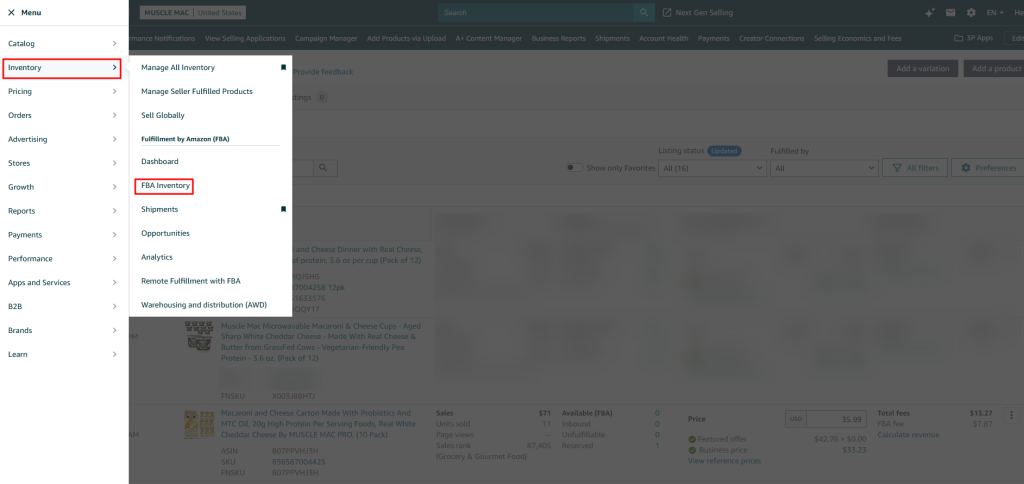
Log into Seller Central and click Inventory in the top menu. Select FBA Inventory from the dropdown.
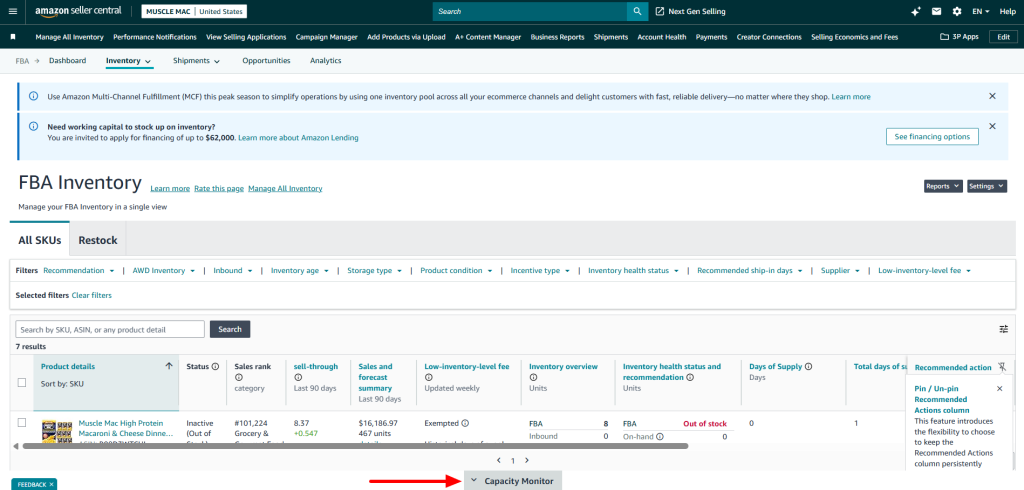
Scroll to the bottom of the page. Look for a gray box labeled ‘Capacity Monitor.
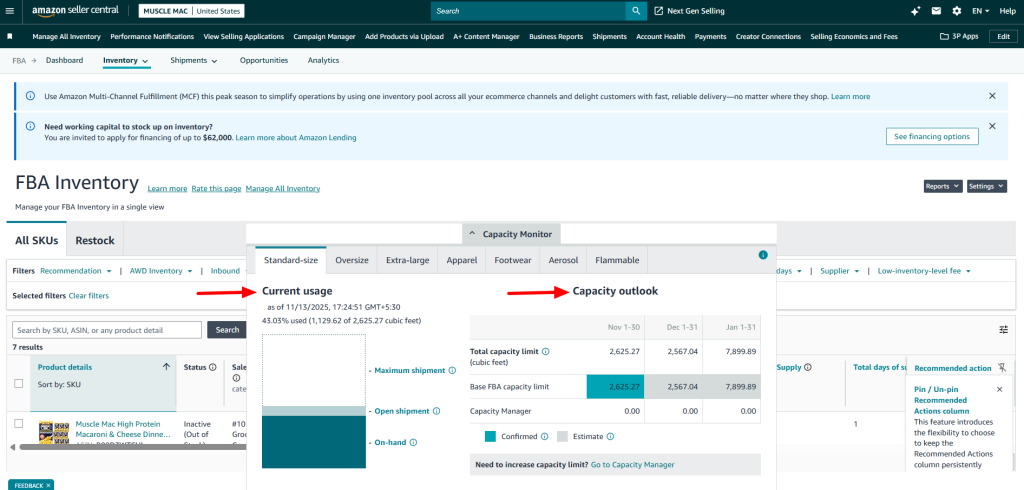
The left side shows a chart with your used and remaining space. The right side displays three columns with your limits.
Understanding Your Usage Percentage
Calculate usage by dividing current usage by your limit. Staying under 80% gives you time. Over 80% puts you in the danger zone with little buffer for new products or sales spikes.
At 90%+ you risk hitting your limit and getting blocked from sending any new shipments. Use the tabs to toggle between standard-size, oversized, apparel, and footwear. Each has separate limits.
The capacity monitor at the bottom of your FBA dashboard shows real-time data that updates every 24 hours. Your current capacity usage by inventory status breaks down into reserved, processing, and available inventory.
Total capacity usage combines all three categories to show how much space you’re consuming against your estimated limit for the following month. Check the capacity usage in the capacity monitor before sending new shipments to avoid surprises.
Using Capacity Manager to Request Additional Space
Amazon’s Capacity Manager lets you request additional capacity when you need more storage than your base allocation.
How to Access Capacity Manager
The capacity manager tool in seller central shows your current capacity alongside your estimated FBA capacity limits for the next three months.
You can use Capacity Manager to request extra space for specific storage types and time periods. Amazon evaluates requests for additional capacity based on your sales history and IPI score.
Understanding Reservation Fees
Request additional capacity by selecting how much additional capacity you want for a given storage type and period. Amazon charges a reservation fee per cubic foot for this extra capacity.
Actual Cost = Reservation Fee – Performance Credits
High-performing sellers receive performance credits that reduce or eliminate fees.
During peak season (Oct–Dec), Amazon FBA storage fee for standard-size inventory jumps to $2.40 per cubic foot.
When Additional Capacity Gets Approved
Additional capacity is granted within 48-72 hours of your request. Once capacity has been allocated, you’ll see updated limits in your capacity monitor.
The capacity is available immediately for creating new shipments. You must use the capacity within the reserved period or lose it.
Using Additional Capacity
Monitor your capacity usage within 24 hours of receiving approval. The received through Capacity Manager amount shows separately from your base allocation.
You can exceed your capacity limits temporarily if you’ve reserved space through Capacity Manager. This prevents shipment blocks during critical sales periods like Prime Day or Q4.
Pay for the extra capacity whether you use it or not. Plan carefully before requesting since fees apply to reserved space, not actual usage.
Why IPI Scores Didn’t Prevent the Capacity Limit Cuts?
The Inventory Performance Index became less protective in 2025. Sellers with excellent scores still lost massive capacity.
What Your IPI Score Actually Means
IPI measures inventory management efficiency on a scale from 0 to 1,000. Amazon calculates this based on stock levels and sales balance.
The minimum threshold is 400. Dropping below 400 now triggers immediate restrictions instead of quarterly reviews.
IPI Requirements That Matter in 2026
| IPI Score Range | What It Means | Capacity Impact |
|---|---|---|
| Below 400 | Immediate restrictions | May be limited to 15 cubic feet |
| 400-450 | Eligible but limited | Constant capacity struggles |
| 450-500 | Decent operating room | Vulnerable to across-the-board cuts |
| 500+ | Best available protection | Improves relative position |
Important Note: While maintaining high IPI scores (500+) provides better relative positioning when Amazon allocates capacity, it does not guarantee protection from system-wide cuts.
During the May 2025 capacity reduction, even sellers with IPI scores above 550 experienced significant capacity decreases, demonstrating that Amazon’s warehouse availability affects all sellers regardless of individual performance metrics.
Even sellers who maintained an FBA sales record without limits for years faced restrictions. The capacity limits are set monthly based on Amazon’s warehouse availability, not just individual seller performance.
You must assess fulfillment center capacity regularly since fulfillment center capacity changes affect everyone regardless of individual metrics.
Four Factors Controlling Your Score
Excess Inventory has the biggest impact. Amazon flags products with over 90 days of supply based on demand forecasts.
Sell-Through Rate measures units shipped in 90 days divided by average inventory. Target 3.0 or higher.
Stranded Inventory tracks units in FBA without active listings. These waste space and tank your score fast.
In-Stock Rate monitors popular product availability. This carries less weight than the other factors.
How Amazon AWD Helps Sellers Survive the 2025 FBA Capacity Crisis?
Amazon Warehousing and Distribution solves capacity problems without losing Prime eligibility.
What Is Amazon AWD?
AWD is Amazon’s bulk storage program for FBA sellers. You send large quantities to AWD facilities where Amazon stores inventory at lower rates.
The system automatically replenishes your FBA stock when levels drop. Products show as ‘in stock’ even while sitting in AWD.
The critical advantage: AWD inventory doesn’t count against FBA capacity limits. You can store thousands of units in AWD with zero impact on FBA restrictions. Since Amazon AWD now accepts sortable items, many standard size products that previously stayed in FBA can now be stored in AWD before replenishment.
Amazon AWD Pricing Structure
AWD uses a tiered pricing model based on storage duration and automation level:
Standard AWD Rates (Effective January 15, 2026):
- Off-Peak Season (January-September):
- West Region: $0.57 per cubic foot/month
- Other Regions: $0.48 per cubic foot/month
- Peak Season (October-December): $2.40 per cubic foot/month (all regions)
Discounted Rates (Conditional):
| Rate Type | Cost Per Cubic Foot | Requirements |
|---|---|---|
| Base Rate (West Region) | $0.57/month (Jan-Sep) | Standard storage with manual replenishment |
| Base Rate (Other Regions) | $0.48/month (Jan-Sep) | Standard storage with manual replenishment |
| Peak Season | $2.40/month (Oct-Dec) | All storage during Q4 |
| Smart Storage Discount | $0.43/month | 70+ days inventory maintained + 70%+ auto-replenishment over 90 days |
| Amazon Managed Discount | Varies by region | Use Amazon Global Logistics for inbound shipping |
*Note: Rates effective January 15, 2026. Check your Seller Central for your specific region’s pricing.
Important: The $0.43 Smart Storage rate is NOT the standard price. You must maintain at least 70 days of COMBINED inventory across both AWD and FBA (not just AWD alone) AND use auto-replenishment at least 70% of the time over a 90-day period to qualify for this discount.
AWD vs FBA Storage Cost Comparison:
| Storage Type | Jan-Sep Rate | Oct-Dec Rate |
|---|---|---|
| FBA Standard-Size | $0.87/cu ft | $2.40/cu ft |
| FBA Oversized | $0.56/cu ft | $1.40/cu ft |
| AWD Base Rate (West) | $0.57/cu ft | $2.40/cu ft |
| AWD Base Rate (Other | $0.48/cu ft | $2.40/cu ft |
| AWD Smart Storage | $0.43/cu ft | $2.40/cu ft* |
*Smart Storage discount does not apply during peak season
The base AWD rates save you $0.30-$0.39 per cubic foot compared to FBA standard-size storage during off-peak months (depending on your region). The real savings come when you qualify for Smart Storage discounts or avoid FBA’s aged inventory surcharges.
How AWD Works with FBA
Send inventory from your supplier to AWD facilities. Amazon receives, processes, and stores products at dedicated Amazon fulfillment centers optimized for bulk storage.
Enable auto-replenishment in AWD settings. Set thresholds like ‘when FBA drops to 15 days supply, ship more from AWD.’
AWD monitors FBA levels daily. When you hit the threshold, it automatically creates a replenishment order.
Transfer time takes 10-14 days. So, plan your thresholds accordingly.
Setting Up AWD
Go to Seller Central, navigate to Inventory, then select Amazon Warehousing and Distribution.
Click ‘Get Started’ and complete enrollment. No setup fees or monthly minimums for FBA sellers.
Create AWD shipments similar to FBA shipments. Select products and quantities, Amazon assigns warehouses.
Prep products according to Amazon requirements. Use AWD barcodes the system generates.
Ship using Amazon Partnered Carrier for discounted rates or arrange your own freight.
Best Products for AWD Storage
Seasonal inventory works perfectly. Store holiday products off-season at cheap rates, move to FBA 6-8 weeks before peak.
Slow-moving SKUs selling 10-30 units monthly don’t need FBA speed. Keep these in AWD to free FBA space.
Bulk quantities of proven products lock in supplier pricing. Store 6 months in AWD while maintaining 30-45 days in FBA.
New product launches start with small FBA quantities for testing. Keep backup in AWD to scale if it takes off.
Using 3PL Prep Centers for Weekly FBA Shipments
Third-party logistics providers like AMZ Prep give you complete control and flexibility Amazon doesn’t offer.
What 3PL Providers Do for Amazon Sellers
A 3PL stores your inventory and handles fulfillment services. For Amazon sellers, they prep products and ship small batches to FBA on schedules.
Unlike Amazon’s limits, 3PLs have no cubic foot restrictions. Send as much inventory as needed.
The weekly shipping model means sending 2-4 weeks of supply to FBA at a time. Your 3PL ships fresh inventory on consistent schedules based on sales.
How Weekly Shipment Scheduling Works
Buy 3-6 months of inventory from suppliers. Ship directly to your 3PL warehouse instead of Amazon.
The 3PL receives and stores bulk inventory. You maintain visibility through warehouse management systems.
Each week, review sales data and calculate replenishment needs. Send quantities to your 3PL for the next FBA shipment.
The 3PL preps products with FBA labels, poly bags, and other requirements. They create Seller Central shipments and send them to Amazon.
Your FBA inventory maintains 30-45 days of supply constantly. This keeps capacity usage around 50-60%.
FBA Prep Services Included
Your 3PL handles FNSKU labeling so products arrive FBA-ready. This includes printing and applying labels to each unit.
Poly bagging with suffocation warnings meets Amazon prep requirements. Fragile items get bubble wrap or protective packaging.
Kitting and bundling services create multi-packs. This improves sell-through on slow-moving individual items.
Quality control catches defects before products reach Amazon. This reduces returns and negative feedback.
Why Sellers Use AMZ Prep as their 3PL Partner?
Many sellers switched to prep centers after the May capacity cuts. The weekly shipping model keeps FBA inventory lean while storing bulk quantities off-site.
Prep centers like AMZ Prep handle all FBA requirements including FNSKU labeling, poly bagging, and shipment creation. Products arrive at Amazon ready for fulfillment.
The real advantage is flexibility. No capacity restrictions mean you can store as much inventory as needed. Scale up during peak season without worrying about hitting Amazon’s limits.
Multi-Channel Fulfillment for Better Capacity
Using FBA inventory for other sales channels improves capacity utilization and Amazon IPI scores.
What Multi-Channel Fulfillment Does
Multi-Channel Fulfillment lets Amazon fulfill orders from other sales channels. Shopify, eBay, Walmart, and your website can use FBA inventory.
You pay per-order fees. But you maintain a single inventory pool instead of splitting stock across warehouses.
Orders from other channels don’t show Amazon branding. Customers receive neutral packaging.
How MCF Improves Your Capacity Situation
Amazon includes MCF order volume when calculating capacity allocations. Higher total sales mean better capacity treatment.
Your inventory moves faster when fulfilling multiple channels, and the Multi-channel fulfillment fees are often competitive compared to maintaining separate 3PL fulfillment for other sales channels. Better sell-through rates directly improve IPI scores.
You avoid duplicate safety stock. One inventory pool serves all channels instead of separate stock for each.
MCF Pricing Options
Amazon’s MCF pricing:
| Delivery Speed | Small Item | Large Item |
|---|---|---|
| Standard (4-5 days) | $5.12 | $7.80 |
| Expedited (2-3 days) | $7.78 | $11.70 |
| Priority (1-2 days) | $10.44 | $15.60 |
All pricing includes picking, packing, and shipping. Compare this to maintaining separate 3PL fulfillment for other channels.
Setting Up MCF
Go to Seller Central and navigate to Orders. Select Multi-Channel Fulfillment Orders.
Click ‘Create MCF Order’ and enter customer shipping details. Select products and quantities from FBA inventory.
Choose delivery speed. Amazon creates pick tickets and fulfills like regular Amazon sales.
For Shopify integration, use the Amazon MCF app. This automates order sync without manual entry.
Track MCF orders separately from Amazon orders. They don’t affect seller metrics or feedback ratings.
Managing Amazon Storage Fees in 2026
Amazon’s 2025 fee structure punishes poor inventory management. Understanding costs helps optimization.
Current FBA Storage Fees 2026
Amazon’s fee schedule:
| Period | Standard-Size | Oversized |
|---|---|---|
| January-September | $0.87 per cubic foot | $0.56 per cubic foot |
| October-December | $2.40 per cubic foot | $1.40 per cubic foot |
Peak season rates nearly triple off-season costs. These fees apply to all inventory regardless of age.
Storage Utilization Surcharge
Amazon introduced the Storage Utilization Surcharge in April 2023 to encourage efficient inventory management. The threshold was tightened from 26 weeks to 22 weeks on April 1, 2024.
How Amazon Calculates It:
Unlike simple ‘weeks of supply,’ Amazon uses a storage utilization ratio:
Storage Utilization Ratio = (Average daily inventory volume over 13 weeks / Average daily shipped volume over 13 weeks) / 7 days
When the ratio exceeds 22 weeks, you’re charged a surcharge IN ADDITION to regular monthly storage fees.
Surcharge Rate Structure:
| Inventory Type | Utilization Ratio | Monthly Surcharge |
|---|---|---|
| Standard-size | 22+ weeks | $0.87 per cu ft |
| Oversized | 22+ weeks | $0.56 per cu ft |
| Apparel | 22+ weeks | $0.48 per cu ft |
| Footwear | 22+ weeks | $0.48 per cu ft |
Real Cost Example:
A seller with 100 cubic feet of standard-size inventory and a utilization ratio of 25 weeks:
- Regular storage (Jan-Sep): 100 cu ft × $0.87 = $87.00
- Utilization surcharge: 100 cu ft × $0.87 = $87.00
- Total monthly cost: $174.00 (double the base rate)
How to Avoid This Surcharge:
- Maintain inventory turnover so you ship at least as much as you store over 13-week periods
- Keep FBA inventory under 60 days of supply for consistent sellers
- Move excess inventory to AWD before your utilization ratio climbs above 22 weeks
- Monitor your inventory performance dashboard weekly for early warning signs
This surcharge makes FBA unsuitable for long-term bulk storage, pushing sellers toward hybrid models using AWD or 3PL partners.
Aged Inventory Fees
Amazon charges aged inventory surcharges on inventory stored long-term in FBA facilities:
These Amazon long term storage fees apply as follows::
- Inventory stored 181-270 days: Subject to regular monthly storage fees only
- Inventory stored 271-365 days: Additional $0.50 per cubic foot monthly surcharge
- Inventory stored 365+ days: Additional $1.10 per cubic foot monthly surcharge
These surcharges are IN ADDITION to your regular monthly storage fees ($0.87 per cubic foot for standard-size items Jan-Sep).
Note: The aged inventory threshold changed from 365 days to 271 days for surcharges to begin, making it more expensive to store slow-moving inventory long-term.
Low Inventory Level Fee
Amazon introduced a low inventory level fee in April 2024 (expanded in 2026) to discourage understocking. It’s added on top of your regular fulfillment fees, increasing the overall Amazon FBA fees for poorly managed inventory.
This fee applies when BOTH your 30-day historical supply AND 90-day historical supply drop below 28 days for products with sufficient historical demand.
Fee Structure by Days of Supply:
| Days of Supply | Standard-Size Items | Large Standard-Size | Small/Large Oversized |
|---|---|---|---|
| 0-14 days | $0.97 per unit | $1.45 per unit | $2.42 per unit |
| 15-21 days | $0.49 per unit | $0.73 per unit | $1.21 per unit |
| 22-28 days | $0.24 per unit | $0.36 per unit | $0.61 per unit |
| 28+ days | No fee | No fee | No fee |
Important: This fee is charged PER UNIT SOLD when your inventory falls below 28 days of supply. It’s added on top of your regular fulfillment fees.
The Inventory Balancing Challenge:
Amazon’s fee structure creates a narrow ‘sweet spot’ for inventory levels:
- Too Little (under 28 days): Low inventory fee of $0.97+ per unit
- Optimal Range (30-60 days): No penalties
- Too Much (over 90 days): Excess inventory flagged, IPI score drops
- Way Too Much (over 26 weeks): Storage Utilization Surcharge added
How to Avoid Low Inventory Fees:
The most effective solution is using AWD with auto-replenishment set at 30-day thresholds. This maintains your FBA stock in the optimal 30-60 day range automatically, preventing both low inventory fees and excess inventory problems.
For manual management, monitor your days of supply weekly and create replenishment shipments when products drop to 35-40 days remaining. This buffer accounts for the 10-14 day transfer time from AWD or 3PL facilities.
Setting Up Your Hybrid Fulfillment System
Transitioning to hybrid fulfillment takes planning. This timeline helps execute without disrupting your sales.
Week 1: Audit Current Inventory
Create a spreadsheet listing every product. Include units sold in the last 30 days, current inventory, days of supply, and cubic feet.
Calculate each product’s revenue and profit contribution. Sort by profitability and sales velocity.
Classify products into tiers:
- Tier 1: Top 20% by revenue (keep in FBA)
- Tier 2: Middle 30% by revenue (move to AWD)
- Tier 3: Bottom 50% (move to 3PL or discontinue)
Calculate storage costs under different scenarios. Compare all-FBA versus hybrid AWD versus hybrid 3PL versus combination to determine the right AWD alternative for your fulfillment model.
Identify products causing excess inventory problems. These move to overflow storage first.
Week 2: Enroll in AWD and Select 3PL
Log into Seller Central and enroll in Amazon Warehousing and Distribution. Takes 15-20 minutes with no fees.
Research 3PL providers and request quotes from at least three. Provide storage volume, SKU count, and monthly orders.
Compare quotes on storage rates, prep fees, minimums, locations, and technology integrations. Choose one 3PL partner to start. You can add more as volume grows.
Set up accounts with chosen providers. Complete onboarding and integrate software connections.
Week 3: Move Excess to Overflow
Create removal orders for Tier 3 products with over 90 days supply in FBA. Ship these to 3PL partners. Set up first AWD shipments for Tier 2 products. Send 3-6 months of supply to AWD facilities.
Configure auto-replenishment in AWD. Set thresholds at 30 days supply to maintain optimal FBA levels. Keep Tier 1 fast-movers in FBA with 45-60 days supply. These drive most revenue and need fastest fulfillment.
Update inventory tracking systems. You now have inventory in three locations needing monitoring.
Week 4: Establish Weekly Schedule
Set Monday as weekly inventory review day. Check FBA capacity usage, days of supply by SKU, and stranded inventory.
Calculate replenishment needs based on last week’s sales velocity. Add a 20% buffer for variability.
Send replenishment instructions to 3PL by Tuesday. They prep Wednesday and ship Thursday. Amazon receives inventory following Tuesday. This creates predictable 7-day cycles.
Monitor IPI score trends. Track capacity utilization percentage. Adjust shipment quantities based on performance.
Real Seller Success: 75% Capacity Cut Survival Story
Background: Mid-sized sellers with 15 SKUs in the home goods category saw capacity drop from 420 cubic feet to 110 cubic feet in May 2025.
Before the Cut:
- All inventory stored in FBA
- Average 120 days of supply
- IPI score: 475
- Monthly storage costs: $365
Hybrid Solution Implemented:
- Enrolled in AWD for 8 slower-moving SKUs
- Partnered with prep center for weekly shipments
- Kept top 5 revenue generators in FBA only
- Reduced FBA inventory to 35 days average supply
Results After 60 Days:
- FBA capacity usage: 52% (57 cu ft used of 110 cu ft limit)
- IPI score improved to 520
- Monthly storage costs reduced to $185
- Zero stockouts during transition
- Avoided $230 in low inventory fees by maintaining optimal levels
Conclusion
Amazon’s 5-month capacity system isn’t going away. Sellers who adapted to hybrid fulfillment models are now in stronger positions than before the May cuts. They have better inventory control, lower storage costs, and the flexibility to scale without hitting capacity walls.
The key is thinking about FBA differently. It’s not a storage solution anymore. FBA is a fulfillment network for your fastest-moving products. Everything else belongs in AWD or 3PL overflow storage.
Start with small changes this week. Fix your stranded inventory. Enroll in AWD. Get quotes from prep centers.
Within a month, you can have a complete hybrid system running. Your FBA capacity usage will drop to 50-60%. Your IPI score will climb above 500. You’ll never have to worry about hitting storage limits again.
Official Amazon Sources & Verification
All pricing and policy information in this guide comes from official Amazon Seller Central documentation:
Primary Sources:
Note: Amazon updates capacity limits monthly during the 4th week of each month. Storage fees and surcharges are reviewed quarterly.
Always verify current rates in your Seller Central account under ‘Inventory > FBA Inventory > Capacity Monitor’ before making inventory decisions.
For the most current information specific to your account, check your Capacity Monitor dashboard and review Amazon’s official fee schedule updates sent via Seller Central notifications.
Frequently Asked Questions About Amazon FBA Capacity Limits
What are Amazon FBA capacity limits and how do they work?
FBA capacity limits restrict how much inventory you can store in Amazon fulfillment centers, measured in cubic feet. Amazon calculates limits based on 5 months of projected sales, your IPI score, sales history, and available warehouse space. Limits update monthly during the fourth week.
Why did Amazon cut FBA capacity limits by 75% in May 2025?
Amazon reduced capacity from 6 months to 5 months of projected sales in May 2025. While the official reason was ‘higher than usual inventory levels,’ the cuts affected even high-performing sellers with IPI scores above 500.
Does my IPI score affect my FBA storage capacity limits?
Yes, your IPI score influences capacity allocations, but it doesn’t guarantee protection from cuts. The minimum threshold is 400 to avoid restrictions. Scores above 500 provide better relative positioning, but even sellers with 550+ IPI scores experienced significant capacity reductions in May 2025.
What is Amazon AWD and how does it help with capacity limits?
Amazon Warehousing and Distribution (AWD) provides bulk storage that doesn’t count against FBA capacity limits. AWD costs $0.43-$0.78 per cubic foot monthly and automatically replenishes FBA inventory.
How can I increase my FBA storage capacity in 2026?
Increase capacity by maintaining IPI scores above 500, fixing stranded inventory immediately, reducing excess inventory over 90 days supply, and improving sell-through rates above 3.0. Use Amazon AWD or 3PL partners for overflow storage, and keep only 30-60 days supply in FBA.
Can I keep my Prime badge using 3PL storage instead of FBA?
Yes, you can maintain Prime badge eligibility by storing bulk inventory at 3PL warehouses and shipping small batches to FBA weekly. Products fulfill through FBA, keeping Prime status. Alternatively, apply for Seller Fulfilled Prime (SFP) if you meet Amazon’s 99% on-time delivery and performance requirements.

Arishekar N is a Vice President (VP) of Marketing at AMZ Prep, specializing in ecommerce fulfillment and Amazon logistics strategies with a proven track record of driving growth for e-commerce businesses. He is a strategic leader with extensive expertise in marketing, e-commerce operations, SEO & advertising, and branding.
Stay updated on his latest insights by following him







Comments