
Last month, a seller checked his FBA fee statement and found an extra $847 in charges he didn’t recognize. The reason? Amazon low inventory level fee.
Thousands of sellers are seeing these unexpected charges pop up on their statements. Most sellers do not know why they are charged or how to stop it.
Here’s what you need to know. This fee comes in when your stock runs too low compared to your sales. Amazon wants you to keep enough inventory in their warehouses to maintain fast shipping. If you don’t, they charge you extra.
Two things changed on January 15, 2026. The fee now covers small bulky and large bulky products, which used to be exempt. And Amazon calculates it per FNSKU instead of per parent ASIN. Both changes are live now.
This blog will walk you through how the fee works. You’ll learn the calculations, where to find charges, and how to keep your stock healthy. More importantly, you’ll discover practical ways to avoid low inventory fee charges altogether.
What is Amazon Low Inventory Fee?
Amazon Low Inventory Fee is a charge that sellers incur when their inventory for certain products falls below Amazon’s recommended thresholds.
The fee, announced in December 2023 and effective April 1, 2024, encourages sellers to maintain adequate stock levels so Amazon can efficiently distribute products across its fulfillment network.
When inventory runs low, Amazon cannot optimize shipments between warehouses, which can slow delivery times and increase fulfillment costs. To offset these costs, Amazon passes a portion of the expense back to sellers through this fee.
For sellers running lean on stock, this fee can quietly erode profits if not carefully managed. Maintaining sufficient inventory not only helps avoid low inventory fee charges but also ensures faster delivery and a better customer experience.
Note: The next section will give you a detailed explanation of how to find this information in Amazon seller central.
The fee appears in your Seller Central account under FBA fees. It shows up as a per-unit charge on items shipped when your stock is running low. It applies to standard-size, small bulky, and large bulky products. Grocery items are exempt. If you fulfill your own orders through FBM, the fee does not apply.
How to Find Your Amazon Low Inventory Level Fee in Seller Central?
Many sellers only realize they’re being charged when it’s too late. Checking your low-inventory fees regularly can help you stay ahead.
Quick Method: FBA Inventory Page
This method shows upcoming fees before they’re charged:
Sign in to Seller Central.
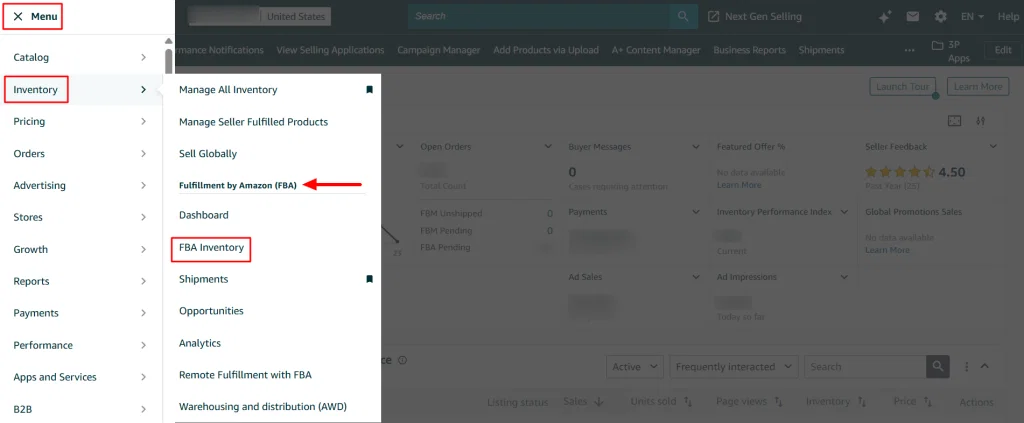
In the left-hand menu, click ‘Inventory’ and Select ‘FBA Inventory’ from the dropdown.
Locate the ‘Low-inventory level fee’ column.
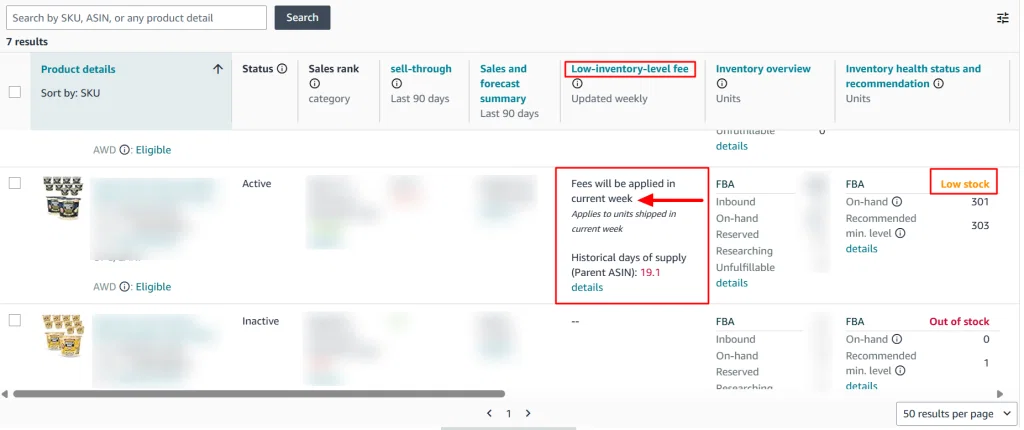
Doing this every Monday gives you a six-day window to react before fees are applied.
Detailed Method: SKU Economics Report
To see fees you’ve already paid:
1. Go to ‘Fulfillment’ and click on ‘FBA Inventory.’
2. Click the ‘SKU link’ in the Product Details column for the item you want to review.
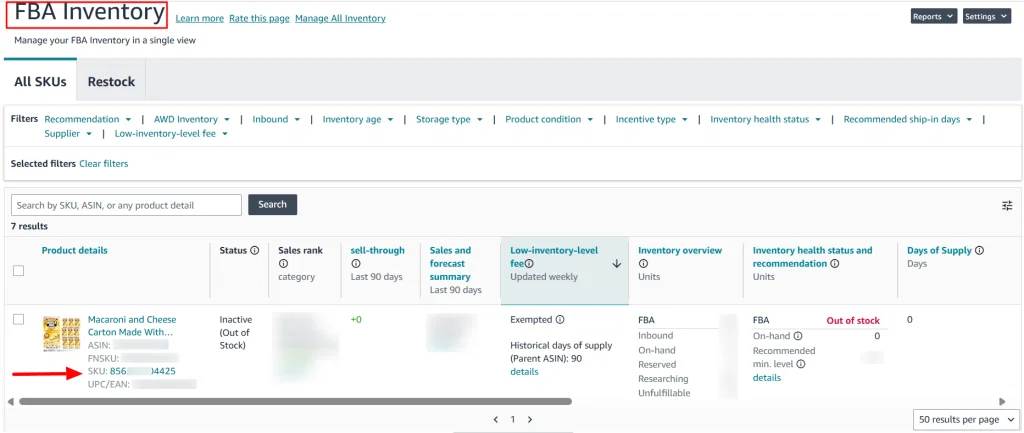
3. Scroll down to the SKU Economics chart.
4. Select your date range from the dropdown.
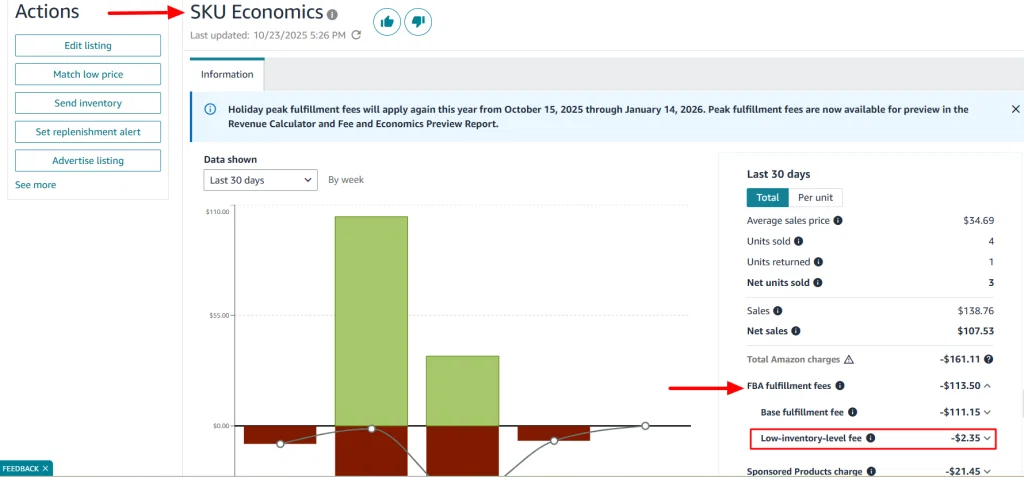
Look under FBA fulfillment fees for Low Inventory Level Fee.
This breakdown shows exactly which SKUs triggered fees, the amount charged, and helps you plan restocking effectively.
The Actual Costs: What You’ll Pay Per Unit
The fee varies based on your product size and how low your inventory gets.
Here’s the current fee structure for 2025:
| Size Tier | Weight | 0-14 Days Supply | 14-21 Days | 21-28 Days |
|---|---|---|---|---|
| Small standard | Up to 16 oz | $0.89 | $0.63 | $0.32 |
| Large standard | Up to 3 lbs | $0.97 | $0.70 | $0.36 |
| Large standard | 3+ lb to 20 lb | $1.11 | $0.87 | $0.47 |
| Small bulky | Up to 50 lbs | Confirm in Seller Central | Confirm | Confirm |
| Large bulky | Up to 50 lbs | Up to $2.09 | Confirm | Confirm |
Bulky products came under this fee on January 15, 2026. Rates at the lowest supply band run as high as $2.09 per unit.
The less inventory you have, the higher the fee. It is a flat per-unit charge, not a percentage. That hits low-priced products hardest, since the fee is the same whether your item sells for $8 or $80.
The less inventory you have, the higher the fee. Notice it’s a flat fee per unit, not a percentage. This hits low-priced products harder and feels like a hidden Amazon stockout penalty for underestimating demand.
Real Seller Examples
Kitchen Gadget Seller: Sarah sells silicone spatula sets at 1.2 pounds. She normally ships 150 units per week. When her supplier had delays, her days of supply dropped to 12 days. For two weeks, she paid $0.97 per unit. That’s $145.50 per week or about $291 total.
Supplement Brand Owner: Mike runs a vitamin business, including shipping supplements to Canada, where demand can fluctuate due to regulatory and seasonal factors. During a promotion, sales spiked unexpectedly. For three weeks, he was below the 14-day threshold. He paid $0.89 per unit on 840 units total. That’s $747.60 in fees he didn’t budget for.
High-Volume Toy Seller: Jennifer manages multiple toy SKUs. During Q4, five products ran low simultaneously. Her total November fees: $1,847. That money could have gone toward more inventory instead.
Understanding Historical Days of Supply
Amazon uses something called ‘historical days of supply’ to decide if you owe the fee. The metric is simpler than it sounds.
How Amazon Calculates Your Inventory Health
The formula is: Average daily inventory divided by average daily units shipped.
Let’s say you have 400 units in stock on average. You ship 10 units per day on average. Your historical days of supply is 40 days (400 ÷ 10 = 40).
Amazon runs this calculation twice. Once for the last 30 days (short-term) and once for the last 90 days (long-term).
Here’s the important part. Both measurements need to stay above 28 days. If either one is above 28, you’re safe. You only get charged if both periods fall below 28 days.
Example calculation:
- Your 30-day average inventory: 300 units
- Your 30-day average daily shipments: 12 units
- Short-term days of supply: 25 days (300 ÷ 12)
- Your 90-day average inventory: 450 units
- Your 90-day average daily shipments: 10 units
- Long-term days of supply: 45 days (450 ÷ 10)
- Result: No fee because your 90-day metric is above 28
Short-Term vs Long-Term: Why Amazon Uses Both
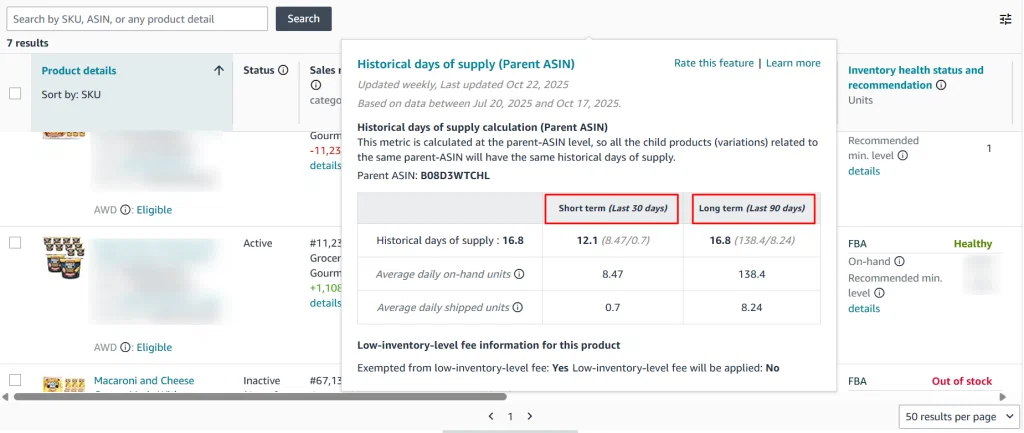
Amazon measures both time periods. The short-term metric identifies recent inventory drops. The long-term metric tells about the seasonal spikes.
Imagine you’re selling Christmas lights. In November, your sales explode. Your 30-day average might show only 15 days of supply because you’re selling so fast.
But your 90-day average includes September and October when sales were slower. That longer view might show 40 days of supply. You avoid the fee because one period is above 28.
Where to Find Your Numbers in Seller Central
Navigate to Inventory, then click FBA Inventory. Look for the historical days of supply column.
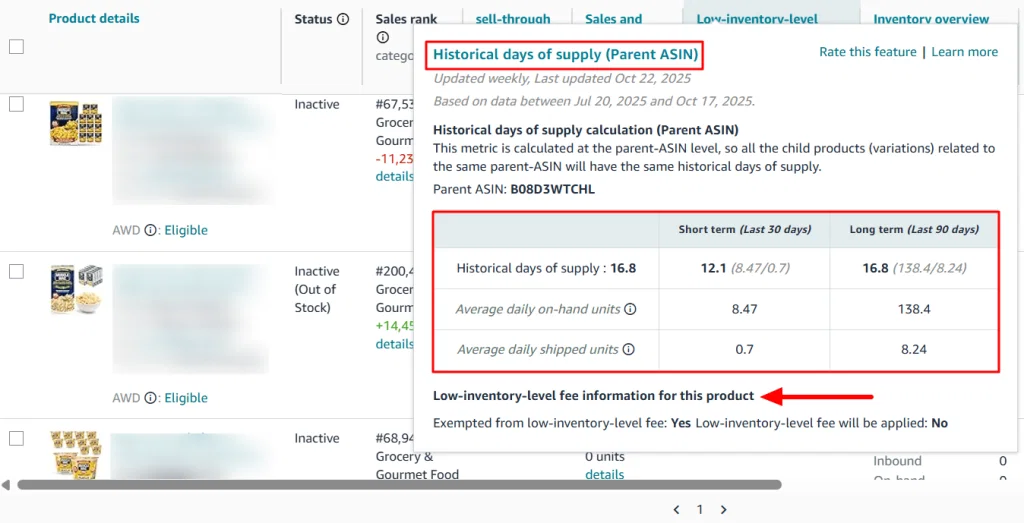
Amazon calculates this per seller-FNSKU as of January 15, 2026. Each variation stands on its own. Before that change, Amazon averaged across the parent ASIN, so a well-stocked variation could mask a low one.
That masking no longer works. If you sell a shirt in five colors and one color drops below 28 days, that color gets charged on every unit sold. The other four are unaffected.
Sellers with wide variation catalogs feel this most. Track inventory at the individual SKU level, not the parent.
| Metric | Short Term (30 days) | Long Term (90 days) |
|---|---|---|
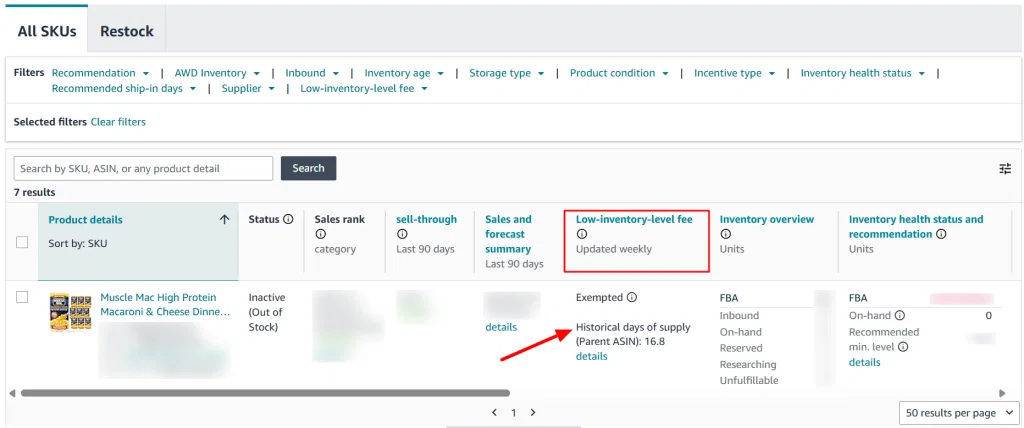
| Historical days of supply | 12.1 | 16.8 |
| Average daily on-hand units | 8.47 | 138.4 |
| Average daily shipped units | 0.7 | 8.24 |
How Amazon Calculated ‘Historical Days of Supply’
Formula:
Days of Supply = Average Daily On-Hand Units / Average Daily Shipped Units
Short-term (30 days): 8.47 / 0.7 = 12.1 days of supply
Long-term (90 days): 138.4 / 8.24 = 16.8 days of supply
- Short-term tells you about recent inventory vs. recent sales.
- Long-term smooths out seasonal or historical trends.
What the Fee Info Means
- Exempted from low-inventory-level fee: Yes. This product is not being charged even though the days of supply is below 28.
- Low-inventory-level fee will be applied: No. No fee will be charged for this item.
Why it’s exempted: Could be because it’s:
- A new-to-FBA product (<180 days), or
- Under other Amazon exemptions like low-volume SKUs.
Products Affected with Amazon Low Inventory Level Fee
Not every product on Amazon faces this fee. Understanding who pays and who doesn’t helps you plan better.
Product Categories Affected
- Small standard items weigh up to 16 ounces (phone cases, small kitchen tools, cosmetics)
- Large standard items go up to 20 pounds (blenders, medium toys, books)
- Small bulky and large bulky items came under the fee on January 15, 2026 (furniture, fitness equipment, large appliances)
- Extra-large items remain outside the fee
Seller Exemptions You Should Know
Amazon applies several exemptions:
Low-volume products: Items selling fewer than 20 units in the last 7 days
Grocery category: exempt as of January 2026
New professional sellers: 365 days of protection from your first inventory receipt
New-to-FBA products: 180 days for products never fulfilled by Amazon before
Amazon Warehousing and Distribution users: Exempt if 70%+ of replenishment uses AWD
Sellers Most Likely to Pay This Fee
- Private label brands managing their own supply chain
- Wholesale sellers juggling multiple SKUs from different suppliers
- High-volume arbitrage sellers with unpredictable sourcing
- Seasonal sellers during transition periods (especially February-March after holidays)
Storage Limits vs Inventory Requirements
There is a tension here worth naming. Amazon wants you to keep more inventory but also limits how much you can store.
Understanding the Dilemma
In 2024 and early 2025, Amazon reduced FBA capacity limits. Some sellers saw reductions of 50% to 75%. Even sellers with IPI scores above 850 weren’t safe.
At the same time, Amazon introduced the low inventory fee. You need to maintain at least 28 days of supply to avoid charges. But there might not be enough storage space.
Many sellers see this as an indirect Amazon stockout penalty, since running lean triggers fees, yet overstocking hits capacity limits.
Comparing Your Options
| Approach | Low inventory fee risk | Storage cost | Flexibility |
|---|---|---|---|
| Run lean in FBA | High | Lowest | Low |
| Overstock in FBA | None | Highest, plus aged inventory risk | Low |
| Hybrid with external storage | Low | Moderate | High |
Six Methods to Maintain Healthy Stock Levels
Here are specific actions you can take to avoid this fee.
1. Calculate Your Minimum Safety Stock
Use this formula: Average daily sales times 35 days, plus 20% buffer.
Example: You sell 10 units per day on average. That’s 350 units minimum (10 × 35). Add 20% buffer (70 units). Your safety stock is 420 units.
Why 35 days instead of just 28? You need to reorder before you hit the threshold. The extra week covers supplier and receiving delays.
For new products, adding these inventory calculations to your Amazon ASIN launch checklist can help you establish healthier stock levels from the beginning.
2. Set Up Weekly Monitoring Routines
Every Monday morning, log into Seller Central. Go to your FBA Inventory page. Sort by ‘Historical days of supply,’ lowest to highest.
Any SKU below 35 days gets flagged. If a product drops below 40 days and you haven’t reordered yet, make sure to do it today.
3. Optimize Your Reorder Schedule
Calculate your total lead time: manufacturing + shipping + Amazon receiving time. Then add 7-10 days for delays.
Place your reorder when inventory hits 40-45 days of supply. This gives you a buffer even if things go wrong.
Example Timeline:
- Manufacturer needs 15 days
- Shipping takes 25 days
- Amazon receiving averages 5-7 days
- Total: 45-47 days
- Reorder trigger: When you hit 50 days of supply
4. Use Amazon’s Replenishment Recommendations
Amazon provides suggested reorder amounts on your FBA Inventory page. These update weekly based on your sales velocity.
Use their number as a starting point. Adjust based on your business knowledge. If you’re planning a promotion, order more.
5. Prioritize Your Top Performers
Your top 20% of products probably generate 80% of your revenue. These SKUs need constant monitoring and buffer stock. Never let them dip below 35 days.
Products selling 10+ units daily require daily attention. High-margin products justify extra inventory investment.
Slower SKUs can run closer to the threshold without as much risk.
6. Prepare for Seasonal Demand
Send Q4 inventory to Amazon by late September. Don’t wait until October. Receiving delays get worse as November approaches.
Prime Day requires 60+ days of supply beforehand. Sales spike dramatically during the event. After promotions end, watch your inventory closely as sales normalize.
Overflow Storage Solutions for FBA Sellers
Sometimes the answer isn’t managing the FBA better. It’s adding another layer to your fulfillment strategy or even expanding your product mix with Amazon Merch on Demand to create inventory free merchandise and reduce your dependency on FBA inventory levels.
The External Warehousing Approach
This method keeps bulk inventory outside Amazon’s system. For sellers evaluating alternatives to Amazon AWD, you can send smaller batches to FBA as needed. Your days of supply stay consistently between 30-40 days.
Benefits include:
- No capacity constraints from Amazon
- Lower per-unit costs for bulk storage
- Quick replenishment during unexpected demand (48 hours)
- Consistent historical metrics that avoid fees
What Makes a 3PL Work for Amazon Sellers
Look for these features:
- Location: Within 1-2 days of major Amazon FCs for fast replenishment
- Real-time visibility: See your stock levels instantly
- FBA prep experience: Understands Amazon’s labeling and packing requirements
Fast turnaround: Ships within 48-72 hours when you request transfers
Cost Comparison
| Factor | FBA Only | Hybrid Model |
|---|---|---|
| Monthly storage (1,000 units) | $166 | $70 FBA + $90 external = $160 |
| Low inventory fee risk | High when near capacity | Minimal |
| Flexibility | Limited by Amazon | High flexibility |
| Total with fees | $166 + $200-400 fees | $160 + $25 transfers |
The hybrid model often costs less after accounting for fees. Plus you gain operational flexibility.
Example: Marcus sells protein supplements. In early 2024, he constantly paid low inventory fees. In March, he moved to hybrid fulfillment with a 3PL near Phoenix.
Results since March: Zero low inventory fees. IPI score increased from 780 to 860. Buy Box percentage improved 12%. Estimated annual savings: $6,200.
Setting Up Automated Monitoring
Manual tracking works but it’s time-consuming. Automation handles the tracking for you.
Benefits of Automated Systems
- No more daily inventory checks
- Reorders trigger at optimal thresholds automatically
- Dashboard shows all SKU health at a glance
- Lead time calculations happen in the background
Key Components
Minimum stock level alerts: Set these at 40 days of supply for critical products. Get notified when any SKU drops to this level.
Automatic reorder calculations: Based on current sales velocity and lead times, the system recommends when to reorder. Use our inventory forecasting calculator to avoid low-inventory fees with predictive forecasting.
Real-time dashboards: See all your products’ health in one view without clicking through multiple pages.
AMZ Prep’s Automation Approach
Some fulfillment services build automation into their offering. AMZ Prep uses inbound processing for faster check-in times. Their system monitors your FBA inventory continuously.
When products hit your predetermined threshold, it triggers automatic transfers from overflow storage. The drip-feed strategy sends smaller, more frequent shipments instead of large monthly batches.
Sellers using automated systems report:
- 89% reduction in low inventory fees
- 12% improvement in IPI scores
- 15% better Buy Box percentage
- 4-6 hours saved weekly on manual checks
What’s Changing in January 2026
While you’re dealing with the current fee, Amazon has announced changes coming January 15, 2026.
What Changed on January 15, 2026
Bulky Products Came Under the Fee
Small bulky and large bulky products used to be exempt. They are not anymore. f you’re unsure which products qualify for AWD storage, review the latest Amazon AWD Size Limits before planning replenishment. Sellers of furniture, fitness equipment, and large appliances now pay this fee when supply runs low. Rates reach $2.09 per unit at the lowest band.
Calculation Moved to FNSKU Level
Amazon used to average days of supply across the parent ASIN. Now each FNSKU is measured on its own.
This caught a lot of variation sellers off guard. A catalog that looked healthy at the parent level can carry two or three low variations underneath. Those variations now get charged individually.
Grocery Became Exempt
Grocery category items no longer incur the fee. Slower-moving products stay exempt as well, though they may carry longer delivery promises.
What to Do Now
- Audit bulky SKUs against the 28-day threshold
- Track days of supply per FNSKU, not per parent ASIN
- Set reorder alerts at the variation level
- Check whether any of your catalog now qualifies for the grocery exemption
The core principle has not changed. Keep days of supply above 28 and you avoid the fee.
Conclusion
This fee has been cutting into seller profits since April 2024. The January 2026 changes widened it to bulky products and moved it to the FNSKU level. Every unit you ship while inventory is low costs you extra.
The solution isn’t complicated. Monitor your days of supply weekly. Maintain 35+ days of stock for important products. Reorder before you hit the threshold. Use overflow storage if capacity is tight.
Need help managing inventory flow between external storage and FBA? AMZ Prep’s auto-replenishment system keeps your days of supply above 28 while maximizing storage efficiency. Their automated monitoring catches problems before they cost you money.
Frequently Asked Questions
What is Amazon low inventory fee?
Amazon low inventory fee is an additional FBA charge applied when your stock runs too low relative to sales velocity. It’s been active since April 2024 for standard-size products, costing $0.32 to $1.11 per unit shipped based on inventory levels.
What does Amazon consider low inventory?
Amazon considers inventory low when your historical days of supply falls below 28 days for both short-term (30 days) and long-term (90 days) periods. This metric divides average daily inventory by average daily units shipped to determine your stock health.
What is the low inventory cost coverage fee?
The low inventory cost coverage fee is another name for Amazon’s low inventory level fee. It covers Amazon’s increased fulfillment costs when inventory is insufficient for efficient distribution across their warehouse network, impacting delivery speeds and operational efficiency.
How much is Amazon’s inventory storage fee?
Amazon’s monthly storage fee runs from $0.78 to $2.40 per cubic foot for standard-size products, depending on season. Bulky and extra-large rates are lower per cubic foot, depending on product size and season. These are separate from low inventory fees. Standard-size items cost less, while oversized items and peak season (October-December) incur higher rates.
How can BSR sales estimators help avoid Amazon’s low inventory level fees?
BSR estimators provide accurate sales forecasts to calculate exactly how much inventory maintains Amazon’s 28-day threshold. Set reorder triggers based on BSR-estimated sales velocity plus lead time to proactively prevent fees while avoiding excess inventory.
Does the low inventory fee apply per variation?
Yes. Since January 15, 2026, Amazon calculates days of supply per seller-FNSKU. Each variation is measured separately. One low-stock color triggers the fee on its own units, even when the parent listing looks healthy.
Do bulky items pay the low inventory level fee?
Yes. Small bulky and large bulky products came under the fee on January 15, 2026. They were exempt before. Rates reach $2.09 per unit at the lowest supply band. Grocery items stay exempt.

Arishekar N is a Vice President (VP) of Marketing at AMZ Prep, specializing in ecommerce fulfillment and Amazon logistics strategies with a proven track record of driving growth for e-commerce businesses. He is a strategic leader with extensive expertise in marketing, e-commerce operations, SEO & advertising, and branding.
Stay updated on his latest insights by following him







Comments