
This month’s release focuses on three areas. Faster error resolution, stronger account security, and warehouse workflow improvements.
Here’s what’s new in Navigate.
Copy Error Messages on Work Orders
Troubleshooting shipment errors just got faster.
When a shipment has an error, a red X now appears next to the Order ID. Click it to copy the full error message instantly.

Why this matters
No more hovering over error messages, taking screenshots, or manually retyping text when communicating with support or warehouse teams.
One click gives you the full error details ready to paste into emails, tickets, or documentation.
How it works
- Red X appears next to any Order ID with an error
- Click the X to copy the complete error message to your clipboard
- Paste directly into support tickets or internal communications
This is particularly useful when managing multiple shipments or coordinating with warehouse partners on resolution.
Account Security Enhancement
We’ve added protection against brute force login attempts. If someone tries to log in unsuccessfully multiple times, the account locks automatically for 15 minutes.
This prevents unauthorized access attempts and protects your business data. If you manage high-value inventory or sensitive client information, this added security layer reduces risk from compromised credentials. Checking if your data has surfaced in a breach via have I been pwned is a recommended first step to identifying these risks. Using strong, unique passwords also increases password cracking time, making compromised credentials harder to exploit through automated attacks.
The 15-minute lockout gives you time to reset passwords or investigate suspicious activity without leaving accounts vulnerable. You can also use this time to tighten your web browser security.
Amazon Product Hyperlinks on Inbounds
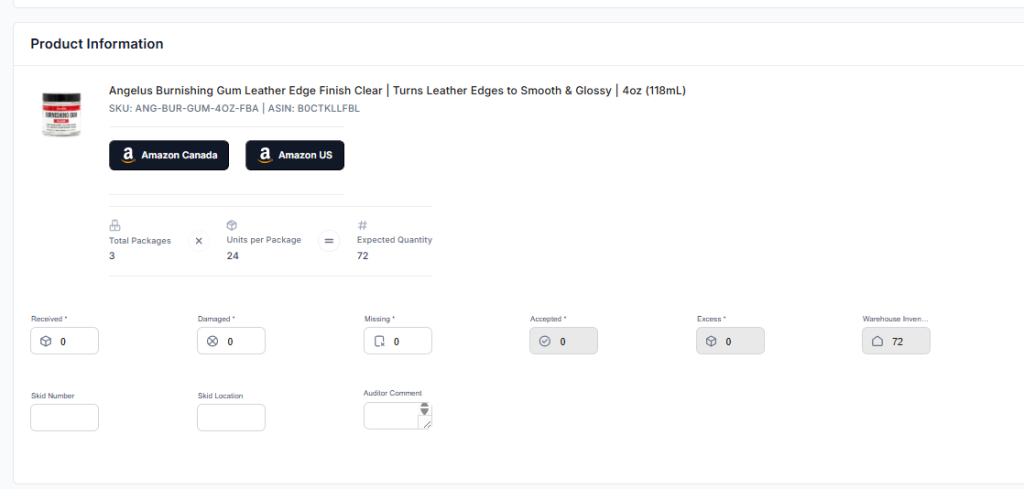
Products listed on inbounds now link directly to their Amazon listings.
Why this matters
When warehouse teams receive unlabeled or mislabeled inventory, they previously had to search for ASINs manually or contact account managers for product details.
Now they can click through to the Amazon listing immediately to verify product images, titles, and specifications.
Impact on operations
- Faster product verification when labels are missing
- Reduced back-and-forth between warehouse and account teams
- Lower risk of mis-sorting or incorrect prep on unlabeled items
Inbound Date Tracking Enhancement
Navigate now captures two separate dates for every inbound: when inventory physically arrives at the warehouse, and when it’s audited and added to the system.
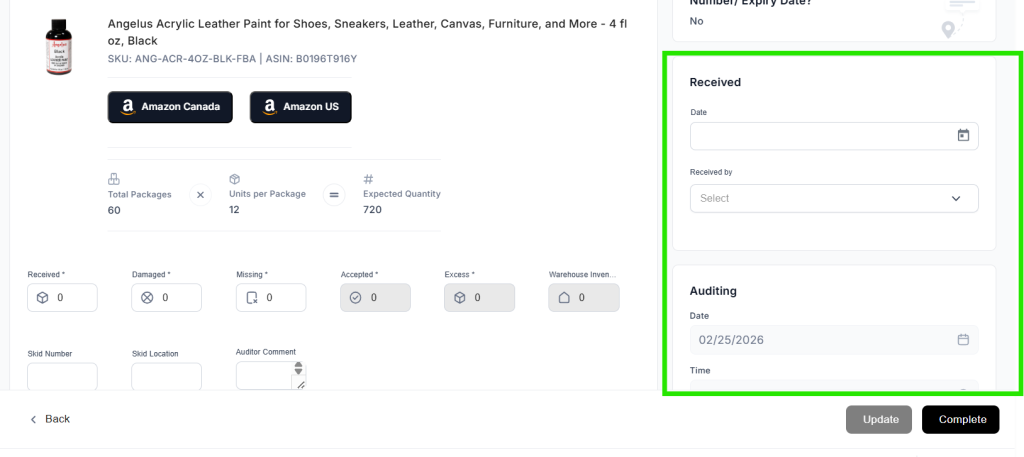
- Physical receiving date – When the warehouse receives the shipment
- System completion date – When inventory is audited and added to Navigate
This separation gives you visibility into actual receiving timelines versus processing speed. If you’re seeing delays, you can now pinpoint whether it’s in receiving or processing.
Static Task Bar Update
The task bar on inbounds and prep requests now stays fixed at the top of the page while you scroll.
Where this applies
- Inbounds
- Prep requests
Now you can scroll through the entire order, review details, and hit save without navigating back to the top of the page. Small change, big time savings over hundreds of orders.
Enable or Disable Prep Locations
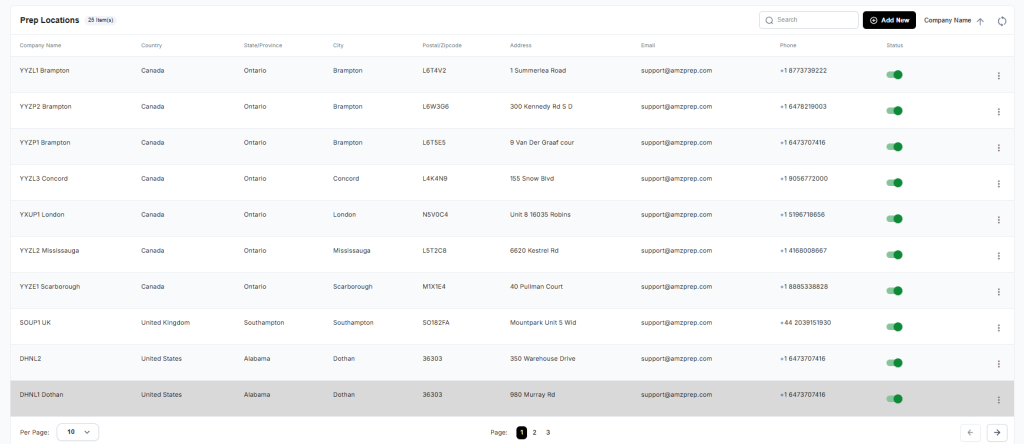
Admin accounts can now enable or disable prep locations directly in Navigate.
How it works
Similar to enabling or disabling users and clients, admins can now toggle prep locations on or off based on operational needs.
Active locations appear in prep request creation, disabled ones are hidden from selection.
This is particularly useful for managing warehouse networks during peak season or when testing new fulfillment partners.
Missed our last update? Read about January 2026’s new features including Open APIs and Auto Populate
Email us at techsupport@amzprep.com and we’ll help you get started right away.

Ginny Kaur is the Technical Project Manager at AMZ Prep, leading Navigate platform development and operations strategy. With 5+ years at AMZ Prep, Ginny bridges business requirements with technology to deliver fulfillment solutions that scale.
Her expertise spans Navigate software management, process optimization, warehouse operations, and cross-functional team leadership. She’s driven major platform initiatives including UI redesigns, feature development, and system integrations. Ginny manages the full product lifecycle from business requirements and Scrum coordination to testing, documentation, and client onboarding.
She’s passionate about solving operational challenges through technology and works directly with the engineering team to ensure Navigate evolves to meet client needs. Ginny’s insights on fulfillment workflows, warehouse management, and platform capability directly inform Navigate’s product roadmap.

















Comments