

This July, we shipped 9 major features focused on bulk operations, developer integrations, operational reporting, and workflow acceleration across all fulfillment scenarios.
These updates continue the momentum from our Navigate June Release, with expanded focus on automation for high-volume operations, enterprise integrations, warehouse transparency, and client self-service capabilities.
Here’s what’s new in Navigate:
Bulk Upload for Prep Orders
The new bulk upload functionality for prep orders is now live.
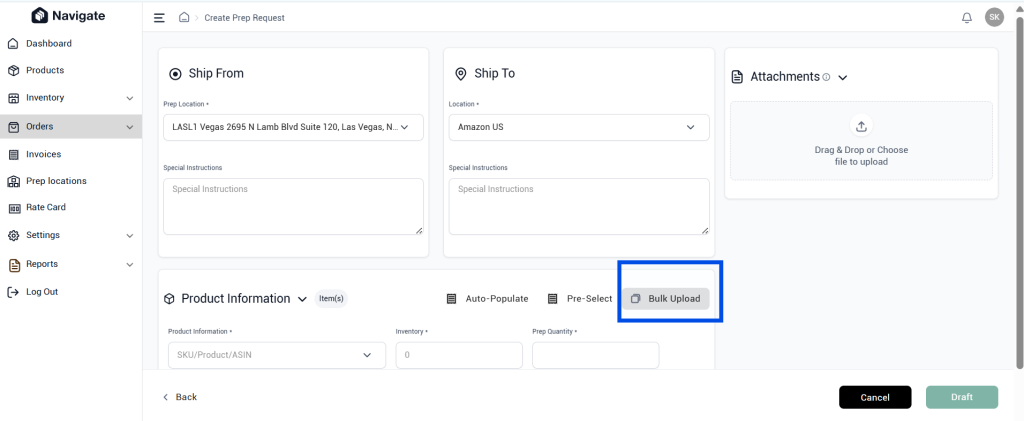
What’s enabled
- Create prep requests in bulk from spreadsheets
- Significantly reduced manual data entry
- Improved efficiency for high-volume operations
- Support for CSV file uploads
Impact on operations
Sellers managing hundreds of prep requests per month can now batch-create them instead of entering each one manually. This is particularly valuable for sellers with seasonal volume spikes or those managing multiple product lines simultaneously.
If you run a high-volume prep operation, bulk upload cuts prep request creation time by up to 80% compared to single-entry workflows.
Increased Product Bulk Upload Capacity
The product bulk upload limit has been increased from 200 to 500 SKUs per upload.
What changed
Clients can now onboard and update larger product catalogs in a single upload. Templates can be saved as CSV files for repeated use across multiple upload cycles.
This enables sellers with large product catalogs to complete bulk imports in fewer batches, reducing upload cycles and administrative overhead. Enterprise brands managing thousands of SKUs can now handle catalog updates without breaking files into multiple submissions.
Open API Enhancements
Several additional API endpoints are now available as part of Navigate’s Open API expansion.
New API endpoints include
- Products
- Bundles
- Supplies
- Inbound Orders
- Prep Orders
- Manual Orders
Why this matters
These enhancements make it easier for partners and enterprise clients to integrate Navigate with their own systems. Developers can now automate operational workflows and build custom applications on top of Navigate without manual data entry.
If you run a 3PL operation or manage multiple fulfillment centers, API access enables end-to-end workflow automation for prep requests, inbound management, and order routing. This is especially valuable for brands with custom ERP systems or those seeking to eliminate manual handoffs between platforms.
Inbound Reconciliation Report
The centralized inbound reconciliation report is now complete and available.
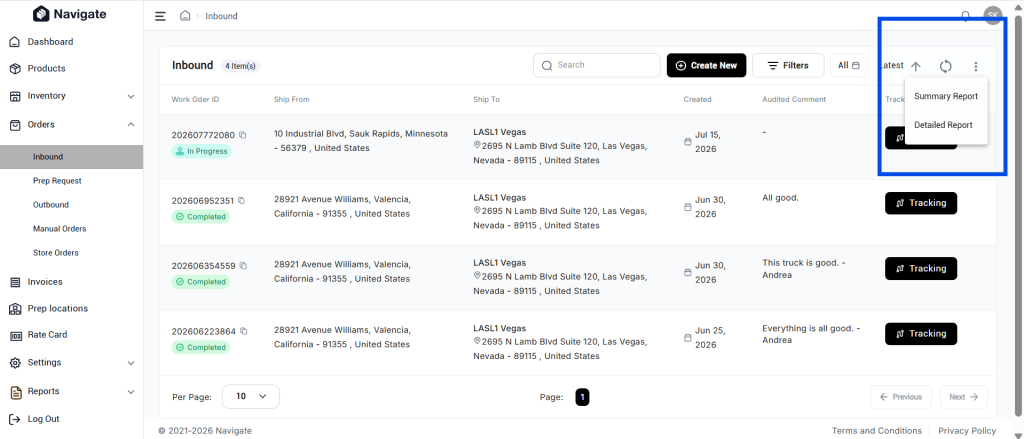
What it shows
- Expected versus received inventory by SKU and work order
- Inbound discrepancies at a glance
- Warehouse performance metrics
- Company name included for easier report sharing
Impact on operations
Ops teams can now identify receiving discrepancies immediately instead of waiting for manual audits. The report provides SKU-level precision, making it easy to spot which products arrived with quantity mismatches.
This visibility into inbound accuracy supports better warehouse management and faster discrepancy resolution. You can now track trends in receiving accuracy and work with warehouse partners to improve performance based on real data.
Client Portal Summary Metrics
Inbound and outbound summary metrics are now displayed on the Client Portal dashboard.
What clients see
- Quick view of shipment activity
- Inventory status at a glance
- Inbound and outbound progress
- No need to navigate multiple pages
Why this matters
Clients no longer have to dig through multiple reports to understand their current operation status. The dashboard provides a real-time snapshot, enabling faster decision-making on inventory levels, shipment status, and fulfillment progress.
This single-screen visibility is especially valuable for multi-warehouse or multi-channel sellers tracking activity across multiple fulfillment centers. Brand managers can now check fulfillment health in seconds instead of generating reports.
Reusable Order Templates
Clients can now create and reuse templates for Prep Requests and Manual Orders.
What’s enabled
- Save order configurations as templates
- Faster order creation for recurring patterns
- More consistent order submissions
- Reduced template setup time
Impact on workflows
Sellers with recurring orders or standard prep requirements can now create a template once and reuse it dozens of times. This eliminates repetitive data entry and ensures consistency across similar orders.
If you have seasonal products, subscription fulfillment, or standardized prep requirements, reusable templates cut order creation time significantly and reduce the risk of configuration errors.
Enhanced Order History
Order history now captures additional activity details for improved audit trails.
What’s tracked
- All order changes with timestamps
- User who made each change
- Detailed activity logging for compliance and auditing
- Complete order lifecycle visibility
Why this matters
You can now trace every modification made to an order from creation through completion. This is critical for compliance audits, customer support investigations, and identifying bottlenecks in order processing.
Enterprise brands and 3PLs managing complex workflows benefit from this transparency. If a client questions why their order was routed a certain way or what happened at a specific timestamp, the enhanced history provides clear answers.
Label Generation Tracking
Navigate now captures timestamps for all label generation events.
What’s tracked
- When labels were generated
- Which user generated them
- Complete label generation history
- Audit trail for traceability
Why this matters
You now have complete visibility into when orders moved through each fulfillment stage. This timestamp data improves shipment traceability and enables better operational reporting.
For warranty claims, customer service disputes, or regulatory audits, you can now prove exactly when labels were created and shipments processed. This is especially valuable for time-sensitive fulfillment and cold chain operations.
Enhanced Outbound Reporting
Outbound reporting has been expanded to include consolidated shipment metrics.
Reports now include
- Shipment metrics (count, volume, weight)
- Packaging metrics (cartons, pallets, handling requirements)
- Processing metrics (speed, throughput, exceptions)
Why this matters
Warehouse teams and ops managers can now see the complete picture of outbound activity in one place. Instead of juggling multiple reports to understand shipment progress, packaging efficiency, and processing speed, all metrics appear in a single consolidated view.
This visibility enables faster identification of bottlenecks and better capacity planning for peak seasons.
Navigate continues to evolve every month as we add new automation and workflow improvements for sellers. For the latest updates before this release, explore the Navigate June release covering D2C integration, warehouse visibility, and barcode mapping capabilities.
Email us at techsupport@amzprep.com and we’ll help you get started right away.

Ginny Kaur is the Technical Project Manager at AMZ Prep, leading Navigate platform development and operations strategy. With 5+ years at AMZ Prep, Ginny bridges business requirements with technology to deliver fulfillment solutions that scale.
Her expertise spans Navigate software management, process optimization, warehouse operations, and cross-functional team leadership. She’s driven major platform initiatives including UI redesigns, feature development, and system integrations. Ginny manages the full product lifecycle from business requirements and Scrum coordination to testing, documentation, and client onboarding.
She’s passionate about solving operational challenges through technology and works directly with the engineering team to ensure Navigate evolves to meet client needs. Ginny’s insights on fulfillment workflows, warehouse management, and platform capability directly inform Navigate’s product roadmap.


Comments