

This January, we shipped features that reduce manual work and give you better control over your prep operations.

These updates build on the improvements introduced in our Navigate Winter Releases, continuing our focus on faster workflows, better accuracy, and operational efficiency.
Here’s what’s new in Navigate:
Navigate Open APIs
Navigate’s open APIs are now fully documented.
This gives partners and clients the ability to integrate directly with Navigate or build custom workflows.
What’s included:
- Complete API documentation
- Authentication guides
- Code examples
- Integration support
If you’re building integrations or need programmatic access to Navigate, the API documentation covers everything you need.
Auto Populate for Prep Requests
Auto Populate is now available for prep requests. This feature loads all SKUs from a selected location with one click.
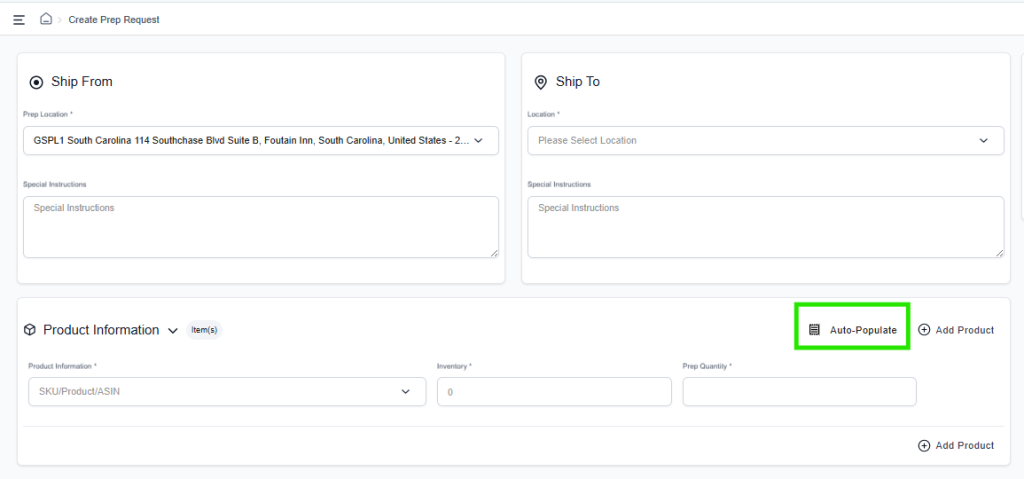
How it works:
- Start a new prep request and select a ship-from location
- Click the Auto Populate button
- All available SKUs at that location load automatically
- Expiry dates and lot numbers populate where applicable
This eliminates manual entry when creating prep requests for multiple SKUs.
Bulk Upload Enhancements
The bulk upload file now supports additional configuration options:
- Expiry tracking
- Lot tracking
- Label owner
- Prep owner
- Default prep services
You can now set these options directly in the upload file instead of configuring them manually after import.
Default Prep Services at Product Level
You can now set default prep services for each product. Once configured, these services will auto-populate when creating prep requests.
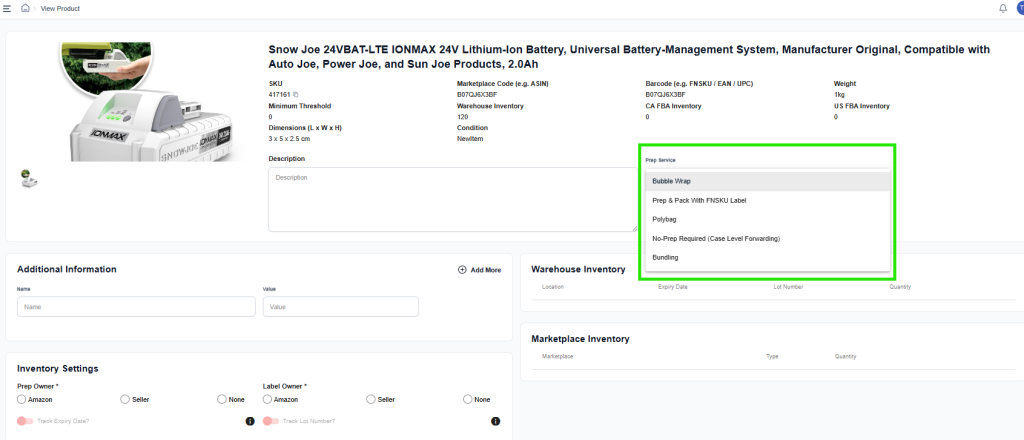
How to use it:
- Go to product settings
- Configure default prep services for each SKU
- Services auto-populate during prep request creation
- Override when needed for specific orders
This reduces repeated manual entry for products that require the same prep services.
Shipping and Transportation Selection
We redesigned the shipping and transportation selection interface based on user feedback.
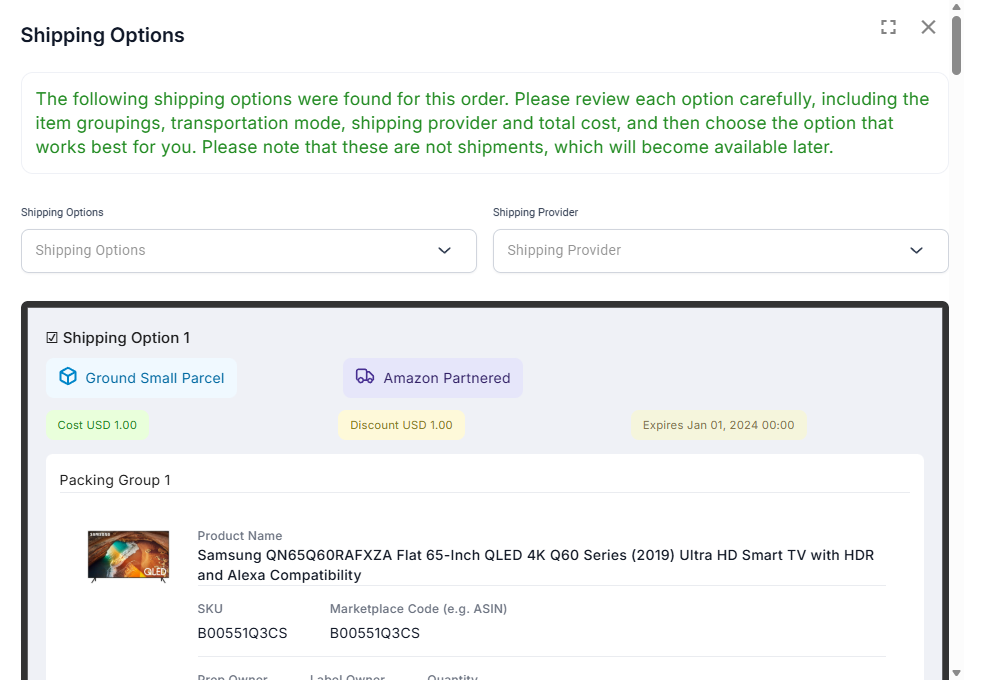
Updates:
- Clearer shipping method options
- Simplified selection process
- Better visibility of available transportation types
The new interface reduces the steps needed to complete shipment setup.
Navigate continues to evolve every month as we add new automation and workflow improvements for sellers. If you want to see what came next, explore the Navigate February release for the latest product updates and enhancements.
Email us at techsupport@amzprep.com and we’ll help you get started right away.

Ginny Kaur is the Technical Project Manager at AMZ Prep, leading Navigate platform development and operations strategy. With 5+ years at AMZ Prep, Ginny bridges business requirements with technology to deliver fulfillment solutions that scale.
Her expertise spans Navigate software management, process optimization, warehouse operations, and cross-functional team leadership. She’s driven major platform initiatives including UI redesigns, feature development, and system integrations. Ginny manages the full product lifecycle from business requirements and Scrum coordination to testing, documentation, and client onboarding.
She’s passionate about solving operational challenges through technology and works directly with the engineering team to ensure Navigate evolves to meet client needs. Ginny’s insights on fulfillment workflows, warehouse management, and platform capability directly inform Navigate’s product roadmap.


Comments