

This May, we shipped updates across order management, inbound workflows, inventory controls, and platform integrations.
These updates build on the workflow improvements from our Navigate April Release, with a focus on operational flexibility, warehouse accountability, and reducing friction across prep and inbound workflows.
Here’s what’s new in Navigate:
Shopify Onboarding Simplification
The Prep Parcel Shopify app now connects directly to the MyShip Navigate application.
Previously, connecting Shopify required manual API key generation. That step is now removed. New clients can complete Shopify onboarding faster with fewer technical steps.
What changed
- Prep Parcel Shopify app works directly with MyShip Navigate
- No manual API key setup required
- Onboarding time for new Shopify clients is reduced
If you manage DTC order flow through Shopify, this removes the most common setup friction during onboarding.
SKU Pre-Select During Order Creation
Users can now pre-select SKUs when creating prep requests and manual orders.

How it works
- Open a new prep request or manual order
- Select the SKUs you want to include before building the order
- Only SKUs with added prep quantities are uploaded to the request
This reduces repetitive manual entry for teams processing similar orders regularly. Warehouse teams can build requests faster without scrolling through full SKU catalogs each time.
Draft State for Prep Requests and Manual Orders
Prep requests and manual orders can now be saved in draft mode before final submission.


Teams can now stage work in progress without committing all details upfront. Draft orders remain accessible and editable until the team is ready to submit.
This is useful for warehouse teams building complex orders across shifts or when waiting on confirmation before finalizing.
Manual Order Duplication
Users can now duplicate manual orders, matching the existing prep order duplication functionality.
What this enables
- Duplicate any manual order with one action
- Reduces repetitive data entry for recurring shipments
- Keeps order history intact while creating a new working copy
If your team processes similar manual orders on a regular cadence, this removes the need to rebuild order details each time.
Expired Inventory Support for Manual Orders
Users can now select expired inventory when creating manual orders.
This supports inventory depletion workflows for aging stock. The option is available during manual order creation only and gives warehouse teams more flexibility when managing stock that has passed its use-by date.
Cancellation Tracking Visibility
Navigate now records the cancellation reason and the user who performed each cancellation.
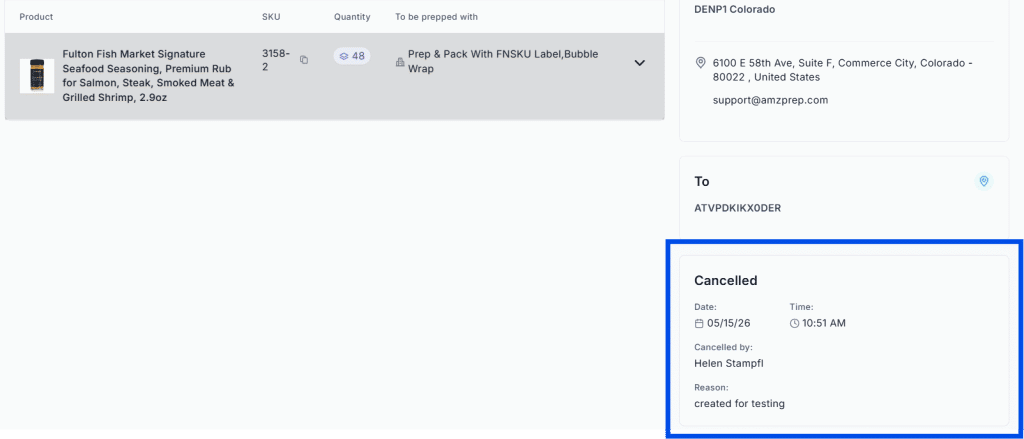
What’s now visible on cancelled orders
- Cancellation reason
- User details of who performed the cancellation
- Date and time of cancellation
Operations and admin teams now have a complete audit trail for every cancelled order. Accountability is built into the cancellation workflow rather than tracked manually.
Store Authorization Validation for Prep Requests
Navigate now validates active store connections before allowing order creation.
What this resolves
Some clients were unable to see shipping addresses when creating prep requests. The root cause was expired store authorizations.
Navigate now checks store connection status before allowing a prep request to proceed. If a connection has expired, the client receives an automatic email to reconnect and reauthorize the store.
This prevents downstream order sync failures and shipping errors caused by expired credentials.
Inbound Completion Bulk Audit
Warehouses and admins can now complete inbounds using bulk audit.

Previously, inbound completion required line-by-line review. Bulk audit lets warehouse teams process large inbounds faster with fewer manual steps.
This is particularly useful for high-volume receiving days where multiple inbounds need to be closed out quickly.
Additional Validation During Manual Order Creation
When moving a manual order from Draft to Prep Generated, users are now required to reconfirm the destination address before submission.
This reduces address-related errors and improves order accuracy before the order enters the prep workflow.
Additional Updates
- Threshold value editing: Teams can now edit threshold values directly in Navigate without requiring backend support.
- Condensed prep request view: A condensed view option is now available for prep requests, improving usability for warehouse teams handling large order volumes.
- Cancelled orders separated: Cancelled orders are now separated from active workflows, making it easier to track live orders.
- Due date visibility for prep orders: Prep order due dates are now visible directly in workflows to support prioritization and planning.
- Receiving date now mandatory: A receiving date is required when accepting an inbound, improving operational tracking and reporting accuracy.
Navigate continues to ship improvements every month. For context on what shipped before this release, see the Navigate April Release covering MyShip D2C integration, SKU transaction reporting, and inbound services options.
See Navigate in Action! Email us at techsupport@amzprep.com and we’ll help you get started right away.

Ginny Kaur is the Technical Project Manager at AMZ Prep, leading Navigate platform development and operations strategy. With 5+ years at AMZ Prep, Ginny bridges business requirements with technology to deliver fulfillment solutions that scale.
Her expertise spans Navigate software management, process optimization, warehouse operations, and cross-functional team leadership. She’s driven major platform initiatives including UI redesigns, feature development, and system integrations. Ginny manages the full product lifecycle from business requirements and Scrum coordination to testing, documentation, and client onboarding.
She’s passionate about solving operational challenges through technology and works directly with the engineering team to ensure Navigate evolves to meet client needs. Ginny’s insights on fulfillment workflows, warehouse management, and platform capability directly inform Navigate’s product roadmap.


Comments