
This August, we shipped 6 major features focused on order management, inbound workflows, inventory organization, and third-party integrations.
Show Image
These updates continue the momentum from our Navigate July Release, with expanded focus on operational control, bulk data management, and seamless integrations with third-party fulfillment platforms.
Here’s what’s new in Navigate:
Enhanced Order History
Order history has been expanded across Manual Orders, Prep Orders, and Inbound Orders with improved visibility for both clients and admins.
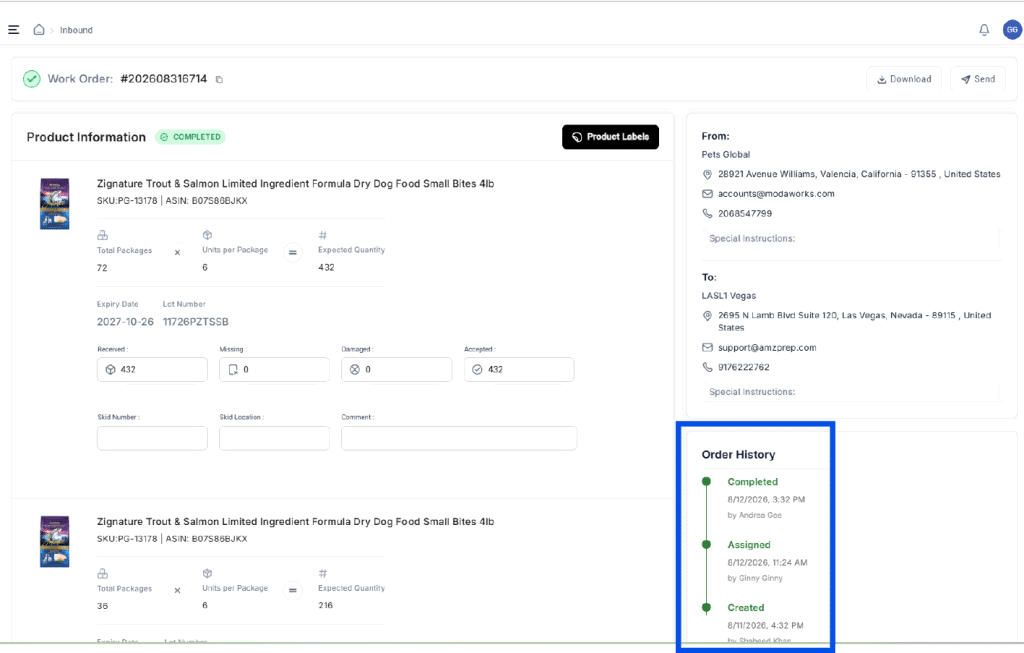
What’s captured
- Complete audit trail for all order changes
- Detailed activity logging for compliance and review
- Visibility into key actions and modifications
- Stronger accountability when reviewing orders
Why this matters
Ops teams and admins now have complete visibility into every change made to an order from creation through completion. This is critical for auditing, customer support investigations, and compliance tracking.
If a client questions why their order was routed a certain way or you need to investigate a fulfillment issue, enhanced order history provides clear answers with full activity trails.
Template Upload for Dimensions and Weights
Users completing shipments can now use template upload to add carton dimensions and weights when completing Prep Requests.
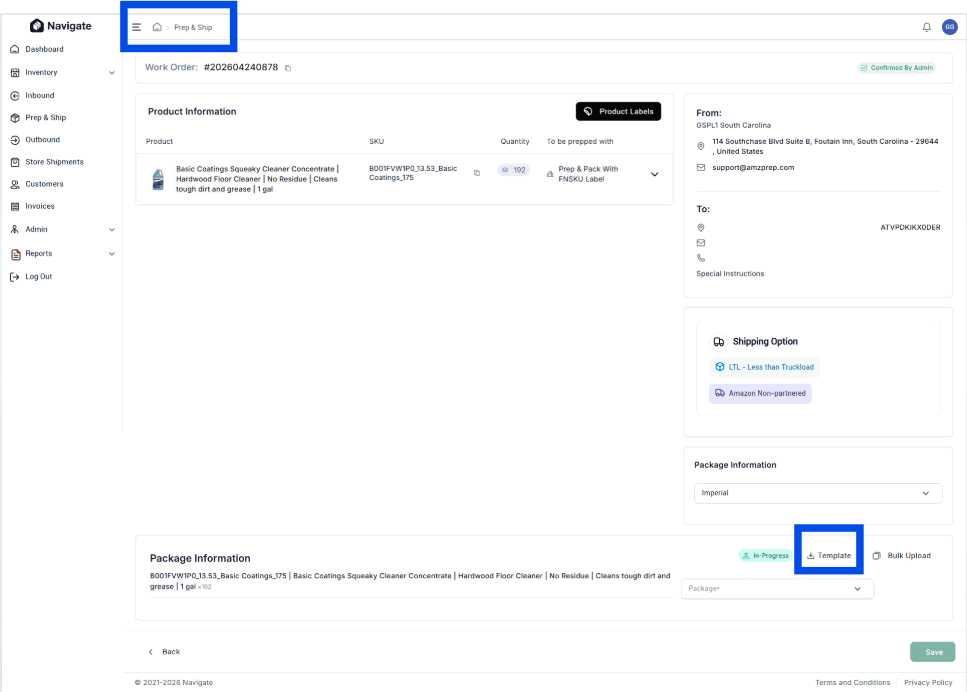
What this enables
- Bulk carton dimension entry via template
- Faster shipment completion for larger orders
- Reduced manual data entry
- CSV-based bulk updates
Impact on operations
For sellers completing large shipments, template upload cuts the time spent entering carton dimensions significantly. Instead of clicking through each carton individually, you can upload a CSV with all dimensions and weights at once.
This is especially valuable for high-volume fulfillment operations where manual dimension entry becomes a bottleneck.
Improved Inbound Bulk Upload Validation
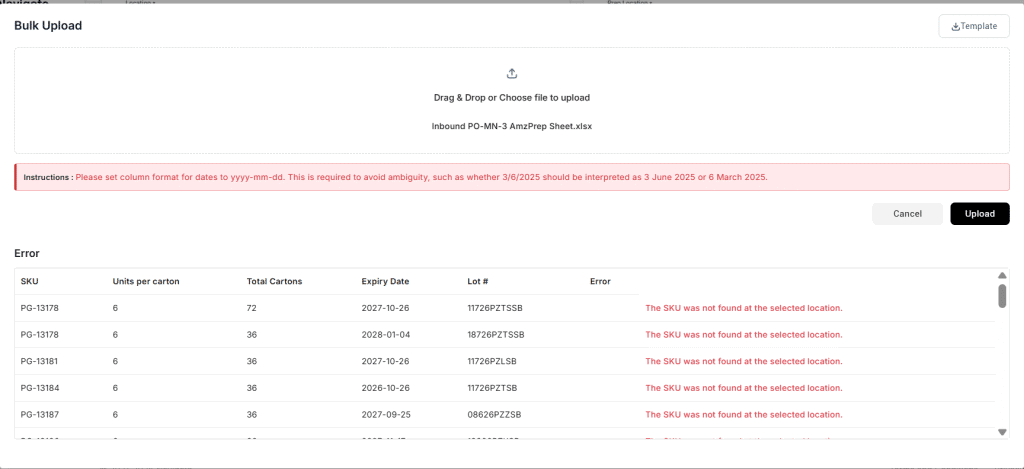
We added enhanced validation and error messaging to inbound bulk uploads.
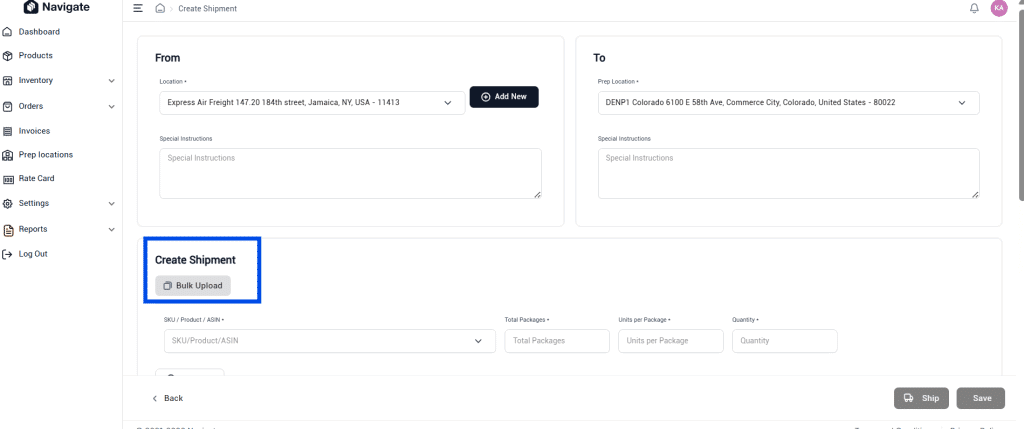
What improved
- Better error detection before file submission
- Clearer error messages identifying specific issues
- Easier correction of bulk upload files
- Validation runs before upload completion
Why this matters
Previously, errors in bulk upload files weren’t caught until after submission, forcing users to re-upload corrected files. Now validation happens upfront, allowing users to identify and fix issues before submitting.
This reduces rejected uploads and frustration for teams managing large inbound batches.
Inventory Tag Search
A new search option for Inventory Tags makes it easier to locate specific inventory.
What’s enabled
- Search functionality for Inventory Tags
- Consistent with existing Product search experience
- Faster inventory lookup by tag
- Improved tag-based organization
Impact on operations
Warehouse teams can now quickly find inventory by tags instead of manually browsing lists. This is especially valuable in multi-warehouse operations where inventory is organized by custom tags.
If you use inventory tags for location routing, product grouping, or fulfillment workflows, search makes tag-based operations faster and more reliable.
Cancel Draft Inbounds
Clients can now cancel inbound orders while they’re still in Draft status.

What’s enabled
- Cancel inbounds without submitting
- No need to contact support for cancellations
- Full control over draft orders
- Cleaner inventory management
Why this matters
Sometimes inbounds are created in error or plans change before submission. Previously, cancelled inbounds had to be submitted then refunded. Now clients can cancel draft inbounds directly, removing the order entirely.
This gives sellers more flexibility in managing their inbound pipeline and reduces unnecessary transactions.
eShipper Integration for Manual Orders
Additional feature parity has been added to the eShipper integration for Manual Orders.
What’s enabled
- Manual order shipping label generation directly from Navigate
- No need to login to eShipper separately
- If eShipper credentials are stored in Navigate, shipping labels generate automatically
- Streamlined workflow for manual order fulfillment
Why this matters
Sellers using both Navigate and eShipper can now generate shipping labels for manual orders without switching platforms. This integration reduces friction in the fulfillment workflow and accelerates order-to-ship time.
For sellers managing both FBA and manual channel orders, this parity ensures consistent workflows across all order types.
Navigate continues to evolve every month as we add new automation and workflow improvements for sellers. For the latest updates before this release, explore the Navigate July release covering bulk prep operations, API enhancements, and inbound reconciliation capabilities.
Email us at techsupport@amzprep.com and we’ll help you get started right away.

Ginny Kaur is the Technical Project Manager at AMZ Prep, leading Navigate platform development and operations strategy. With 5+ years at AMZ Prep, Ginny bridges business requirements with technology to deliver fulfillment solutions that scale.
Her expertise spans Navigate software management, process optimization, warehouse operations, and cross-functional team leadership. She’s driven major platform initiatives including UI redesigns, feature development, and system integrations. Ginny manages the full product lifecycle from business requirements and Scrum coordination to testing, documentation, and client onboarding.
She’s passionate about solving operational challenges through technology and works directly with the engineering team to ensure Navigate evolves to meet client needs. Ginny’s insights on fulfillment workflows, warehouse management, and platform capability directly inform Navigate’s product roadmap.

















Comments