

This April, we focused on D2C order routing, warehouse picking efficiency, and inbound completion rates.
These updates continue the workflow improvements from our Navigate February Release, with a focus on expanding fulfillment options and reducing manual warehouse steps.
Here’s what’s new in Navigate:
MyShip Access
Clients can now access and connect MyShip directly from Store Settings.
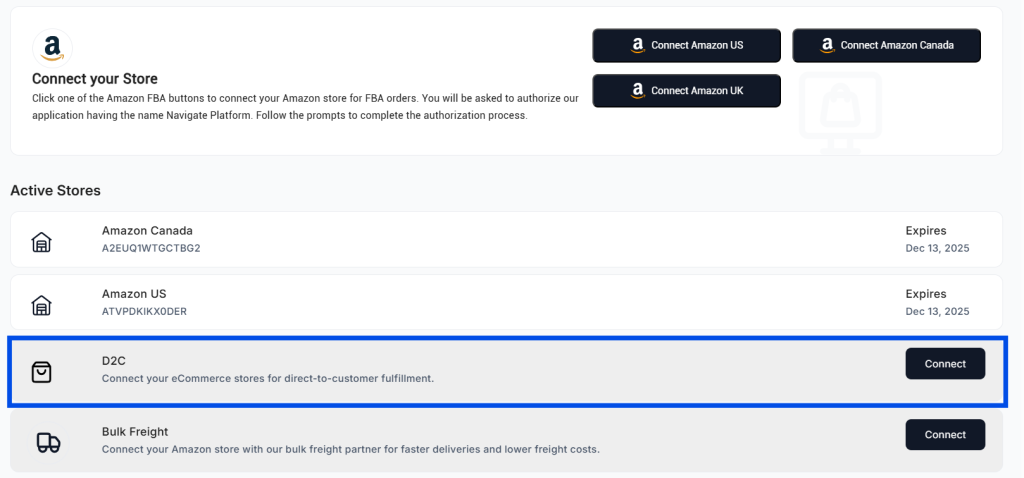
What this enables
- D2C order integration with ShipHero and Logiwa
- Direct connection setup without support tickets
- Automated order flow from storefront to warehouse management system
How it works
- Navigate to Store Settings
- Select MyShip integration
- Connect your D2C store
- Orders begin flowing into ShipHero or Logiwa automatically
This removes the manual handoff for D2C sellers routing orders through Navigate. Orders from your storefront now sync directly to your warehouse management system.
If you run both FBA and D2C operations, this lets you manage both channels from the same interface without switching platforms.
Order Sheet Download Enhancement
Order downloads now include bundled SKUs along with their component SKUs.
What changed
Previously, order downloads showed bundle-level data only. Warehouse teams had to manually reference which individual SKUs made up each bundle during picking.
Now, both bundle information and component SKU breakdowns appear in the same download.
Impact on warehouse operations
- Warehouse teams can pick directly from the order sheet
- No manual lookup required to determine bundle contents
- Faster picking for multi-component products
- Reduced picking errors on bundled items
If you sell product bundles or kits, your warehouse team now has complete SKU visibility in a single download.
Draft Inbound Reminders
If an inbound is left in draft status for 24 hours, Navigate now sends an automatic email reminder.
Why this matters
Inbounds left in draft status delay warehouse receiving and processing. You can sometimes create draft inbounds but forget to finalize them before shipping inventory.
The 24-hour reminder catches these incomplete inbounds before they cause receiving issues.
How it works
- Client creates an inbound in Navigate
- Inbound remains in draft status for 24 hours
- Automatic email reminder sent to the client
- Client finalizes inbound before inventory ships
This is expected to reduce receiving delays caused by incomplete inbound documentation.
In & Out Report per SKU
Transaction history download is now available for products.
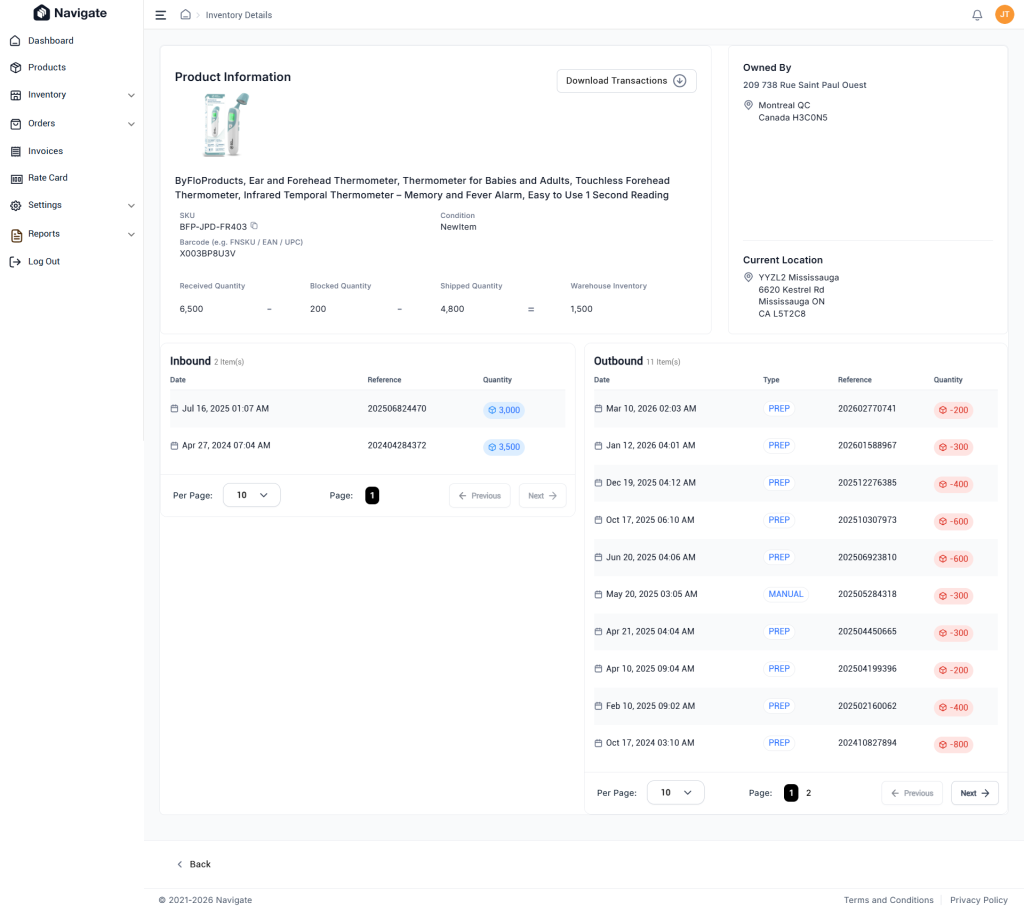
Navigate now tracks and exports inbound and outbound movement reports for each SKU. You can download a complete transaction history showing when inventory arrived, when it shipped, and current on-hand quantities.
Why this matters
- Reconcile inventory discrepancies between Navigate and your accounting system
- Audit SKU movement over specific date ranges
- Track fulfillment velocity per product
- Verify receiving accuracy against purchase orders
This is particularly useful for sellers managing multiple SKUs across multiple warehouses who need granular inventory movement data for reconciliation or financial reporting.
Inbound Services Options
Custom inbound services are now configurable during inbound creation.
Services like refrigeration and special handling can be selected when creating an inbound. This information also appears on the inbound details page to support warehouse handling.
What’s configurable
- Refrigeration requirements
- Special handling instructions
- Temperature-controlled storage needs
- Custom prep requirements
Impact on operations
Warehouse teams now see service requirements directly on the inbound details page. Previously, these details lived in notes or required back-and-forth communication.
If you ship perishables, supplements, or other products requiring specific storage conditions, this ensures warehouse teams have handling instructions before inventory arrives.
For the latest Navigate improvements, check out the Navigate February release covering error message copying, account security, and Amazon product hyperlinks.
Email us at techsupport@amzprep.com and we’ll help you get started right away.

Ginny Kaur is the Technical Project Manager at AMZ Prep, leading Navigate platform development and operations strategy. With 5+ years at AMZ Prep, Ginny bridges business requirements with technology to deliver fulfillment solutions that scale.
Her expertise spans Navigate software management, process optimization, warehouse operations, and cross-functional team leadership. She’s driven major platform initiatives including UI redesigns, feature development, and system integrations. Ginny manages the full product lifecycle from business requirements and Scrum coordination to testing, documentation, and client onboarding.
She’s passionate about solving operational challenges through technology and works directly with the engineering team to ensure Navigate evolves to meet client needs. Ginny’s insights on fulfillment workflows, warehouse management, and platform capability directly inform Navigate’s product roadmap.


Comments