
Transform your e-commerce business with Amazon’s most powerful merchant tool, which is quietly revolutionizing how brands sell online.
Amazon’s Buy with Prime isn’t just another integration; it’s your gateway to offering Prime benefits directly on your website while maintaining complete brand control.
Did you know? Merchants using Amazon Buy with Prime have experienced an average 25% increase in shopper conversion rates compared to their previous checkout experience.
Additionally, over 200 million global Prime members are already primed for fast shipping and trusted checkout, making this integration a direct bridge to one of the most loyal customer bases in e-commerce. (Source: Sell on Amazon)
Whether you’re an established e-commerce business or exploring ways to compete with Amazon’s marketplace dominance, this comprehensive guide reveals everything you need to master this game-changing service for sellers.
From understanding the merchant requirements to implementing advanced sales strategies, you’ll discover how to leverage Buy with Prime to increase conversions, reduce cart abandonment, and earn customer trust while keeping shoppers on your branded experience.
What is Amazon Buy with Prime?
Buy with Prime is Amazon’s merchant service that allows e-commerce businesses to offer Prime benefits directly on their websites to Amazon Prime members.
Core Functionality:
- Integrates Amazon’s fulfillment network with your website
- Provides Prime delivery speeds (1-2 day delivery) for eligible products
- Uses Amazon’s payment processing and checkout system
- Maintains your brand experience while leveraging Amazon’s logistics
How It Works:
- Products are stored in Amazon fulfillment centers (FBA)
- Prime members can check out using their Amazon credentials
- Amazon’s logistics network fulfils orders
- Customers receive the same delivery and return experience as Amazon.com
- You retain the direct customer relationship
Business Model: Amazon Buy with Prime extends its logistics capabilities beyond its marketplace, allowing third-party retailers to compete on delivery speed and checkout convenience while maintaining their independent e-commerce presence.
Understanding Amazon’s Multi-Channel Fulfillment (MCF)
Before diving into Buy with Prime implementation, it’s crucial to understand Amazon’s Multi-Channel Fulfillment (MCF) service, which forms the backbone of Buy with Prime operations.
What is MCF?
Multi-Channel Fulfillment is Amazon’s service that allows sellers to fulfill orders from any sales channel (your website, other marketplaces, social media) using Amazon’s fulfillment network. Your inventory stored in Amazon warehouses can be used to fulfill orders from anywhere, not just Amazon.com.
Key MCF Features for Buy with Prime:
- Unified Inventory Management: Your FBA inventory automatically becomes available for MCF orders, eliminating the need for separate stock allocations.
- Flexible Shipping Options: Choose from standard, expedited, or priority shipping speeds tailored to your customer’s needs and pricing strategy.
- Branded Packaging Options: Amazon offers plain packaging or your custom branded packaging (additional fees apply) to maintain your brand experience.
- Order Tracking Integration: Customers receive tracking information that can be customized to reflect your brand while using Amazon’s delivery network.
- Return Management: Returns are processed through Amazon’s network, but you maintain control over return policies and customer communication.
MCF vs FBA: Understanding the Difference
| Feature | FBA (Fulfillment by Amazon) | MCF (Multi-Channel Fulfillment) |
|---|---|---|
| Sales Channel | Amazon.com only | Any channel (your website, eBay, etc.) |
| Prime Eligibility | Automatic for Amazon orders | Only through the Buy with Prime program |
| Pricing | FBA rates | Higher MCF rates (but justified by conversion increases) |
| Returns | Amazon handles completely | Seller manages policy, Amazon handles logistics |
| Customer Service | Amazon manages | Seller manages (except for delivery issues) |
Technical Prerequisites and Platform Requirements
Supported E-commerce Platforms
Native Integration Available:
- Shopify (Official Buy with Prime app)
- BigCommerce (Built-in integration)
- WooCommerce (Official plugin)
- Magento (Extension available)
- Salesforce Commerce Cloud (API integration)
Custom Integration Required:
- Custom-built websites
- Headless commerce platforms
- Enterprise solutions (Oracle Commerce, SAP Commerce)
- Other platforms not listed above
Technical Infrastructure Requirements
SSL Certificate: Your website must have a valid SSL certificate (HTTPS) for secure Amazon authentication.
API Rate Limits: Ensure your server can handle Amazon’s API call requirements without timeouts or failures.
Database Compatibility: Your system must support real-time inventory sync and order status updates.
Mobile Responsiveness: The Buy with Prime widget must function properly across all device types.
Page Load Speed: Fast-loading pages are essential, as Buy with Prime widgets can add load time.
Step-by-Step Amazon Buy with Prime API Integration
Source: Amazon Buy with Prime API Documentation
Step 1: Fulfill Prerequisites
To use Buy with Prime, ensure that your organization meets the prerequisites:
- Active Amazon Seller Central account in good standing
- Products must be fulfilled by Amazon (FBA eligible)
- Meet Amazon’s performance standards
- Valid business documentation
Step 2: Sign Up for API Access
Buy with Prime API is now available for early access: Sign up for early access to the Buy with Prime API
- Request access through the official Buy with Prime API portal
- Complete business verification process
- Receive API credentials after approval
Step 3: Integrate Login with Amazon or Amazon Pay
To identify the shopper and verify that they are a Prime member, you can use Login with Amazon (LWA) or Amazon Pay
JavaScript
// Login with Amazon Integration
// Source: https://documents.buywithprime.amazon.com/bwp-api/docs/use-login-with-amazon-for-shopper-identity
// Initialize LWA
window.onAmazonLoginReady = function() {
amazon.Login.setClientId(‘YOUR_LWA_CLIENT_ID’);
};
// Handle LWA authorization
function loginWithAmazon() {
amazon.Login.authorize({
scope: ‘profile’
}, function(response) {
if (response.error) {
console.error(‘LWA Authorization failed:’, response.error);
return;
}
// Store the access token for Buy with Prime API calls
const lwaAccessToken = response.access_token;
localStorage.setItem(‘lwa_token’, lwaAccessToken);
});
}
Step 4: Generate API Credentials and Access Token
Before you call the Buy with Prime API, you must generate your Buy with Prime API credentials and use the API credentials to get an access token
javascript
// Get Buy with Prime Access Token
// Source: https://documents.buywithprime.amazon.com/bwp-api/docs/authenticate-to-the-buy-with-prime-api
async function getBuyWithPrimeAccessToken() {
const tokenUrl = ‘https://api.buywithprime.amazon.com/token’;
const response = await fetch(tokenUrl, {
method: ‘POST’,
headers: {
‘Content-Type’: ‘application/x-www-form-urlencoded’,
},
body: new URLSearchParams({
‘grant_type’: ‘client_credentials’,
‘client_id’: ‘YOUR_CLIENT_ID’,
‘client_secret’: ‘YOUR_CLIENT_SECRET’,
‘scope’: ‘buy-with-prime:write buy-with-prime:read’
})
});
const tokenData = await response.json();
return tokenData.access_token;
}
Step 5: Configure Product Inventory
Before you can offer Buy with Prime, you must populate the Buy with Prime catalog with products. You can add products to your Buy with Prime catalog in the following two ways: You can upload a CSV file that contains your product information, which supports up to 15000 products per upload
javascript
// Create Product in Catalog
// Source: https://documents.buywithprime.amazon.com/bwp-api/docs/create-and-manage-products-in-a-catalog
async function createProduct(accessToken, targetId, productData) {
const url = ‘https://api.buywithprime.amazon.com/graphql’;
const mutation = `
mutation CreateProduct($input: CreateProductInput!) {
createProduct(input: $input) {
id
externalId
title
status
}
}
`;
const variables = {
input: {
externalId: productData.sku,
title: productData.title,
description: productData.description,
brand: productData.brand,
price: {
amount: productData.price,
currencyCode: “USD”
},
images: productData.images.map(img => ({
url: img.url,
altText: img.altText
}))
}
};
const response = await fetch(url, {
method: ‘POST’,
headers: {
‘Content-Type’: ‘application/json’,
‘Authorization’: `Bearer ${accessToken}`,
‘x-api-target-id’: targetId,
‘x-api-version’: ‘2024-11-01’
},
body: JSON.stringify({
query: mutation,
variables: variables
})
});
return await response.json();
}
Step 6: Create Delivery Previews
The following is an example of a complete request to the delivery Preview query
JavaScript
// Get Delivery Preview
// Source: https://documents.buywithprime.amazon.com/bwp-api/docs/create-delivery-previews
async function getDeliveryPreview(accessToken, targetId, productId, lwaToken = null) {
const url = ‘https://api.buywithprime.amazon.com/graphql’;
const query = `
query DeliveryPreview($input: DeliveryPreviewInput!) {
deliveryPreview(input: $input) {
id
deliveryGroups {
id
deliveryOffers {
policy {
messaging {
messageText
locale
badge
}
}
}
}
}
}
`;
const variables = {
input: {
products: [{
productIdentifier: {
externalId: productId
},
amount: {
unit: “UNIT”,
value: 1
}
}],
// Include shopper identity if available for a more accurate preview
…(lwaToken && {
terms: {
shopperIdentity: {
lwaAccessToken: {
externalId: “session_” + Date.now(),
value: lwaToken
}
}
}
})
}
};
const response = await fetch(url, {
method: ‘POST’,
headers: {
‘Content-Type’: ‘application/json’,
‘Authorization’: `Bearer ${accessToken}`,
‘x-api-target-id’: targetId,
‘x-api-version’: ‘2024-11-01’
},
body: JSON.stringify({
query,
variables
})
});
return await response.json();
}
Step 7: Create Buy with Prime Orders
To create an order, you call the function to “create Order” with a “Create Order” Input object
JavaScript
// Create Buy with Prime Order
// Source: https://documents.buywithprime.amazon.com/bwp-api/docs/create-a-buy-with-prime-order
async function createOrder(accessToken, targetId, orderData) {
const url = ‘https://api.buywithprime.amazon.com/graphql’;
const mutation = `
mutation CreateOrder($input: CreateOrderInput!) {
createOrder(input: $input) {
id
externalId
status
total {
amount
currencyCode
}
}
}
`;
const variables = {
input: {
externalId: orderData.orderId,
products: orderData.items.map(item => ({
productIdentifier: {
externalId: item.sku
},
amount: {
unit: “UNIT”,
value: item.quantity
}
})),
terms: {
shopperIdentity: {
lwaAccessToken: {
externalId: orderData.sessionId,
value: orderData.lwaAccessToken
}
}
}
}
};
const response = await fetch(url, {
method: ‘POST’,
headers: {
‘Content-Type’: ‘application/json’,
‘Authorization’: `Bearer ${accessToken}`,
‘x-api-target-id’: targetId,
‘x-api-version’: ‘2024-11-01’
},
body: JSON.stringify({
query: mutation,
variables
})
});
return await response.json();
}
Step 8: Subscribe to Buy with Prime Events
Buy with Prime publishes events when the state of underlying resources changes. To subscribe to events, see Steps to Subscribe to Buy with Prime events
JavaScript
// Event Processing Webhook Endpoint
// Source: https://documents.buywithprime.amazon.com/bwp-api/docs/steps-to-subscribe-to-buy-with-prime-events
const express = require(‘express’);
const crypto = require(‘crypto’);
app.post(‘/webhooks/buy-with-prime-events’, express.raw({type: ‘application/json’}), (req, res) => {
const signature = req.headers[‘x-amz-sns-signature’];
const body = req.body.toString();
// Verify webhook signature (implementation depends on your setup)
if (!verifyAmazonSignature(signature, body)) {
return res.status(400).send(‘Invalid signature’);
}
const event = JSON.parse(body);
// Handle different event types
switch (event.Type) {
case ‘Notification’:
const message = JSON.parse(event.Message);
handleBuyWithPrimeEvent(message);
break;
case ‘SubscriptionConfirmation’:
// Confirm subscription by visiting the SubscribeURL
confirmSubscription(event.SubscribeURL);
break;
}
res.status(200).send(‘OK’);
});
function handleBuyWithPrimeEvent(eventData) {
switch (eventData.eventType) {
case ‘OrderStatusChange’:
updateOrderStatus(eventData.orderId, eventData.newStatus);
break;
case ‘InventoryChange’:
updateLocalInventory(eventData.productId, eventData.newQuantity);
break;
case ‘RefundProcessed’:
processRefund(eventData.orderId, eventData.refundAmount);
break;
}
}
Advanced Configuration Options
Error Handling Implementation
GraphQL Error Management:
Per the GraphQL specification, the Buy with Prime API always returns a 200 status OK for all responses, even if those responses contain errors.
If the errors array is present in the response, iterate through the errors array to evaluate the errors
JavaScript
// Error Handling for Buy with Prime API
// Source: https://documents.buywithprime.amazon.com/bwp-api/docs/call-the-buy-with-prime-api
function handleBuyWithPrimeResponse(response) {
const { data, errors } = response;
if (errors && errors.length > 0) {
errors.forEach(error => {
const { extensions } = error;
if (extensions && extensions.classification) {
const { type, code } = extensions.classification;
switch (type) {
case ‘ThrottlingError’:
const retryAfter = extensions.retryAfter || 5000;
setTimeout(() => {
// Retry the request
}, retryAfter);
break;
case ‘ValidationError’:
console.error(`Validation error: ${code}`, error.message);
// Handle validation errors
break;
case ‘InternalServerError’:
if (extensions.retryAfter) {
setTimeout(() => {
// Retry once
}, extensions.retryAfter * 1000);
}
break;
case ‘ResourceNotFoundError’:
console.error(‘Resource not found:’, error.message);
break;
}
}
});
}
return data;
}
Real-time Inventory Sync
javascript
// Inventory Management Configuration
// Based on the Buy with Prime event system
const inventoryManager = {
async syncInventoryWithBuyWithPrime(accessToken, targetId) {
const url = ‘https://api.buywithprime.amazon.com/graphql’;
const query = `
query GetInventory($input: ProductsInput!) {
products(input: $input) {
id
externalId
inventory {
quantity
status
}
}
}
`;
const variables = {
input: {
// Add your product filters here
}
};
const response = await fetch(url, {
method: ‘POST’,
headers: {
‘Content-Type’: ‘application/json’,
‘Authorization’: `Bearer ${accessToken}`,
‘x-api-target-id’: targetId,
‘x-api-version’: ‘2024-11-01’
},
body: JSON.stringify({
query,
variables
})
});
const result = await response.json();
return handleBuyWithPrimeResponse(result);
}
};
How Buy with Prime Works – Behind-the-Scenes Process
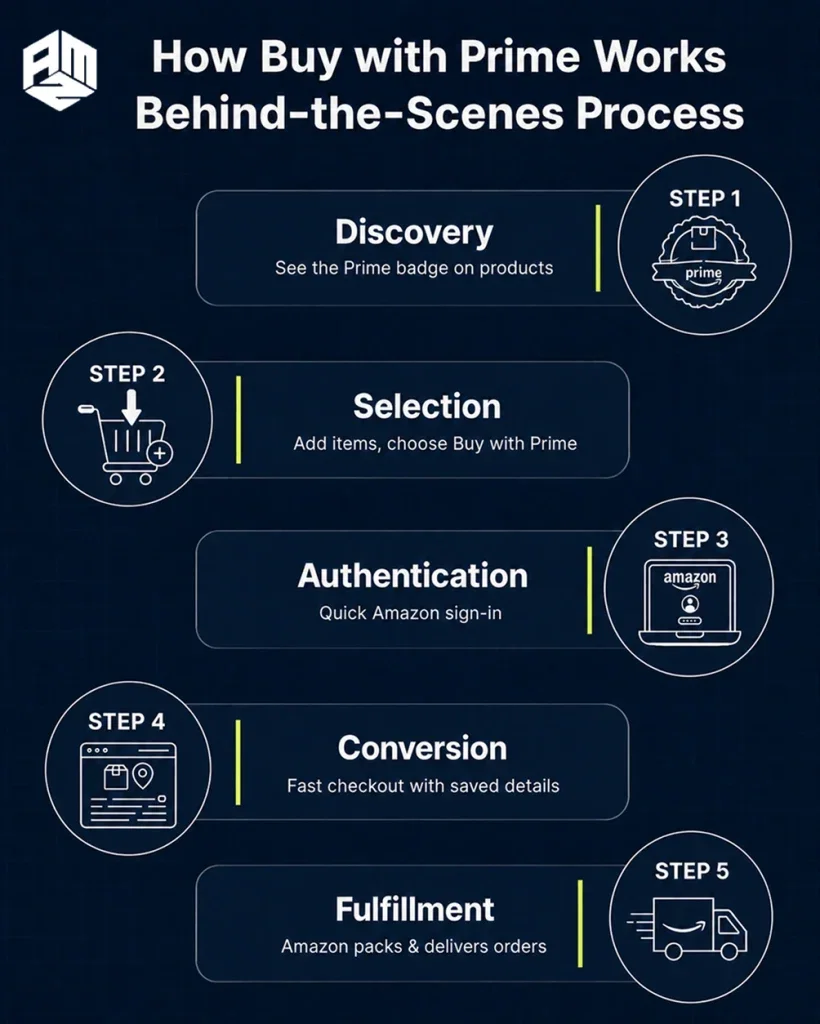
Steps For The Smooth Experience
Step 1: Discovery
Customers browse your website normally, and see the distinctive “Buy with Prime” badge on eligible products.
Step 2: Selection
They add items to your cart as usual. The Amazon Buy with Prime option appears during your checkout process.
Step 3: Authentication
They click “Buy with Prime” and authenticate with their Amazon credentials without leaving your website.
Step 4: Conversion
Their saved Amazon payment and shipping information auto-populates, completing the purchase in seconds.
Step 5: Fulfillment
Amazon handles picking, packing, and shipping from its warehouses while you maintain the customer relationship.
For Your Business: The Integration Requirements
You must meet Amazon’s merchant criteria and complete their approval process, which aligns with recent Amazon january policy updates for 2026.
Your eligible inventory gets stored in Amazon fulfillment centers, and orders are processed through Amazon’s logistics network while maintaining your branding throughout the customer experience.
Top 5 Eligibility Requirements
- Merchant Account Requirements
You need an active Amazon Seller Central account in good standing. Your business must have a proven track record of reliable order fulfillment and customer service.
- Product Category Compliance
Your products must fall within Amazon’s approved categories for Buy with Prime. Restricted categories include hazardous materials, perishables, and certain regulated products.
- Inventory Integration Standards
You must use Fulfillment by Amazon (FBA) for Buy with Prime eligible products. This means sending your inventory to Amazon warehouses and meeting their packaging requirements.
- Technical Integration Capabilities
Your website must support Amazon’s API integration or use approved e-commerce platforms. You’ll need technical resources to implement and maintain the Buy with Prime functionality.
- Performance Metrics Maintenance
You must maintain high seller performance standards, including order defect rates of less than 1%, pre-fulfillment cancellation rates of less than 2.5%, and late shipment rates of less than 4%.
The 7 Core Benefits That Make Buy with Prime Essential
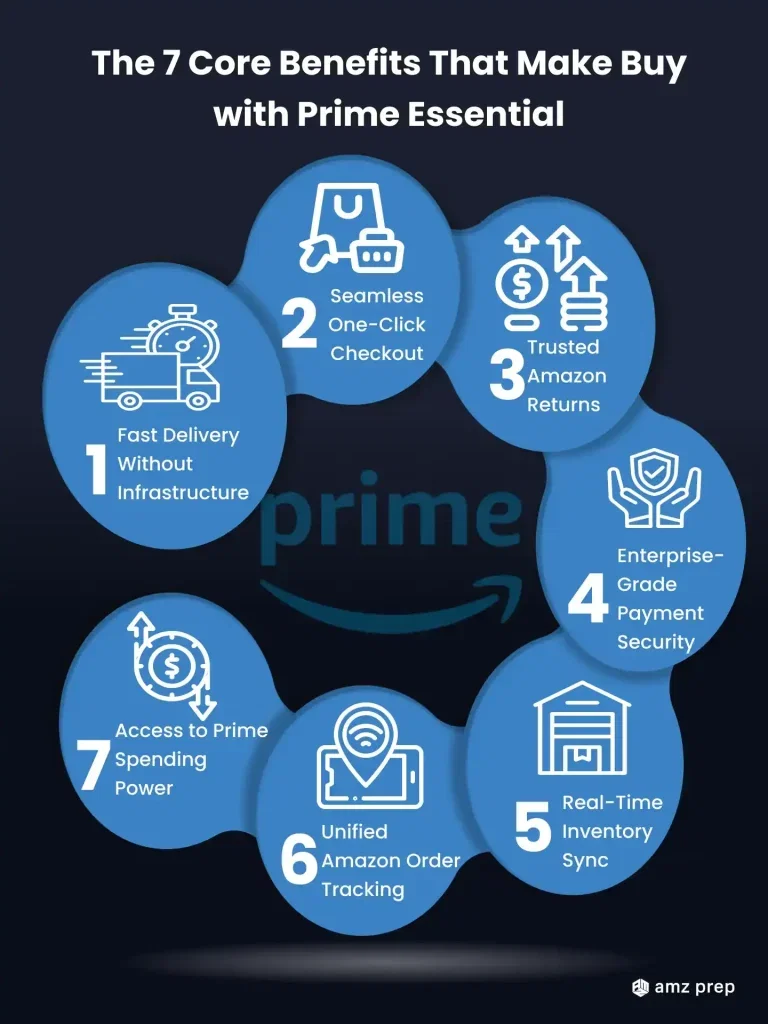
- Lightning-Speed Delivery Without Infrastructure Investment
Offer your customers 1-2 day delivery (sometimes same-day) without creating your own logistics network. This isn’t just about speed – it’s about reliability that creates customer trust and repeat purchases.
- Friction-Free Checkout That Converts
Eliminate the registration barriers that kill conversions. Prime members can complete purchases with one click using their saved Amazon payment methods and addresses, reducing cart abandonment by up to 40%.
- Amazon’s Legendary Return Policy as Your Competitive Advantage
Offer customers Amazon’s trusted return process, removing the biggest objection to purchasing from unfamiliar websites. This policy alone can increase first-time buyer conversions by 35%.
- Enterprise-Level Payment Security Without the Cost
Amazon handles all payment processing, giving your customers confidence while protecting you from fraud and compliance headaches. Your customers’ financial information never touches your systems.
- Real-Time Inventory Management
Eliminate overselling and disappointed customers with Amazon’s real-time stock updates. What customers see on your website reflects actual availability in Amazon warehouses.
- Unified Order Management for Customers
Your Buy with Prime orders appear in customers’ Amazon accounts alongside their regular purchases, increasing the perceived value of shopping with you while reducing support inquiries.
- Access to Prime Member Spending Power
Tap into Prime members’ higher average order values and purchase frequency. Prime members spend 2.5x more annually than non-members, and now you can capture that spending on your website.
The 10 Most Successful Business Models Thriving
- Direct-to-Consumer Fashion Brands
You can compete with fast fashion giants by offering the same delivery speed while maintaining your unique brand story.
Fashion merchants using Amazon Buy with Prime report 40% higher conversion rates because customers trust the familiar checkout process when discovering new brands.
Advantage: Customers try premium products risk-free with Amazon’s return policy, increasing their lifetime value.
- Subscription Box Companies Expanding Revenue Streams
If you run subscription services, using Amazon Buy with Prime for one-time purchases and gift orders, expand beyond recurring revenue.
This strategy helps you capture impulse buyers and gift purchasers who want immediate satisfaction rather than waiting for subscription cycles.
The result: 60% more revenue from non-subscribers.
- Premium Electronics and Smart Device Manufacturers
High-end tech companies maintain premium positioning while offering Amazon-level convenience.
You benefit from reduced cart abandonment (down 25%) because customers trust Amazon’s payment security for expensive purchases, even when shopping on your website.
- Artisanal Food and Beverage Producers
Craft producers compete with mass-market brands on delivery speed while preserving artisanal appeal.
You’ll see 35% higher average order values because customers are more willing to try premium products when they know returns are hassle-free.
- Health and Wellness Direct Brands
If you sell supplements, fitness equipment, or wellness products, Amazon Buy with Prime creates trust in an industry plagued by skepticism.
Amazon’s checkout process reduces “scam” perceptions that hurt direct-to-consumer health brands, leading to 50% better email capture rates and customer retention.
- Home Decor and Furniture E-commerce Sites
Online furniture brands solve the biggest pain point in your industry: delivery uncertainty.
Customers are 3x more likely to purchase expensive home goods when they see familiar Prime delivery promises on your website, even if they’re first-time visitors.
- Luxury and Designer Resale Platforms
High-end consignment and authenticated luxury platforms add legitimacy to operations.
The Amazon association helps combat counterfeit concerns in your market, with merchants reporting 45% fewer authenticity-related customer service inquiries.
- Specialized Pet Product Companies
New pet product companies and premium pet food brands compete against established retailers.
Pet owners are particularly loyal to fast delivery for essentials, and you can capture market share by offering major retailer convenience while specializing in innovative products.
- Outdoor and Adventure Equipment Retailers
Niche outdoor equipment brands capture last-minute adventure needs and seasonal rushes.
You’ll see the highest success during peak seasons when customers need gear quickly for planned trips, with conversion rates jumping 70% compared to standard checkout.
- B2B Educational and Professional Supply Companies
Companies selling specialized software, educational materials, and professional equipment serve urgent business needs.
B2B buyers increasingly expect B2C-level convenience, and you can capture emergency orders and end-of-quarter purchases with Amazon’s reliable delivery infrastructure.
Top 6 Advanced Strategies to Maximize Your Buy with Prime Success
1. Strategic Product Selection for Maximum Impact
Start Small, Think Big
Don’t rush to make every product of Amazon Buy with Prime eligible right away. This is one of the biggest mistakes sellers make. Instead, pick your winners first.
Here’s what to do: Choose products that make you the most money per sale. These high-margin items can handle Amazon’s fees and still leave you with good profits. Also, focus on your best-selling products – the ones customers already love and buy frequently.
Think about which products really benefit from fast delivery. Emergency items, last-minute gifts, or business supplies work great. Items like decorative artwork or furniture might not need two-day delivery as much.
Start with 5-10 products, learn how the system works, then expand based on what performs well.
Why this works: You make more money while learning the ropes. The data from your best products helps you decide what to add next.
2. Pricing Intelligence and Margin Optimization
Price for the Premium Service You’re Providing
Amazon’s fulfillment isn’t free, but it’s not just a cost – it’s a premium service that customers value. Many shoppers will pay extra for guaranteed fast delivery and Amazon’s trusted service.
Here’s what to do: Calculate all your costs first – Amazon’s fees, storage, and service charges. Then look at what competitors charge for fast shipping. You’ll often find customers are willing to pay more for the convenience and reliability.
Test different prices. Start higher than you think and see how it affects sales. The Amazon Prime badge creates trust that can justify premium pricing. Monitor your conversion rates to find the sweet spot between profit and sales volume.
Why this works: Customers often connect higher prices with better quality and service. The Prime badge gives them confidence in their purchase.
3. Inventory Forecasting and Demand Planning
Use Amazon’s Data Superpowers
Amazon has massive amounts of data that can help you predict what customers want and when they want it. This helps you avoid the nightmare of running out of stock.
Here’s what to do: Use Amazon’s tools to see buying patterns and seasonal trends. Set up automatic reordering so you never run out of your most important products. Being out of stock kills your conversion rates and frustrates customers.
Pay attention to Amazon’s inventory reports. They show you optimal stock levels and help you plan for busy seasons or sales events. The data is much more detailed than what you can get from your website alone.
Why this works: Empty shelves equal lost sales and disappointed customers. Amazon’s data helps you stay stocked with the right products at the right times.
4. Customer Journey Optimization
Make Prime Benefits Impossible to Miss
Your website needs to showcase Amazon Buy with Prime benefits clearly. Don’t hide this valuable feature – make it the star of your product pages.
Here’s what to do: Put Prime badges where customers can see them easily – on product pages, search results, and during checkout.
Create special sections for Prime-eligible products. Use countdown timers showing delivery deadlines like “Order by 2 PM for delivery tomorrow.”
Show trust signals like Amazon’s customer service guarantee and easy returns. Create urgency with messages about limited-time fast delivery availability.
Test different badge placements and messages to see what works best.
Why this works: The Prime badge reduces purchase anxiety. Customers trust Amazon’s delivery promises, which helps them buy with confidence.
5. Multi-Channel Revenue Stream Development
Get Amazon’s Power Without Amazon’s Control
Buy with Prime lets you use Amazon’s amazing fulfillment system while keeping control of your business. You’re not dependent on their marketplace rules and fees.
Here’s what to do: Get your own website as your main sales channel while Amazon handles shipping. Keep control over your prices, branding, and customer relationships. You can also sell on other platforms while using Amazon for fulfillment.
Collect customer emails and create your database. Create exclusive offers only available on your website. Use Amazon’s reliable shipping to support growth across all your sales channels.
Why this works: You get the best of both worlds – operational excellence without giving up control of your business or customer relationships.
6. Customer Data and Remarketing Integration
Keep the Customer Relationship Yours
Amazon ships your products, but the customers are still yours. Use this relationship to drive future sales and earn loyalty.
Here’s what to do: Collect customer information during checkout on your website. Create email campaigns based on what people bought and when they bought it. Set up retargeting ads created using an ad maker tools on social media and Google using purchase data.
Calculate how much each customer is worth over time. Create loyalty programs and special offers like prime shopping for your best customers. Use purchase timing to predict when people need to reorder consumable products.
Why this works: You combine Amazon’s excellent service with your own marketing skills. This creates a powerful advantage that drives both immediate sales and long-term customer value.
Buy with Prime vs. Traditional E-commerce
| Feature | Buy with Prime | Traditional E-commerce | Your Advantage |
|---|---|---|---|
| Customer Trust | Instant Amazon credibility | Earn trust over time | Immediate conversion boost |
| Delivery Speed | 1-2 day Prime delivery | 3-7 days average | Competitive differentiation |
| Return Handling | Amazon manages returns | You handle returns/costs | Reduced operational burden |
| Payment Security | Amazon’s infrastructure | Your payment processor | Lower fraud risk |
| Conversion Rates | 25-40% higher average | Standard rates | Immediate revenue increase |
| Customer Service | Amazon handles delivery issues | You handle all inquiries | Reduced support costs |
| Setup Costs | Integration and FBA fees | Warehouse/logistics investment | Lower barrier to entry |
Troubleshooting – 5 Common Seller Issues and Business Solutions
Issue 1: Low Buy with Prime Adoption Rates
Solution: Audit your product mix and pricing. Ensure your Buy with Prime products offer clear value over marketplace alternatives.
Consider promotional pricing during initial rollout to drive adoption.
Issue 2: Inventory Management Conflicts
Solution: Implement separate inventory planning for FBA and your other sales channels.
Use Amazon’s inventory management tools to prevent conflicts and ensure adequate stock levels for Prime delivery promises.
Issue 3: Customer Service Confusion
Solution: Create clear customer service protocols, distinguishing between pre-sale inquiries (your responsibility) and post-sale/shipping issues (Amazon’s responsibility). Train your team on the handoff process.
Issue 4: Profitability Concerns with FBA Fees
Solution: Conduct a thorough cost analysis, including increased conversion rates and reduced operational costs.
Factor in the customer lifetime value increase from improved experience when calculating ROI.
Issue 5: Technical Integration Challenges
Solution: Work with Amazon-certified developers or use approved e-commerce platforms with built-in Buy with Prime support. Invest in proper integration to avoid customer experience issues that hurt conversions.
Future of Buy with Prime – Strategic Business Implications
Amazon continues expanding Buy with Prime’s capabilities, and smart merchants should prepare for these developments:
Enhanced Merchant Analytics
Deeper insights into customer behavior and conversion optimization opportunities, helping you refine your product and pricing strategies.
Global Marketplace Expansion
International rollout creating opportunities for cross-border selling with Amazon’s logistics backing your international expansion.
Advanced Personalization Tools
AI-driven recommendations that work across all Buy with Prime merchants, potentially increasing your average order values through cross-selling.
Subscription Commerce Integration
Potential integration with Subscribe & Save, opening new recurring revenue opportunities for consumable products.
Voice Commerce Integration
Alexa integration for reorders and discovery, creating new touchpoints with your customers beyond your website.
Your Buy with Prime Business Implementation Checklist
Before launching Buy with Prime for your business, ensure you’ve completed these critical steps:
- Business Requirements Assessment: Confirm your seller account status and performance metrics meet Amazon’s standards
- Product Portfolio Analysis: Identify which products will benefit most from Buy with Prime integration
- Cost-Benefit Analysis: Calculate the impact of FBA fees against expected conversion rate increases
- Technical Infrastructure Review: Ensure your website can support the integration requirements
- Inventory Planning Strategy: Develop forecasting for FBA inventory levels and replenishment cycles
- Customer Service Protocol Updates: Train your team on the division of responsibilities with Amazon
- Marketing Strategy Adjustment: Plan how to promote Buy with Prime benefits to your customers
Streamline Your FBA Preparation Process
AMZ Prep specializes in preparing your products for Amazon’s fulfillment centers, ensuring your Buy with Prime inventory meets Amazon’s strict requirements while optimizing your supply chain costs.
As a trusted 3PL partner, AMZ Prep handles everything from product inspection and labeling to strategic inventory placement, letting you focus on growing your business while ensuring seamless FBA integration.
Final Thoughts
Buy with Prime isn’t just another fulfillment option, it’s your opportunity to compete with Amazon’s marketplace while maintaining brand independence.
You receive Amazon’s legendary service standards on your website, providing customers with trusted convenience within your branded environment.
As more merchants adopt this program, Buy with Prime becomes the standard for premium e-commerce.
Whether you’re reducing marketplace dependency or enhancing competitive positioning, you’re positioning your business ahead of the curve.
The future demands better, more reliable, conversion-focused channels. Buy with Prime delivers exactly that.
FAQ’s
What is Amazon Buy with Prime, and how does it work?
Buy with Prime allows millions of US-based Prime members to shop directly from participating websites using a familiar Amazon experience, fast, free (1–2 day) delivery, seamless checkout with saved payment and shipping info, and easy returns. Shoppers simply sign in with their Amazon account to complete the purchase, and Amazon handles fulfillment and support.
Do I have to be an Amazon seller to use Buy with Prime?
No, you don’t need to sell on Amazon.com, but you must have a Professional Seller Central account or a Multi-Channel Fulfillment (MCF) account with inventory stored in Amazon fulfillment centers. You’ll also need to set up Amazon Pay to handle payments and verify Prime member status.
Does Buy with Prime use Amazon’s Multi-Channel Fulfillment (MCF)?
Yes. All Buy with Prime orders are fulfilled using Amazon’s MCF network. This means you send inventory to Amazon, and they handle storage, shipping, tracking, and returns—even for orders placed on your website.
How does Buy with Prime affect my Amazon.com selling business?
Buy with Prime is designed to complement, not cannibalize- your Amazon business. It enables an omnichannel strategy, allowing brands to reach Prime members both on Amazon and their site without compromising either channel.
Will adding Buy with Prime to my site impact conversion rates and new customer acquisition?
Yes. Merchants using Buy with Prime have reported an average 25% uplift in shopper conversion, and up to 45% of Buy with Prime orders come from new customers, compared to 40% elsewhere
What customer and order data does Amazon share with Buy with Prime merchants?
Amazon shares Buy with Prime order and customer data, including email addresses and purchase info. This enables you to manage customer service, marketing (like email campaigns), and build direct relationships post-purchase.
Can I customize how the Buy with Prime button appears on my website?
Absolutely. Through the Merchant Console under Settings → Button & Cart, you can customize the appearance, style, and placement of the Buy with Prime button and cart widget to match your brand’s design.
What if the Buy with Prime button doesn’t show up on my product pages?
Common causes include:
The “Offer Prime” toggle isn’t enabled for that SKU in Merchant Console
The widget code’s domain doesn’t match your approved domain
The SKU entered doesn’t match your website’s catalog
No inventory is available in Amazon’s fulfillment network
What customer support options are available for Buy with Prime orders?
Buy with Prime offers Buy with Prime Assist, live chat support automatically enabled for post-order assistance. Customers access it via their order confirmation email or Amazon.com order details. You can view chat transcripts and reports, but you can also opt out if desired.
How is the pricing structured for Buy with Prime?
It’s a pay-as-you-go model. You pay only when a Buy with Prime order is placed, covering fulfillment, storage, payment processing, etc. Storage may incur separate fees, depending on your inventory.

Arishekar N is a Vice President (VP) of Marketing at AMZ Prep, specializing in ecommerce fulfillment and Amazon logistics strategies with a proven track record of driving growth for e-commerce businesses. He is a strategic leader with extensive expertise in marketing, e-commerce operations, SEO & advertising, and branding.
Stay updated on his latest insights by following him

















Love how this guide breaks down the technical requirements. It’s not as daunting as I thought.
The checklist for implementation is a lifesaver. It ensures we don’t miss any critical steps during the setup process.
I wish I had found this guide sooner. It’s comprehensive, easy to understand, and packed with actionable advice.
This guide has given me a clear roadmap for integrating Buy with Prime. Excited to see how it impacts our sales.
The insights on customer trust and fast delivery are spot on. Offering Prime benefits directly on our website could really enhance the shopping experience.
The section on Multi-Channel Fulfillment (MCF) was eye-opening. It’s great to see how Amazon’s logistics can support our e-commerce efforts beyond their marketplace.
The case studies showcasing fashion brands and subscription boxes were particularly helpful. It’s inspiring to see how different businesses are leveraging Buy with Prime.
This guide is a game-changer! The step-by-step setup instructions made the integration process seamless.
I appreciate the clarity on the prerequisites and platform requirements. It’s reassuring to know what needs to be in place before integrating.
I didn’t realize how much Buy with Prime could boost conversions. Definitely considering it for our site.