
Sending inventory to Amazon FBA means creating a shipping plan in Seller Central, prepping and labeling your products to Amazon’s standards, choosing a shipping method, and delivering to the assigned fulfillment center.
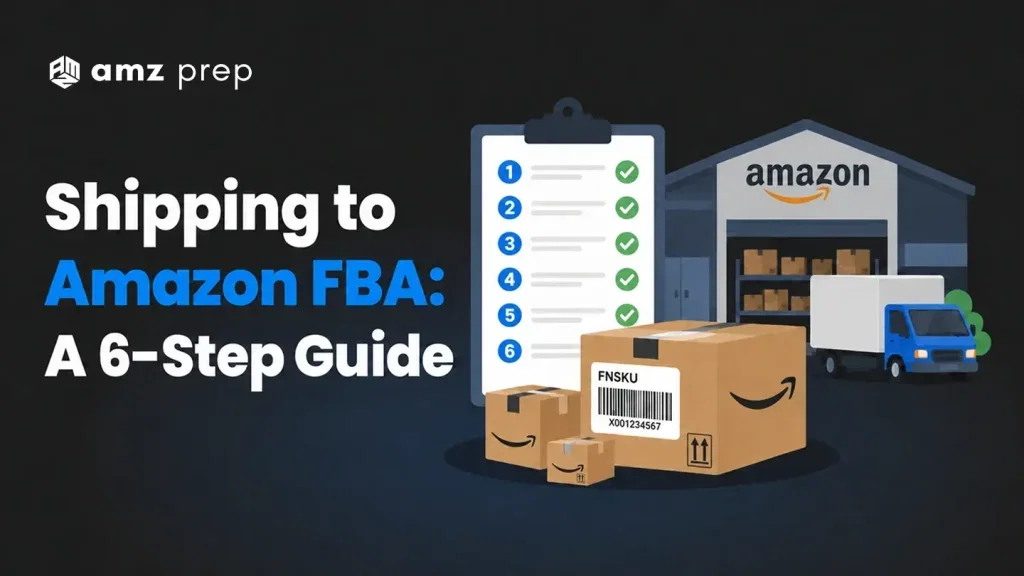
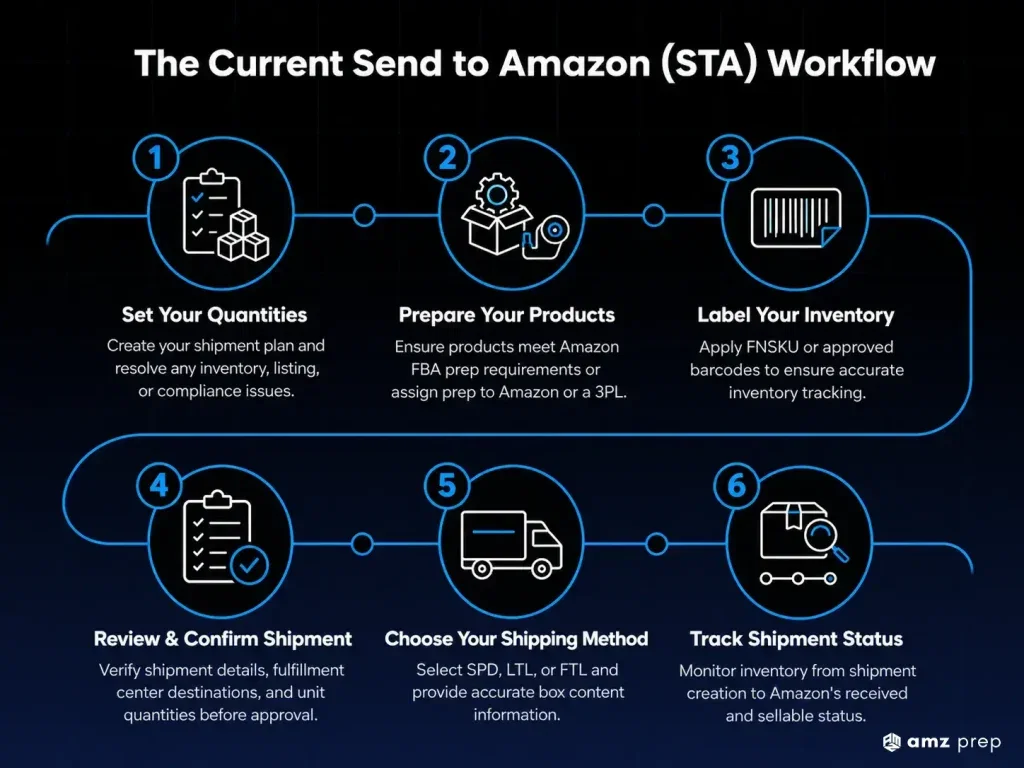
Amazon currently uses the Send to Amazon (STA) workflow for all inbound shipments. The six steps are: set your quantities, prepare products, label inventory, review your shipment, choose your shipping method, and confirm delivery.
This guide covers each step using the current STA interface, plus the fee changes and packaging updates every seller needs to know in 2026.
What Changed in 2024 and 2025 – and What Still Applies in 2026
Two updates affect every seller shipping to Amazon FBA right now. Getting these wrong costs money before your inventory even arrives.
Inbound Placement Fees (Introduced March 2024)
Amazon introduced inbound placement fees in March 2024. These fees apply when your shipment goes to a single fulfillment center and Amazon has to redistribute inventory across its network.
The fee amount depends on your product size tier and how many locations Amazon needs to move inventory to. Standard-size items can see fees ranging from a few cents to over a dollar per unit. Large bulky items run higher. The fewer FCs you ship to, the more redistribution Amazon does, and the more you pay.
There are three ways to handle placement fees. You can ship to a single location and absorb the fee. You can use Amazon’s Inventory Placement Service and pay per unit. Or you can ship to multiple FCs yourself, which Amazon calls a “minimal shipment splits” option and which reduces or eliminates the fee. A fourth option is using a prep partner whose freight network already routes to multiple FCs – more on that in the last section.
For current fee rates by size tier, check the FBA fee schedule before building your cost model.
Box Dimension Update (June 2025)
Amazon raised the maximum box length for FBA inbound shipments from 25 inches to 36 inches in June 2025. The weight cap stayed at 50 pounds. Width and height limits did not change.
If you have been splitting long SKUs into multiple cartons to stay under the old 25-inch limit, you can now consolidate. The update brings FBA closer to standard freight carrier limits.
The Current Send to Amazon (STA) Workflow – 6 Steps
Amazon replaced the legacy “Send/Replenish Inventory” flow with Send to Amazon in 2024. If your Seller Central looks different from older guides online, this is why. The steps below match the current STA interface.
Step 1: Set Your Quantities
Go to Inventory > Manage FBA Inventory in Seller Central. Select the products you want to ship and choose Send/Replenish Inventory. This opens the STA workflow.
Set the quantity for each MSKU you are sending. Amazon will flag any SKUs with issues at this stage. Common flags include:
- Excess inventory – you have more units than Amazon’s restock recommendation
- Removal required – the item cannot be included in this plan
- Information required – Amazon needs additional product data before it can accept the shipment
You can acknowledge excess inventory warnings and continue. Remove any flagged SKUs before moving forward.
Only MSKUs previously set to FBA appear in the search. If a product was set to FBM, update the fulfillment method first under Manage Inventory before creating your plan.
Step 2: Prepare Your Products
Amazon requires all FBA inventory to meet its prep standards. On the Prepare Products page, items appear under two tabs.
Prep required shows products with known requirements. These are items Amazon has determined need poly bags, bubble wrap, opaque bags, or other protective packaging.
Prep may be required shows products with unknown prep status. Select the product category to see whether additional prep applies.
You have two options for who handles prep: you do it, or Amazon does it for an additional per-unit fee. If you choose to have Amazon prep the items, you still need to pack them safely enough to survive the inbound journey. A damaged unit still cannot be received by Amazon, regardless of who was supposed to prep it.
Most brands with consistent volume work with a 3PL or FBA prep center at this stage. It removes prep from your internal workflow and keeps inbounds compliant without paying Amazon’s per-unit rate.
Step 3: Label Your Inventory
Amazon tracks every FBA unit using barcodes. Your labeling options are:
- Use an existing UPC or EAN barcode (only for eligible products in stickerless, commingled inventory programs)
- Apply an FNSKU barcode directly to each unit or its packaging
- Pay Amazon’s FBA Label Service fee to have Amazon apply barcodes on your behalf
FNSKU barcodes tie a unit to your specific seller account. Without the correct FNSKU, Amazon can commingle your inventory with other sellers’ stock of the same ASIN. That creates fulfillment and customer experience problems.
On the Label Products page, set who labels each item under the Who labels column. If you select Amazon, the FBA Label Service applies and the cost shows in the Label cost column. If you select Merchant, you are responsible for labeling before the shipment leaves.
Click Print labels for this page to generate your label PDF. Use a quality printer and permanent labels. Thermal label printers are the standard. Inkjet labels can smear in transit.
Step 4: Review and Confirm Your Shipment
The Review Shipments page shows a summary of your plan. Check the following before approving:
- Shipment ID and destination FC code
- MSKU count and unit quantities
- Whether your plan has been split into multiple shipments to different FCs
Amazon may route your inventory to multiple fulfillment centers based on demand signals and network capacity. This is expected behavior. Print your packing lists after approving, not before. Any changes made after approval affect your packing lists.
Once you approve, go to Work on Shipment for each shipment in your plan.
After a shipment is approved, you cannot delete it. The corresponding listings convert to Fulfilled by Amazon status. If you were previously fulfilling those units via FBM, those listings become inactive until Amazon receives and processes your inventory.
Step 5: Choose Your Shipping Method
On the Prepare Shipment page, select your shipping method and carrier, set box dimensions and weights, and schedule or pay for the shipment. The three options are:
Small Parcel Delivery (SPD) – for items packed in individual boxes, shipped via a small parcel carrier like UPS or FedEx. Best for lower unit counts or lighter shipments. Amazon-partnered carriers offer discounted SPD rates. A 1-pound minimum charge applies.
Less Than Truckload (LTL) – for inventory stacked on pallets. Most private-label sellers use LTL once they have enough volume to fill pallets. Pallets must meet Amazon’s stacking and strapping requirements. LTL shipments must be cancelled within one hour of submitting a shipment request if you need to make changes.
Full Truckload (FTL) – a dedicated truck goes directly to one fulfillment center without other stops or deliveries. Used by brands with very high inbound volumes. Faster check-in times and fewer handling points.
Enter accurate box content information for each carton – ASIN, quantity, and dimensions. Missing or inaccurate box content data causes inbound delays and can result in unplanned prep fees.
Step 6: Track Your Inbound to Received Status
The Summary page is the final step in the STA workflow. It shows shipment status, tracking tools, and receive progress. The page has three tabs: Shipment summary, Track shipment, and Contents.
Once Amazon receives your units and scans them in, status updates to Received. Your listing goes live and units become available for purchase. Check-in times vary by FC and by season. During Q4, check-in times can extend significantly across the network.
For faster, more predictable check-in times, the middle mile approach in the section below is worth knowing.
FBA Packaging and Labeling Requirements in 2026
These are the current standards for physical packaging going into Amazon FCs.
Box limits: Maximum length of 36 inches. Maximum weight of 50 pounds per carton. Exceptions exist only for single oversized items that cannot be reasonably reduced in carton size.
Tape and sealing: Use strong packing tape rated for warehouse environments. Tape all box seams. Do not use duct tape, string, or twine.
Poly bags: Required for soft goods, plush items, and products that could cause a safety hazard if loose. Bags must be transparent, have a suffocation warning label for openings larger than 5 inches, and be able to withstand the shipping environment.
Bubble wrap: Required for fragile items that cannot be protected by the product’s own packaging alone.
Opaque bags: Required for adult products and items that must be concealed from view.
For the full prep requirements by product category, see the Amazon FBA packaging requirements guide.
Choosing Your Shipping Method: SPD, LTL, or FTL
The right method depends on your unit count, carton weight, and how often you ship.
| SPD | LTL | FTL | |
|---|---|---|---|
| Best for | Test shipments, new launches, low unit counts (under 150 units) | Mid-volume replenishments filling one or more pallets | Very high volume brands sending thousands of units |
| Setup | No pallets required. Fast to set up. | Pallets required. 48×40-inch GMA, stretch-wrapped, no overhang. | Dedicated truck. Highest setup complexity. |
| Cost profile | Higher per-pound rate. Cost per unit rises quickly at volume. | More cost-effective from around 150 units. | Lowest per-unit freight cost at scale. |
| Cancellation window | Within 24 hours of submitting | Within 1 hour of submitting | Within 1 hour of submitting |
| Placement fee risk | Low to medium, depending on routing | Medium, depends on number of FCs assigned | Higher – FTL routes to one FC, increasing redistribution risk |
| Amazon-partnered carriers | Available | Available | Not available |
| Tracking in Seller Central | Yes | Yes | Yes |
Enter accurate box content information for each carton – ASIN, quantity, and dimensions. Missing or inaccurate box content data causes inbound delays and can result in unplanned prep fees.
How a Prep Partner Reduces Your Inbound Costs in 2026
The standard FBA inbound path puts all the prep, labeling, and logistics work on the seller. A prep partner takes that work off your plate and can also reduce or eliminate placement fees through how they route freight.
At AMZ Prep, we use a five-way split routing model through our middle mile program. Your inventory ships into our network, we handle all prep and labeling to Amazon’s standards, and we route shipments across multiple FCs using our existing consolidated freight. Because the shipment arrives pre-split, Amazon’s placement fee logic does not apply.
The practical result is faster check-in times – typically two to four days versus the 15- to 30-day range sellers see with standard LTL. The placement fee exposure drops to zero.
Huel, the nutrition brand, shifted their FBA replenishment to AMZ Prep and cut check-in times from more than 20 days to three to five days. WOOF, a pet brand, now ships from China directly into our network and reaches Amazon in three to five days with no placement fees.
This approach works best for brands sending consistent FBA volume. If you are still shipping one-off test batches, standard SPD with Amazon-partnered carriers is the right starting point.
Conclusion
The FBA inbound process has more moving parts in 2026 than it did two years ago. Placement fees, the STA workflow, updated box limits, and tighter compliance requirements all affect how quickly your inventory goes live and what it costs to get there.
The sellers who move fastest are the ones who have prep, labeling, and freight handled before the shipment ever leaves. That means fewer delays at the FC, lower per-unit costs, and no surprises from Amazon’s fee structure.
If you are managing inbounds yourself and hitting check-in delays or unexpected fees, talk to our team. We work with brands sending 300 orders a month up to enterprise volumes, and we can show you exactly what a faster inbound path looks like for your SKUs.
Frequently Asked Questions
What is the FBA inbound placement fee?
The FBA inbound placement fee is a per-unit charge Amazon applies when your inventory ships to a single fulfillment center and Amazon redistributes it across its network. The rate varies by product size tier. Shipping to multiple FCs yourself, or using a prep partner with split routing, reduces or eliminates the fee.
How long does it take Amazon to receive FBA inventory?
Standard check-in times range from five to fifteen business days for most shipments, depending on the FC and time of year. During Q4 peak season, delays are common. Prep partners using consolidated middle mile freight typically see two to four day check-in times.
Can I ship directly from a supplier to Amazon FBA?
Yes, suppliers can ship directly to Amazon FBA. Your supplier’s address goes in the ship-from field during shipping plan creation. The supplier must meet all FBA prep and labeling requirements. Amazon will apply unplanned prep fees for non-compliant units.
What are the box size limits for FBA shipments in 2026?
As of June 2025, the maximum box length is 36 inches. Maximum weight is 50 pounds per carton. Width and height limits remain in place. The only exception to the length limit is a single oversized item that cannot be packaged more compactly.
Do I need to prep products before sending to Amazon FBA?
Yes. Amazon requires all FBA inventory to meet its prep standards before it arrives at the FC. You can prep items yourself, pay Amazon’s per-unit prep fee, or use an FBA prep center. Non-compliant inventory at the FC generates unplanned prep fees and can delay receiving.
What is the Send to Amazon (STA) workflow?
Send to Amazon is Amazon’s current inbound shipping workflow in Seller Central, replacing the legacy Send/Replenish Inventory interface. Sellers use STA to create shipping plans, set quantities, confirm prep and labeling, and submit shipments. All new inbound shipments use this workflow.
How do I avoid FBA inbound placement fees?
Ship to multiple fulfillment centers directly using Amazon’s “minimal shipment splits” option. Alternatively, use a prep partner whose freight network distributes inventory across FCs automatically. Either method routes inventory to its destination without Amazon needing to redistribute it afterward.

Blair Forrest is the Founder of AMZ Prep, one of North America’s fastest-growing third-party logistics and fulfillment networks, built entirely without outside capital since 2016. Under his leadership, AMZ Prep has scaled to 50+ fulfillment centers across 6 countries, processing over 10 million plus units monthly and powering $2 billion+ in annual GMV for more than 5,000 brands worldwide including 437, Silverts, Saltyface, Unilever, Duracell, and JBL. A recognized authority in eCommerce logistics, Amazon FBA strategy, and supply chain optimization, Blair has helped thousands of sellers and brands master their fulfillment operations from first shipment to enterprise scale. He regularly consults on FBA prep, multi-channel fulfillment, last mile delivery, international expansion, and cost reduction strategies that save brands 20–40% compared to traditional 3PL providers. Blair’s insights on Amazon logistics, 3PL operations, and eCommerce growth are widely cited across the industry. Through AMZ Prep’s content, guides, and resources, he continues to share battle-tested strategies drawn from managing one of the largest independently owned fulfillment networks in North America.






Good to read and highly informative! Keep posting
Thanks Maria!
Well written content and simply presented. Good post!
We just intend to keep our readers informed and add on to their knowledge.
This is really a good one to read and an informative one. Appreciate your work and effort!
Thank you for your kind words!
It’s evident that you have a genuine passion for what you do, and it’s inspiring to witness. Well researched article!
Having passion for what you do pays you back in every possible way. Exploring eCom industry keeps me going and growing.
FBA Guides are easily available but the way you present, and state each critical factor is what brings me to your website. Keep posting Blair!
Thanks for such appreciating words, Fernandes…
Amazingly presented. It’s a wonderful piece, I really enjoyed reading it.
Thank you Arnold!
FBA is a critical concern for Amazon sellers, I would like to read on Amazon FBA fees and alternatives to FBA for 3pl services in US.
Sure, your request would be fulfilled soon.
Can you bring on a more detailed reading for the FBA shipping?? Help me understand FBA in a more regressive way. Thanks in advance!
FBA Shipping would be followed up in the coming up articles Kian, keep reading until then.
FBA needs a broader understanding; I am amazed how you briefed it so well and yet didn’t missed any major information. Really wonderful work! It speaks for your expertise and knowledge in the ecommerce domain.
Thank you so much Garry!
Does Amazon FBA ship internationally, this has been my concern for a while but I didn’t got any proper answer for this yet…If you can help me with the same, that would be appreciated.
Yes, Fulfillment by Amazon (FBA) ships internationally to many marketplaces, including the US, UK, UAE, and Australia. FBA handles all aspects of international shipping, including customs clearance and local delivery.
FBA labeling is a major concern for sellers like us, and you have described it really well. Thanks!
Labeling is a critical part of shipping. Thanks for your kind wors!
Good one! Keep writing
Thanks Celia
Simple and well-balanced information. Really liked your style of presenting and framing.
Thank you Elena!
Nice to read!! Thanks for writing
My pleasure Taurus!
Amazon fulfillment requires a lot of understanding of its policies and fees, the shipping factor has been explained well. Good one!
Yes, you are correct Laura FBA requires accurate understanding of the policies and regulations for smooth functioning. You need to be very careful with all the policies.
You did a fabulous work….FBA shipping is an altogether a big concern, you rightly explained it in simplest manner. FBA needs a break–up of topics to understand it in a fruitful manner.
Thanks Jackson!
I have been partnered with your 3pl services for long, and I must say your way of delivering services is unique in the industry.
Hey James, thanks for believing us!
Great piece! Nice to read
Thank you!
Your choice of topics and meet readers requirements, is commendable Blair! Keep Posting
Thank you so much Derek!
Your posts are consistently relevant and timely, as if you possess a sixth sense for what your readers need to hear.
Its just about aligning with the trend Sally. You need to understand the market before it reacts to your actions.
Easy to read and better to understand, this is what describes your writing. Good One!
Awesome explanation of FBA shipping process.
Wonderful explanation of the process of Shipping.
You have been a great support for my eCom business. Good write-up!
Prepping is critical but partnering with you has supported my ecom business tremendously. Thanks
Can you bring on article on Catalog Management, have been waiting for its detailed process
Smooth shipping, leads to satisfactory deliverables. You have rightly stated the significance of Shipping.
Amazing writing! Keep posting!
Fantastic post!
You did a great job by keeping the post simple and informative.
Your shipment services are amazing! I recommend you to all who are looking for fulfillment services.