
Instagram does not have a Marketplace like Facebook does. There is no buy-and-sell classifieds section inside the app. When people search for the instagram marketplace, they usually mean one of two things. Either Instagram Shopping, which lets brands tag products in posts. Or Meta Creator Marketplace, which connects brands with influencers.
This guide covers both. It also covers what Meta removed, because most guides still describe features that no longer exist. The Shop tab was retired in 2023. Live Shopping was discontinued. Native in-app checkout was fully phased out in August 2025.
Instagram Marketplace vs Instagram Shopping vs Creator Marketplace
Three names get confused constantly. Here is the split.
Facebook Marketplace is a peer-to-peer classifieds product. Someone lists a used couch and a neighbour buys it. Instagram has no equivalent. It never launched one.
Instagram Shopping is a business tool. Approved brands tag products in feed posts, Stories and Reels. A shopper taps the tag and lands on your product page.
Meta Creator Marketplace is different again. It connects brands with creators for paid partnerships. No physical products change hands there.
So when someone asks if instagram has a marketplace, the accurate answer is no. People searching marketplace instagram, ig marketplace or marketplace on instagram in a selling context almost always mean Instagram Shopping.
The facebook marketplace instagram comparison comes up often too. Does instagram have a marketplace like facebook is one of the most common versions of this question. The short answer stays the same. Facebook has classifieds. Instagram has a brand catalog system.
I see this confusion costs teams real time. They go looking for a listings feature that was never built.
Where Instagram Shopping Lives in the App
Anyone asking where the instagram marketplace is usually looking for a tab that no longer exists.
There is no Marketplace tab and no Shop tab in the navigation bar. Meta removed the Shop tab in February 2023 and replaced it with Reels.
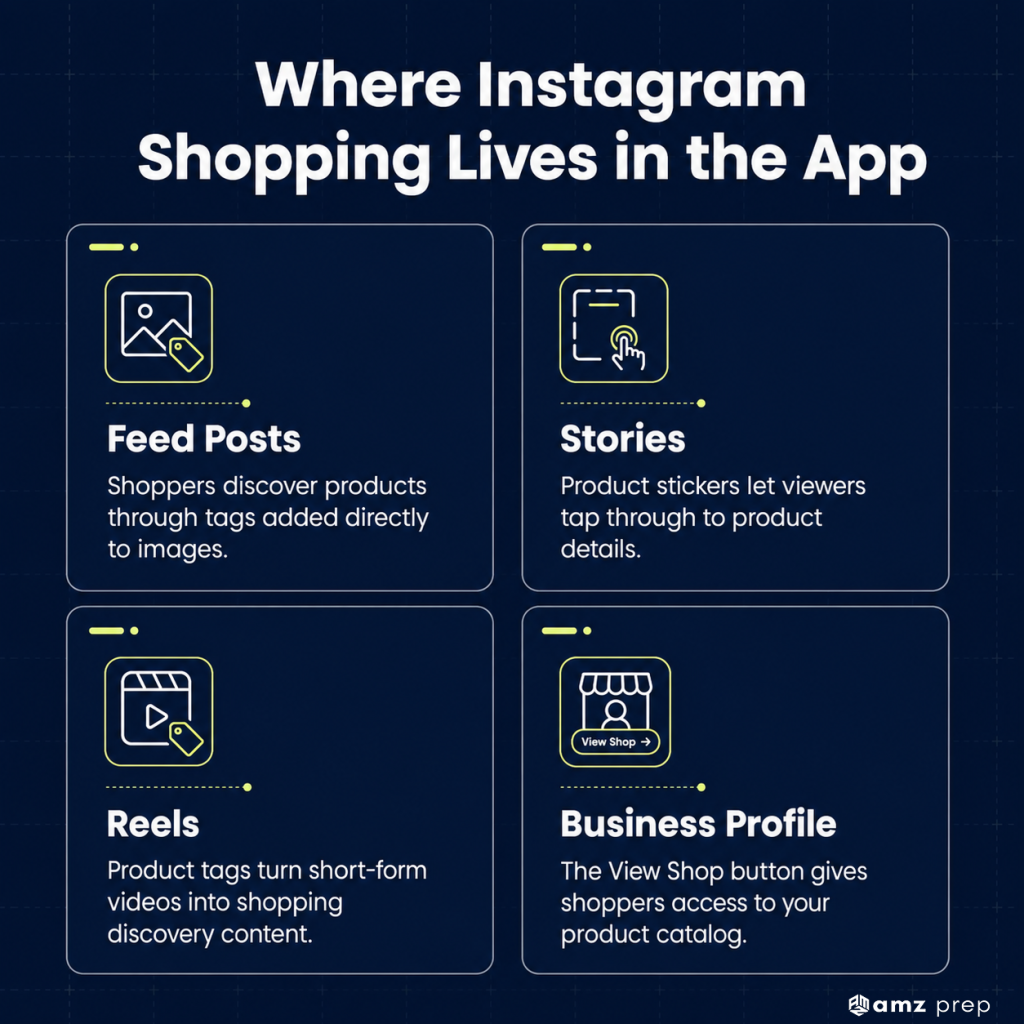
Shopping now appears in four places:
- Product tags inside feed posts. A small shopping bag icon on the image
- Product stickers in Stories. Tap to open the product
- Tags in Reels. Same mechanic, and this is where most discovery happens now
- Your shop surface. Reachable from the View Shop button on a business profile
For sellers working out how to use instagram marketplace, that last one is the closest thing to a storefront. It holds your collections and product detail pages. Buyers reach it from your profile, not from a global browse tab.
What Meta Removed From Instagram Shopping
This matters more than any tactic below. Meta scaled Instagram Shopping back significantly between 2023 and 2025.
The dedicated Shop tab left the navigation bar in February 2023.
Live Shopping was discontinued. Product tags in live video no longer work.
Native in-app checkout was the biggest change. Meta began moving US merchants off it in June 2025. By August 2025 the in-app purchase flow was fully deprecated. Payment processing, chargebacks and dispute resolution moved to the merchant.
What survived is the part that actually drives revenue. Product tags in organic posts and Reels still work. Catalog ads and Advantage+ Shopping campaigns still work. The sale completes on your store instead of inside the app.
How to Sell Products on Instagram: The 2026 Setup
Anyone working out how to sell products on instagram needs four things in place before a single product tag goes live. This is also the answer for setting up instagram shopping and how to sell on instagram shop.
Step 1: Switch to a business or creator account
Open Settings, then Account type and tools, then Professional account. Pick business unless you are an individual creator.
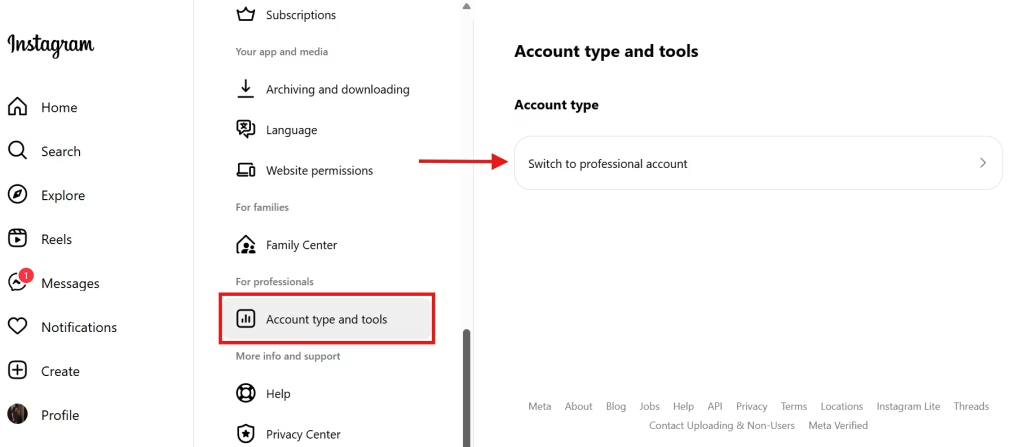
The business account unlocks Insights, contact buttons and shopping eligibility. A personal account cannot sell products on instagram through the catalog system.
Step 2: Connect a Facebook Page
Instagram Shopping runs on Meta’s commerce infrastructure. That infrastructure sits on the Facebook side.
Link the two through the Accounts Center. You need admin access on the Page. Skipping this is the most common reason shop applications get rejected.
Step 3: Build your product catalog
Your catalog lives in Meta Commerce Manager. Upload products manually or sync them from your ecommerce platform.
Sync is better. Shopify, WooCommerce, BigCommerce and Wix all connect directly. Manual catalogs drift out of sync within weeks.
Every product needs a clear title, an accurate description, a price and at least one high-resolution image. Stock levels should update automatically.
Step 4: Submit for review
Meta reviews every shop before approving it. Reviews typically take a few business days.
Keep posting normal content while you wait. Approval does not depend on posting frequency, but an empty profile does not help.
Step 5: Tag products and route the traffic
Once approved, product tags appear in the post composer. Tag products in feed posts, Stories and Reels.
A tap opens the product detail page. From there the shopper goes to your store to complete the purchase.
That is the full path for anyone asking how can i sell my products on instagram or how do you sell stuff on instagram. Account, Page, catalog, approval, tags.
Rules for Selling on Instagram
The rules for selling on instagram sit in Meta’s Commerce Policies. Shops get rejected or suspended against these, so they are worth reading before you build a catalog.
Eligibility requirements:
- A business or creator account, connected to a Facebook Page
- A product catalog in Commerce Manager or synced from a supported platform
- Operation in a supported market
- Compliance with Meta’s Commerce and Merchant Agreement
Product restrictions
Instagram Shopping is built for physical goods. Services, subscriptions, digital downloads, event tickets and animals are not eligible for the catalog. Alcohol, tobacco, weapons, supplements with certain claims and medical devices are restricted or prohibited outright.
Accuracy requirements
Prices, availability and product images have to match your website. Mismatches between the catalog and the landing page trigger reviews.
Service standards
Meta expects merchants to publish a clear returns policy and respond to buyer messages. Accounts that consistently ignore inquiries risk losing shopping access.
Most rejections come from one of three things. No connected Page. A catalog with missing fields. Or a product category that was never eligible.
Selling on Instagram Without a Website
The honest answer changed in 2025. For most sellers, you now need one.
Meta retired native checkout and moved the transaction to merchant-owned storefronts. Your catalog still lives in Commerce Manager. The payment does not.
There is still a manual path. Take orders in DMs and invoice separately through PayPal or a bank transfer. That is how to sell on instagram without a website in 2026.
It works at a small volume. It stops working fast. No catalog means no product tags, no shop surface and no catalog ads.
So if you need a website to sell on instagram, the practical answer is yes for anyone planning to grow. Sellers researching how to sell products on instagram without a website should price out a basic Shopify or Wix store first. The monthly subscription usually costs less than the revenue lost to manual order handling.
What It Costs to Sell on Instagram
Setting up an Instagram Shop is free. There is no listing fee and no monthly platform fee from Meta.
So is it free to sell on instagram? In the narrow sense, yes.
Costs appear in three other places:
- Your ecommerce platform. A monthly subscription for Shopify, Wix or similar
- Payment processing. A percentage of each order, set by your processor
- Advertising. Whatever you choose to bid on catalog and Advantage+ campaigns
The old 5% selling fee applied to native checkout only. With checkout retired, that fee no longer applies to most sellers.
That is the real answer on how much does it cost to sell on instagram. The platform is free. The storefront, the processor and the fulfillment behind the order are not.
Free Ways to Sell on Instagram
Plenty of brands ask about how to sell on instagram for free before committing an ad budget. These levers cost nothing but time, and they are the foundation of selling on instagram free strategies that actually hold up.
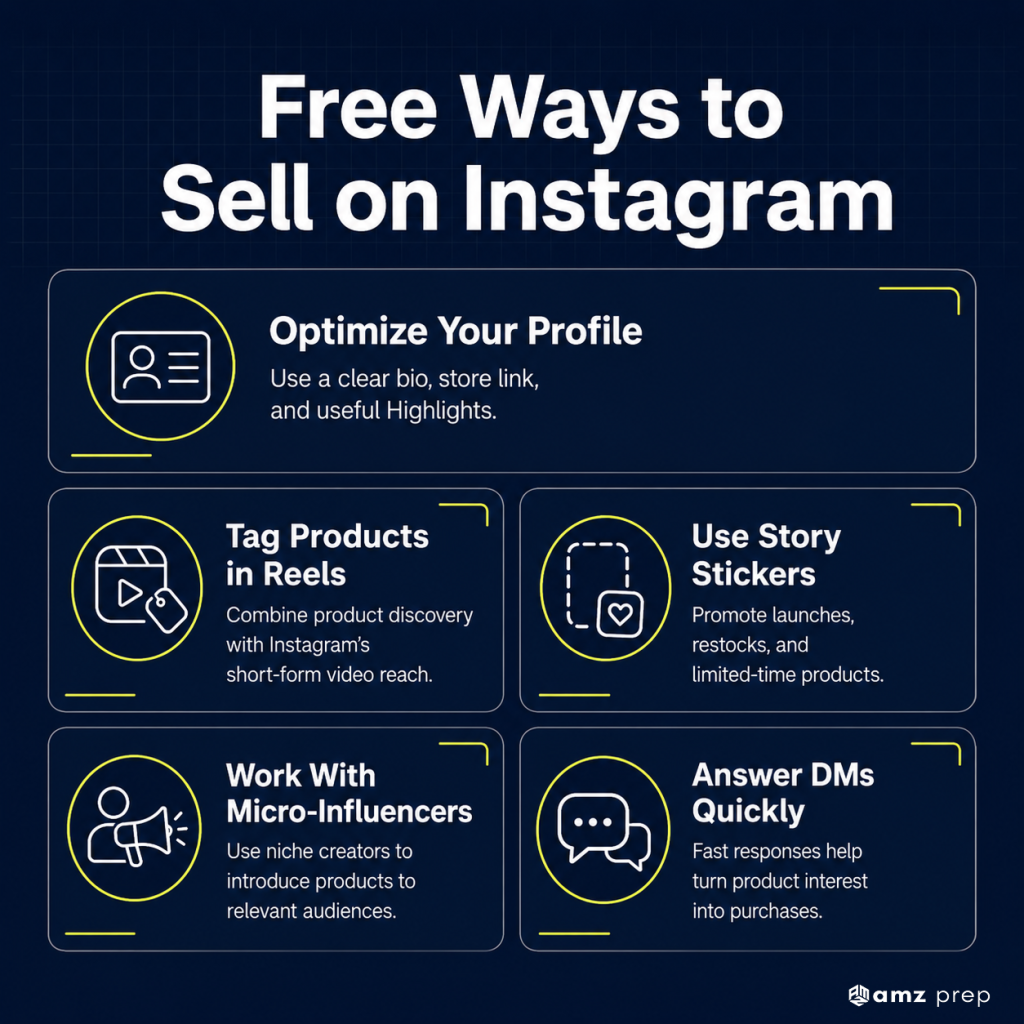
Optimise the profile first
Your bio is the storefront entrance. Use a clear username, a logo or product image, and a single link to your store. Highlights should cover best sellers, reviews and shipping FAQs.
Tag products in Reels
Reels drive most discovery on Instagram now. A product tag in a Reel reaches further than the same tag in a feed post.
Use Stories with product stickers
Stories expire in 24 hours, which suits limited drops and restock announcements.
Work with micro-influencers
Creators in the 5,000 to 50,000 follower range often accept products in exchange for content. Their audiences convert better than larger accounts.
Answer DMs quickly
Response time affects both conversion and your standing with Meta.
The best way to sell on instagram without spending is consistency across these five. Not one campaign. Brands that sell through instagram successfully treat it as a weekly habit.
Physical Products vs Digital Products
Instagram Shopping was built for physical goods. That shapes what is possible.
Physical products
Anyone asking how to sell physical products on Instagram is on the supported path. Catalog, tags, ads and shop surface all work as described above.
Digital products
This is where it gets restricted. Digital downloads are not eligible for the Meta catalog, so how to sell digital products on instagram has a different answer entirely.
Creators who sell digital products on instagram route around the catalog:
- A link in bio to a Gumroad, Stan Store, Payhip or Shopify digital storefront
- Link stickers in Stories pointing to the same
- DM automation that sends a checkout link when someone comments a keyword
- Reels that demonstrate the product, with the sale happening off-platform
No product tags. No shop. The traffic mechanic is a link, not a catalog.
Best Products to Sell on Instagram
Instagram rewards products that photograph and film well. That is a real constraint, not a preference.
The best products to sell on instagram cluster into a few reliable categories:
- Apparel and accessories. Strong visual format, high repeat rate
- Skincare and cosmetics. Before-and-after content performs, and reorder cycles are short
- Fitness and wellness gear. Demonstrable in Reels
- Personalised jewellery. High emotional value, strong gifting demand
- Pet accessories. Consistently high engagement
- Home and kitchen goods. Works well in lifestyle content
Products that struggle are the ones needing explanation before purchase. Technical B2B equipment. Anything with a long specification sheet. Anything requiring a demo call.
Teams evaluating products to sell on instagram should test the photo first. If the product does not communicate its value in one image, the channel will fight you.
For a complex product, treat Instagram as top of funnel. Use it for awareness and close elsewhere. That is one of the good ways to sell products on Instagram that gets overlooked.
Selling on Facebook and Instagram Together
Both platforms run on the same commerce backend. One catalog in Commerce Manager can power both.
For anyone working out how to sell products on facebook and instagram, the setup is shared. Connect the Page, build the catalog once, and enable both surfaces.
The channels behave differently though. Facebook Marketplace suits secondhand and local resale. Instagram Shopping suits brand-led retail with strong visuals. Running the same listings on both rarely works well.
Our guide on selling through Facebook Marketplace covers the classifieds side in detail, including how listings and buyer messaging differ there.
Selling on Instagram in the UK
Instagram Shopping is available in the UK, and setup follows the same five steps.
Two differences matter for how to sell on instagram uk specifically.
Checkout was never the UK default. UK sellers have always routed to their own store, so the 2025 checkout retirement changed less there than in the US.
VAT and consumer law apply at your checkout, not Instagram’s. Since the transaction happens on your site, UK distance selling rules, the 14-day cancellation right and VAT display requirements sit with you.
UK brands shipping into Europe also carry customs paperwork on cross-border orders. That sits outside Instagram entirely.
Fulfillment Is Now the Instagram Conversion Layer
When checkout lived inside Instagram, fulfillment sat behind a wall. Meta handled the purchase. You handled the box.
That wall is gone. The shopper now lands on your store, sees your shipping options and your delivery date, and decides there.
Three things now carry Instagram conversion rate.
Delivery speed shown at checkout
A two-day promise converts better than a five-day one. That gap widens on impulse purchases, which is most of what Instagram drives.
Inventory accuracy
A tagged product that shows out of stock at checkout costs you the sale and often the follower. Catalog sync is only as good as the stock data feeding it.
Return handling
Instagram shoppers buy on impulse and return at higher rates than search buyers. A slow refund shows up in your comments within days.
Brands running Instagram alongside Amazon and their own store usually hit this as an inventory-splitting problem first. The same SKU has to serve three channels with different speed expectations.
AMZ Prep’s omnichannel fulfillment network holds one pooled inventory position across all of them, and our DTC fulfillment operation is built around the delivery promise that shows at checkout.
For brands running the storefront on Shopify, Shopify Plus fulfillment connects the catalog and the warehouse directly.
Where Instagram Fits Now
Instagram in 2026 is a discovery channel that hands off to your store. That is a smaller promise than the 2021 version. It is also a more reliable one.
The brands doing well here treat Instagram as the top of the funnel and their own storefront as the close. They keep one catalog. They tag products in Reels. They make sure the delivery date at checkout is worth the tap.
The next constraint most sellers hit is not content. It is holding accurate stock across Instagram, Amazon and their own store at the same time.
Frequently Asked Questions
Is there an Instagram Marketplace?
No. Instagram has no Facebook-style Marketplace. It has Instagram Shopping for brands and Meta Creator Marketplace for influencer partnerships. Product tags and a linked catalog are how selling works.
Where is the Instagram marketplace located in the app?
There is no Marketplace or Shop tab. Shopping appears as product tags in posts, Stories and Reels, plus a shop surface reachable from a business profile.
Does Instagram have a marketplace like Facebook?
No. Facebook Marketplace is peer-to-peer classifieds for local resale. Instagram has a brand catalog system instead, built around product tags. The two work very differently.
How do you sell things on Instagram?
Switch to a business account, connect a Facebook Page, build a catalog in Commerce Manager, get approved, then tag products in posts and Reels.
Is it free to sell on Instagram?
Setting up a shop is free with no listing or monthly fees. Costs come from your ecommerce platform subscription, payment processing and ads. The old checkout selling fee no longer applies.
What are the rules for selling on Instagram?
Meta requires a business account, a connected Page, a compliant catalog and eligible physical goods in a supported market. Services, digital downloads and restricted categories are not allowed.
Do you need a website to sell on Instagram?
For most sellers, yes. Meta retired in-app checkout in 2025, so purchases complete on your own store. DM selling works without a website but has no catalog, tags or ads.
What happened to the Instagram Shop tab?
Meta removed it from the navigation bar in February 2023. Shops still exist and are reachable from business profiles. Discovery now happens through feed, Reels, Stories and ads.

Arishekar N is a Vice President (VP) of Marketing at AMZ Prep, specializing in ecommerce fulfillment and Amazon logistics strategies with a proven track record of driving growth for e-commerce businesses. He is a strategic leader with extensive expertise in marketing, e-commerce operations, SEO & advertising, and branding.
Stay updated on his latest insights by following him






Step-by-step instructions on linking Shopify and Instagram are perfect for beginners.
I didn’t know you could sell directly through Instagram Checkout. Super helpful info!
Using micro-influencers is such a smart way to promote products without a big budget.
I love the section on Instagram Shopping. Makes selling online so much simpler.
Stories + shopping stickers = simple but effective. Great reminder.
Great tips on using Stories and Reels to boost sales. Really practical advice.
Didn’t know you could sell on IG without a website. Super helpful!
So detailed but easy to follow. I’m setting up my shop tonight.
Instagram really feels like a shopping mall now. Wild.
The product suggestions are on point. Eco-friendly items are trending big on Instagram!
One of the clearest IG selling guides I’ve come across. Bookmarked!
This guide covers everything from creating a business profile to maximizing sales. Very detailed!
The free selling tips are gold. Micro-influencers are smart.
Thanks for the free selling strategies tips. I feel ready to grow my Instagram business now.
For sellers outside the US, the DM workaround tip is key. Thanks!
This guide made selling on Instagram Marketplace so much easier. Excited to start!
Loved the business profile setup tips makes it less intimidating.
Integrating Shopify with Instagram really helps manage inventory seamlessly. Game changer.
The Shopify integration steps were so clear. Exactly what I needed.
Had no idea pet products were trending this much. Good catch.