AMZ Prep Free Shipping Label Generator
Create a Shipping Label in Seconds. No Registration Required.
Tired of logging into carrier portals just to generate a label? Our free shipping label generator lets you enter your shipment details, download a print-ready PDF, and get your package out the door. No account needed, no cost, no carrier portal required.
- AMZ Prep named Top 100 B2B logistics in 2025 by Clutch






Shipping label generator
Build a carrier-ready 4×6 label with a scannable Code 128 barcode. Downloads as a print-ready PDF.
Sender
Printed as the return address
Recipient
The delivery address on the label
Shipment
Tracking number drives the barcode
Why Use AMZ Prep's Shipping Label Generator
Free to Use
No account, no subscription, no per-label fee
Barcode Included
Scannable barcode generated automatically from your tracking number
Works from Anywhere
Generate and print delivery labels from any desktop or laptop browser
Small Business Ready
Built for sellers managing shipments without a 3PL or carrier portal
No Platform Lock-In
Works independently of Shopify, Amazon, eBay, Etsy, or any other selling platform
How to Generate a Shipping Label
Getting a label ready takes under two minutes.
- Enter your sender name, email, mobile number, and full address including city, state, zip/postal code, and country
- Enter your receiver name, email, and full delivery address
- Add your ship date, tracking number, and package weight
- Click Create Shipping Label
- Download the PDF and print or share with your carrier
Your label includes a FROM and TO address block, ship date, package weight, tracking number, and a scannable barcode generated from your tracking number.
Accurate Shipping Label Generated Instantly
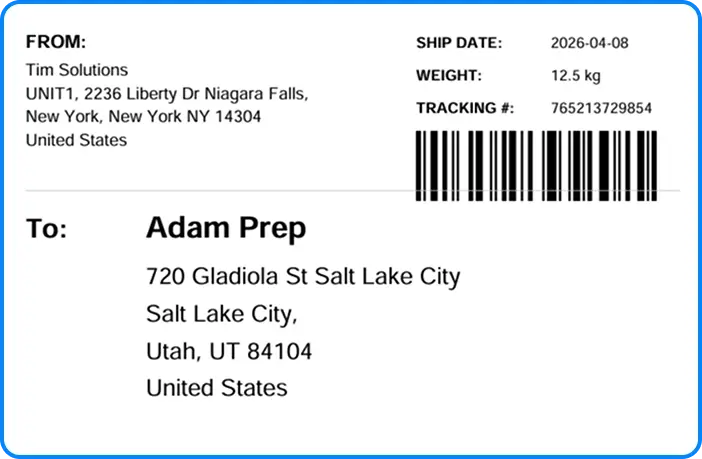
Shipping Label Generator for Small Business
Small business shipping labels need to be fast to produce and easy to print. This shipping label generator for small business removes the dependency on carrier portals or platform-native label tools. Enter your shipment details manually and download a clean, professional label in seconds.
This tool works for:
- DTC sellers preparing outbound shipments
- Marketplace sellers on Etsy, eBay, and Amazon shipping outside platform tools
- Subscription box operators labeling each fulfillment cycle
- Resellers managing outbound shipments across multiple channels
- eCommerce brands processing daily orders without a 3PL
What Your Shipping Label Includes
Every label generated by this tool contains:
- FROM block with full sender name and address
- TO block with full receiver name and delivery address
- Ship date
- Package weight with unit
- Tracking number
- Barcode generated from your tracking number for carrier scanning
Labels are generated as a 6×4 PDF, compatible with standard desktop printers and most thermal label printers.
Print Shipping Labels at Home
You do not need a warehouse printer or specialist equipment to use this tool. Print shipping labels at home using a standard inkjet or laser printer. Download the PDF, open it, and print at full size on label paper or plain paper. Cut and attach to your package before handoff to your carrier.
For higher daily volumes, a thermal label printer produces cleaner output and eliminates the need for ink. The label format is compatible with most desktop thermal printers.
Frequently Asked Questions
Enter your sender and receiver details, add your ship date, tracking number, and package weight, then click Create Shipping Label. Your label downloads as a PDF immediately. The full process takes under two minutes.
Use this free shipping label generator. There are no fees, no subscription, and no account required. Enter your shipment details and download your label at no cost.
Download the PDF after generating your label. Print on a standard inkjet or laser printer using label paper or plain paper, then cut and attach to your package.
You need the sender’s first name, last name, email, mobile number, and full address. You also need the receiver’s first name, last name, email, and full delivery address. Ship date, tracking number, and package weight complete the label.
Yes. The tool generates a scannable barcode automatically from the tracking number you enter.
Labels download as a 6×4 PDF. This format is compatible with standard desktop printers and most thermal label printers.
Yes. The tracking number field is optional. If left blank, the label will not include a barcode but will still show all address and shipment details.
Yes. Enter your best weight estimate if you do not have a scale. Note that your carrier will weigh the package at the facility and may adjust billing accordingly.
No. This tool generates your label format. You purchase postage and book your shipment separately through your preferred carrier.
A shipping label includes sender address, receiver address, tracking number, and barcode. A postage label includes all of the above plus prepaid postage embedded in the barcode. This tool generates the shipping label. Postage is purchased separately through your carrier.
Generate your label using this tool, print and attach it to your package, then drop it at your carrier’s nearest location or schedule a pickup through your carrier’s website.
Yes. The tool is built for single-order and daily-volume use. For high-volume operations requiring automated label generation, carrier rate negotiation, and fulfillment at scale, contact AMZ Prep to discuss 3PL solutions.
Ready to Create Your Shipping Label?
Enter your shipment details and download a carrier-ready label at no cost. No registration required. Print free shipping labels in seconds.