Amazon FBA Reimbursement Tool 2026: Free Lost & Damaged Inventory Analyzer
The Most Powerful Free Amazon Reimbursement Tool for FBA Sellers Worldwide
Let’s be honest — Amazon loses stuff. A lot of it. And most sellers never get their money back simply because they don’t know it’s missing. Our free amazon reimbursement tool scans your Seller Central reports and shows you exactly what Amazon owes you for lost inventory, warehouse damage, and return issues. Works for USA, UK, Canada, Germany, India, Australia, and more.
- ✓ 100% Free Forever ✓ No Signup Required ✓ Your Data Stays Private ✓ Results in 60 Seconds
FBA Reimbursement Analyzer
Discover money Amazon may owe you — 100% Free
🌍 Select Your Amazon Marketplace
Choose the marketplace where you sell. Report formats may vary by region.
📂 Upload Your Seller Central Reports
Upload these reports from your Amazon Seller Central. We process everything locally in your browser — your data never leaves your computer.
Inventory Ledger Required
Shows all inventory movements including lost & damaged
- Go to
Reports → Fulfillment → Inventory - Click "Inventory Ledger"
- Select "Detailed View"
- Set date range: Last 18 months
- Click "Generate Report" → Download CSV
Reimbursements Required
Shows all reimbursements Amazon has paid you
- Go to
Reports → Fulfillment → Payments - Click "Reimbursements"
- Set date range: Last 18 months
- Click "Generate Report" → Download CSV
FBA Customer Returns Recommended
Track returns that never made it back to inventory
- Go to
Reports → Fulfillment → Customer Concessions - Click "FBA Customer Returns"
- Set date range: Last 18 months
- Download CSV
FBA Inventory Recommended
Current inventory snapshot with pricing data
- Go to
Reports → Fulfillment → Inventory - Click "FBA Inventory" or "Manage FBA Inventory"
- Download CSV
Removal Order Detail Optional
Track lost removals and disposal issues
- Go to
Reports → Fulfillment → Removals - Click "Removal Order Detail"
- Set date range: Last 18 months
- Download CSV
Analyzing Your Reports
Processing inventory ledger...
Need help? Contact our FBA experts | FBA Prep Services
This tool provides estimates based on your report data. Actual reimbursement amounts may vary. Always verify with Amazon Seller Central before filing cases.
WHY USE OUR AMAZON REIMBURSEMENT TOOL
Why Use Our Amazon FBA Reimbursement Tool?
Most sellers leave thousands on the table every year. Amazon’s warehouses handle millions of units daily — mistakes happen. Our FBA reimbursement tool helps you catch what falls through the cracks:
Lost Inventory Detection
Amazon misplaces inventory more than you'd think. We scan your Inventory Ledger to find items that vanished without reimbursement.
Warehouse Damage Tracking
When Amazon damages your products, they should pay. Our tool identifies warehouse-damaged items and checks if you've been compensated.
Return Discrepancy Finder
Customer got a refund but never returned the item? We cross-reference your returns and reimbursements to catch these gaps.
Reversal Alerts
Sometimes Amazon gives money back, then quietly takes it away. We flag every reversal so you can dispute incorrect clawbacks.
Multi-Marketplace Support
Selling in multiple countries? No problem. Our tool works with Amazon USA, UK, Canada, Germany, India, Australia, Mexico, and Japan.
100% Private & Secure
Your reports never leave your browser. Everything is processed locally on your computer — we never see or store your data.
Detailed Breakdown Reports
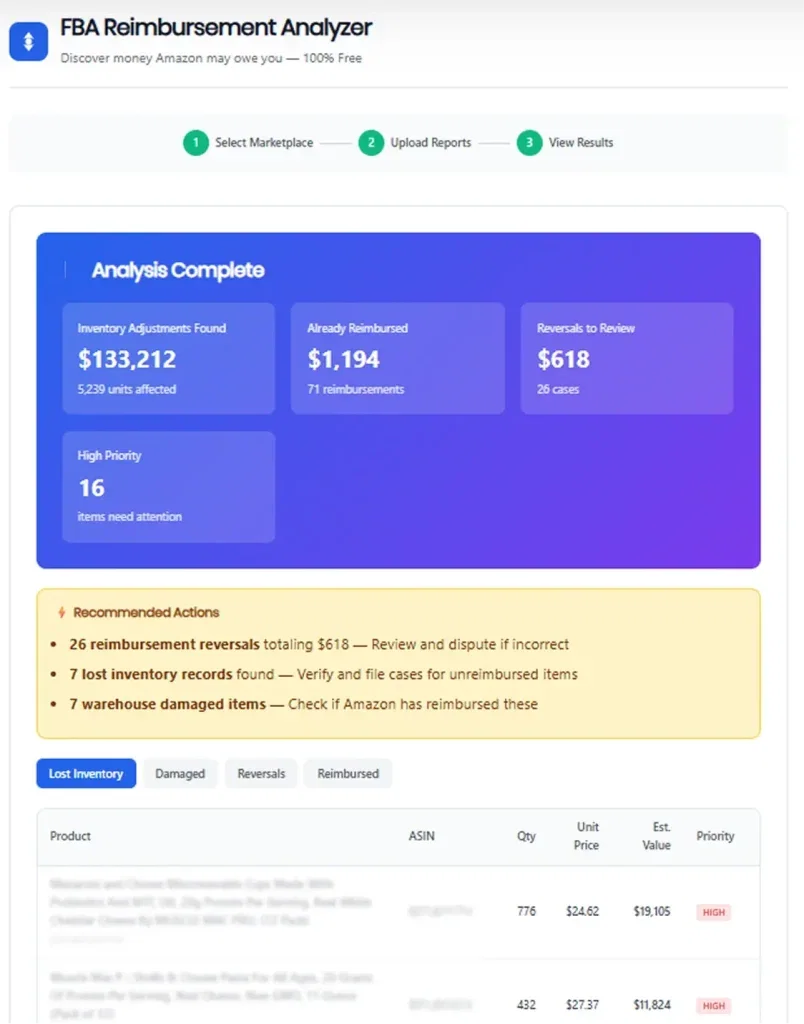
See exactly which SKUs are affected, how much is at stake, and what priority level each case deserves. Export to CSV for easy case filing.
Instant Results
No waiting for emails or processing queues. Upload your reports, get your analysis in under 60 seconds. Simple as that.
HOW OUR FBA REIMBURSEMENT TOOL WORKS
1. Choose Your Marketplace
Select which Amazon marketplace you’re analyzing:
- Amazon Reimbursement Tool USA – Covers amazon.com seller accounts
- Amazon Reimbursement Tool UK – For amazon.co.uk sellers
- FBA Reimbursement Tool Canada – Canadian marketplace support
- Amazon Reimbursement Tool Europe – Germany, France, Italy, Spain, Netherlands
- FBA Reimbursement Tool India – Full support for amazon.in
- Other Markets – Australia, Japan, Mexico, UAE, and more
2. Download Your Reports from Seller Central
Grab these reports from your Amazon Seller Central account:
- Inventory Ledger (Required) – Shows all inventory movements, losses, and adjustments
- Reimbursements Report (Required) – Lists what Amazon has already paid you
- FBA Customer Returns (Recommended) – Tracks return status and discrepancies
- FBA Inventory (Recommended) – Current snapshot with pricing data
- Removal Order Detail (Optional) – For tracking lost removals
Don’t worry — we show you exactly where to find each report with step-by-step instructions.
3. Upload & Analyze
Simply drag and drop your CSV files into our tool. The analysis happens instantly in your browser:
- Cross-references inventory adjustments with reimbursements
- Identifies unreimbursed lost and damaged inventory
- Flags suspicious reversals for review
- Calculates estimated recovery value per SKU
- Prioritizes high-value opportunities
4. Review Your Results & Take Action
Get a complete breakdown showing:
- Total potential recovery amount
- Lost inventory details with quantities and values
- Warehouse-damaged items eligible for claims
- Reimbursement reversals to dispute
- Priority levels (High, Medium, Low) for each case
- Export everything to CSV for filing cases with Amazon
Amazon FBA Reimbursement Projection
KEY FEATURES SECTION
Global Marketplace Support
Our amazon reimbursement tool isn’t limited to US sellers. We support every major Amazon marketplace with accurate analysis:
– Amazon Reimbursement Tool USA – Full support for the largest FBA marketplace
– FBA Reimbursement Tool UK – Complete analysis for British sellers
– Amazon Reimbursement Tool Canada – Canadian-specific report formats
– Amazon FBA Reimbursement Tool Germany – Covers amazon.de accounts
– FBA Reimbursement Tool India – Support for amazon.in sellers
– Plus Australia, Japan, Mexico, France, Italy, Spain, and more
Each marketplace has slightly different report formats. Our tool handles them all automatically.
Comprehensive Lost Inventory Analysis
Our amazon FBA reimbursement tool digs deep into your Inventory Ledger to find every missing unit:
– Adjustment Analysis – Identifies negative adjustments where inventory disappeared
– Reason Code Tracking – Flags specific loss reasons (misplaced, damaged, lost in transit)
– Fulfillment Center Mapping – See which warehouses have the most issues
– Reimbursement Cross-Reference – Confirms whether Amazon already paid you
We calculate the estimated value based on your actual selling prices, not Amazon’s often-lower valuations.
Reimbursement Reversal Detection
Here’s something most sellers don’t know: Amazon sometimes pays you a reimbursement, then takes it back weeks later. Our FBA reimbursement tool catches these:
– Tracks all reversal transactions in your account
– Links reversals to original reimbursement IDs
– Calculates total amount clawed back
– Flags high-priority reversals for dispute
Many of these reversals are mistakes. Having the data makes disputing them much easier.
Customer Return Reconciliation
When a customer returns an item, one of three things should happen: the item goes back to your inventory, gets marked unsellable, or you get reimbursed. Often, none of these happen. Our tool helps by:
– Tracking return status vs. reimbursement status
– Identifying returns where customer kept the item
– Flagging returns that never made it back to inventory
– Calculating potential recovery from return discrepancies
FAQs
Everything About Amazon Reimbursement Tools
An Amazon reimbursement tool analyzes your Seller Central reports to find cases where Amazon owes you money — typically for lost inventory, damaged goods, customer returns that were never returned, or other FBA errors. Instead of manually digging through thousands of rows, the tool does the heavy lifting and shows you exactly what to claim.
Because Amazon’s warehouses process millions of items daily, and mistakes happen constantly. Studies suggest Amazon loses or damages 1-3% of FBA inventory. For a seller moving $100,000/year through FBA, that’s $1,000-$3,000 in potential claims. Most sellers never file because they simply don’t know the money is there. A reimbursement tool finds it for you.
Yes, completely free. No trial period, no credit card required, no “freemium” upsells. We built this tool to help Amazon sellers and drive traffic to our FBA prep services. The tool itself costs you nothing.
Paid services typically charge 15-25% of recovered funds and require access to your Seller Central account. Our tool is free, processes data locally (we never see your information), and gives you the same analysis. The only difference is you file the cases yourself instead of them doing it — which takes about 5 minutes per case.
You’ll need at minimum two reports: the Inventory Ledger (found under Reports → Fulfillment → Inventory) and the Reimbursements Report (under Reports → Fulfillment → Payments). For better analysis, also grab your FBA Customer Returns report and FBA Inventory snapshot. We provide step-by-step instructions for downloading each one.
Amazon’s reimbursement policy typically covers the last 18 months. We recommend downloading reports for the full 18-month period to catch everything you’re eligible to claim.
Yes. Our FBA reimbursement tool supports Amazon USA, UK, Canada, Germany, France, Italy, Spain, Netherlands, India, Japan, Australia, Mexico, UAE, and more. Simply select your marketplace and upload your reports.
Usually under 60 seconds. The processing happens entirely in your browser, so speed depends on your computer and report size. Most sellers see results within 30 seconds.
Absolutely. Your reports are processed 100% locally in your browser. Nothing is uploaded to our servers. We literally never see your data. Once you close the page, the data is gone.
Lost inventory refers to units that Amazon cannot account for. These are items that entered FBA warehouses but have no record of being sold, returned, removed, or currently in stock. Amazon should reimburse you for these — but often doesn’t unless you file a case.
Lost inventory is missing with no explanation — it simply vanished from Amazon’s system. Damaged inventory was physically damaged by Amazon’s warehouse operations (not by customers). Both are eligible for reimbursement, but they’re tracked separately because the claim process differs slightly.
A reversal happens when Amazon initially pays you a reimbursement, then later takes the money back. Sometimes this is legitimate (they found the inventory), but often it’s an error. Our tool flags all reversals so you can review them and dispute any that seem incorrect.
We calculate values based on prices found in your reports — either from your FBA Inventory snapshot or from previous reimbursement amounts. These are estimates. Amazon may value items differently when you file a case, but our numbers give you a solid starting point.
We assign High, Medium, or Low priority based on the dollar value at stake. High priority items (typically $100+) should be addressed first. This helps you focus your time on the cases that matter most.
The tool identifies what you’re owed — you then file cases with Amazon Seller Support. Go to Seller Central → Help → Contact Us, select “Fulfillment by Amazon” → “FBA Issue,” and submit your claim with the ASIN, FNSKU, quantity, and dates from our report. Most cases are resolved within 5-7 days.
Yes. Click “Download CSV Report” to get a spreadsheet with all findings. This makes it easy to track your cases and reference specific details when filing with Amazon.
Amazon doesn’t publish official limits, but we recommend filing 5-10 cases per day to avoid triggering any automated flags. Start with your highest-value items.
It happens. If you believe the denial is incorrect, you can escalate by asking for a supervisor review or filing a new case with additional documentation. Having the detailed data from our tool often helps in escalation.
The Inventory Ledger is the most comprehensive record of every inventory movement in your FBA account — receipts, shipments, adjustments, returns, removals, and more. It’s the foundation for identifying discrepancies. The old “Inventory Adjustments” report was merged into this.
Yes. We’ve tested with reports containing over 50,000 rows. Large files may take a bit longer to process (up to 2 minutes), but the tool handles them fine. Just be patient while the progress bar completes.
No installation required. The tool runs entirely in your web browser. Just visit the page and start uploading.
Any modern browser works — Chrome, Firefox, Safari, Edge. We recommend keeping your browser updated for best performance.
Technically yes, but we recommend using a desktop or laptop. Downloading reports from Seller Central and uploading CSV files is much easier on a computer.
Amazon sellers recover an average of $2,000-$5,000 in their first analysis. It takes 5 minutes. It’s completely free. Your data stays private.
[Analyze Your Reports Now →]